

Every L&D team has seen it. You roll out a training program, 200 people complete the same modules, and a month later nothing has changed on the job. The senior rep sat through the basics she mastered years ago. The new hire felt lost in advanced material.
That is the problem with one-size-fits-all training. It treats very different people as one audience.
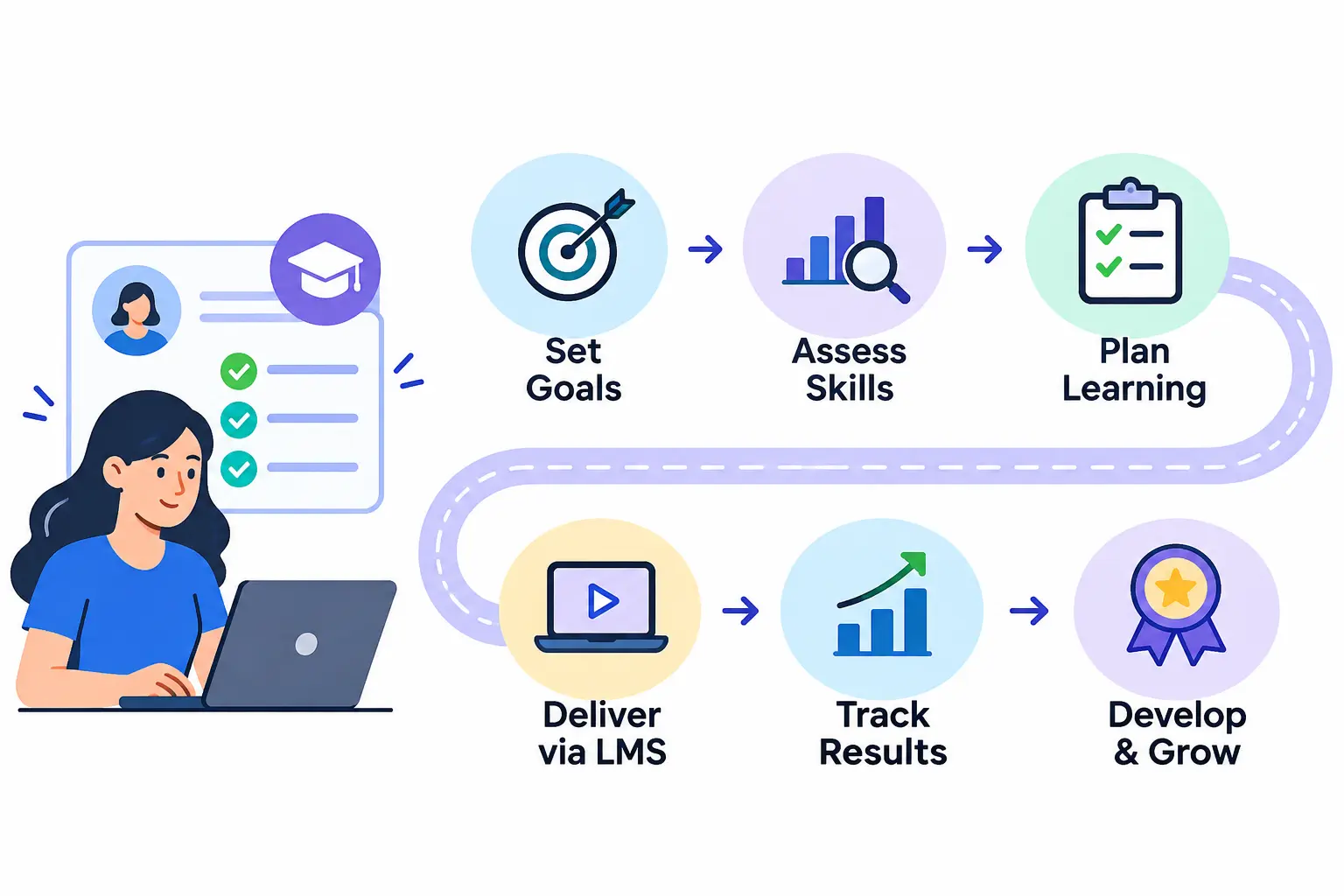
To create personalized employee learning paths, define business goals, assess each employee’s current skills, compare them with role requirements, set clear learning goals, choose the right learning methods, sequence them with milestones, deliver them through an LMS, and review results regularly.
This guide walks through each of those stages. You will learn what a learning path includes, how to build one step by step, what it looks like for five common roles, which tools help, and how to measure success.
What Are Personalized Employee Learning Paths?
A personalized employee learning path is a planned sequence of learning activities built around one person’s role, current skills, and goals. It tells the employee what to learn, in what order, and how progress will be judged.
Traditional training works differently. Everyone gets the same course, on the same schedule, with the same content. Personalized learning adjusts the content, pace, or method to the learner instead.
Three things shape a good path:
- Job responsibilities: what the person must do well today.
- Current skills: what they already know, so they don’t repeat it.
- Career goals: where they want to go next.
When all three are in play, the path feels useful to the employee and valuable to the business.
Key Components of a Personalized Employee Learning Path
A solid path usually has six parts:
- Skill assessment. A baseline of what the employee can do now.
- Individual learning objectives. Specific outcomes the employee should reach.
- Role-specific resources. Courses, mentors, projects, and reading that fit the job.
- Activities and milestones. Checkpoints that break a long journey into small wins.
- Progress tracking and feedback. Regular signals on how things are going.
- Performance evaluation. Proof that learning shows up in actual work.
If one of these is missing, the path tends to drift. Without milestones, people lose momentum. Without evaluation, nobody knows if it worked.
Personalized Learning Paths vs. Individual Development Plans
People often mix these up. They overlap, but they are not the same thing.
An individual development plan (IDP) is a broader career document, usually agreed between an employee and a manager. A learning path is the specific, structured set of learning activities that helps deliver part of that plan.
| Personalized learning path | Individual development plan | |
| Main purpose | Build specific skills through sequenced learning | Guide overall career growth |
| Typical scope | Weeks to months | Often 6 to 24 months |
| Core components | Courses, projects, assessments, milestones | Career goals, skills to develop, support needed, timeline |
| Who owns it | L&D team, manager, and employee | Employee and manager |
| How they work together | Delivers the learning actions | Sets the direction and priorities |
In practice, the IDP sets the destination and the learning path maps the route.
Why Are Personalized Learning Paths Important for Employee Development?
Personalization is not a nice extra. It solves real problems that generic training leaves behind.
Improve Employee Engagement and Motivation
People engage more when learning is clearly relevant to them. A path that connects to someone’s daily tasks and future goals gives them a reason to start and keep going.
It also signals that the company is investing in the individual, not just ticking a training box.
Address Individual Skill Gaps
Two people with the same job title can have very different gaps. One may struggle with data analysis, the other with presenting to executives.
A personalized path targets each gap directly. This saves time because employees skip what they already know.
Support Career Growth and Internal Mobility
Employees stay longer when they can see a future at the company. Learning paths make that future visible by showing which skills lead to the next role.
They also help managers spot internal candidates for open positions, which can reduce hiring costs.
Increase Knowledge Retention and Skill Application
Learning sticks when people use it soon after they learn it. Paths that mix short lessons with on-the-job practice help employees apply new skills while the material is fresh.
Align Employee Development With Business Goals
If the company plans to launch a new product, expand into a new market, or adopt new software, the right skills must exist in the right places. Learning paths link individual development to those priorities. A structured employee training program helps organizations translate these development priorities into practical training activities that support business objectives.
Support Upskilling and Reskilling Initiatives
Roles change quickly. Upskilling deepens current skills, and reskilling prepares people for different work. Paths let you do both in a structured way, rather than relying on employees to figure it out alone.
LinkedIn’s Workplace Learning Report is a useful annual source for current L&D trends if you want to back up a business case with fresh data.
Types of Personalized Employee Learning Paths
Not every path serves the same purpose. Most organizations use a mix of the following types.
Role-Based Learning Paths
These are built around what a specific job requires. A customer support agent, an accountant, and a data analyst each get a different set of courses and practice tasks. This is often the best starting point because it is easy to scale.
Skill-Based Learning Paths
These focus on one competency, such as project management, Excel, or negotiation. They suit employees who have a clear gap, regardless of department.
Career-Based Learning Paths
These prepare someone for a promotion or a move into a new function. For example, a senior developer who wants to become an engineering manager follows a path that adds people-leadership skills.
Performance-Based Learning Paths
These respond to performance reviews, assessment scores, or quality metrics. If a review shows weak customer communication, the system or manager assigns targeted learning to fix it.
Compliance and Certification-Based Learning Paths
Some learning is not optional. Safety rules, data protection, financial regulations, and professional certifications all require proof of completion. These paths often have fixed deadlines and renewal cycles, so automation helps a lot.
How to Create Personalized Employee Learning Paths: 8 Essential Steps
Here is the process I would follow if you handed me a blank page. Each step builds on the last.
Step 1. Identify Organizational Goals and Learning Requirements
Start with the business, not the course catalog. Ask what the company needs to achieve in the next 12 months, and which capabilities are required to get there.
Talk to department heads and team managers. They know where performance is slipping and which skills are hard to find.
Then write each learning goal as a business outcome. For example: “Reduce support ticket resolution time by building advanced troubleshooting skills.”
Step 2. Assess Employee Skills and Identify Skill Gaps
Conducting a training needs analysis helps organizations identify employee development requirements and determine which skills need improvement. You cannot personalize anything until you know where people stand. Use a mix of sources:
- Self-assessments and short skills quizzes
- Recent performance reviews
- Manager observations
- Work samples or practical tasks
- Employee feedback on where they feel stuck
Using several sources matters because each one has blind spots. People often overrate or underrate themselves, and managers only see part of the picture.
Step 3. Create an Employee Skills Matrix
A skills matrix is a simple grid. It lists the skills a role needs, the level required, and each person’s current level. The difference between those two numbers is the gap.
Here is a basic example for a customer success team, using a 1 to 4 scale (1 = beginner, 4 = expert):
| Skill | Required level | Employee A | Employee B | Gap (A / B) |
| Product knowledge | 4 | 3 | 4 | 1 / 0 |
| Client communication | 3 | 2 | 3 | 1 / 0 |
| CRM usage | 3 | 3 | 1 | 0 / 2 |
| Renewal negotiation | 3 | 1 | 2 | 2 / 1 |
Employee A needs help with negotiation first. Employee B needs CRM training. Same role, different paths.
Keep the matrix short at the start. Five to eight skills per role is easier to maintain than thirty.
Step 4. Define Individual Learning Goals and Objectives
Turn each priority gap into a goal. Use the SMART format: specific, measurable, achievable, relevant, and time-bound.
A weak goal says, “Get better at negotiation.” A strong one says, “Complete a negotiation course and lead two renewal calls with manager feedback within 90 days.”
Also ask the employee what they want. Two or three short conversations about their ambitions can change how engaged they are with the path.
Balance short-term needs, such as fixing a gap in the current role, with longer-term goals, such as preparing for a lead position.
Step 5. Select Relevant Learning Resources and Training Methods
Pick the format that fits the skill. Not everything belongs in an online course.
- Online courses and certifications: good for knowledge and formal credentials.
- Instructor-led training: useful for complex topics that benefit from discussion.
- Microlearning: short lessons that fit into a busy day.
- Mentoring and coaching: best for judgment, leadership, and soft skills.
- Hands-on projects and simulations: the closest thing to real work.
- Peer learning: lunch-and-learns, shadowing, and team knowledge sharing.
A good rule is to pair every knowledge-based activity with a practice-based one.
Step 6. Design a Structured Learning Path With Milestones
Now put the pieces in order. Start with fundamentals and move toward advanced topics. Give each stage a realistic deadline.
Add milestones, such as a quiz, a project submission, or a manager check-in. They show progress and keep people motivated.
Mark some activities as mandatory and others as optional. This leaves room for choice.
Finally, let employees test out of what they already know. A short pre-assessment that skips completed topics respects their time and keeps experienced staff from tuning out.
Step 7. Implement Learning Paths Using an LMS
Spreadsheets work for a pilot. At scale, you need a learning management system (LMS).
A good LMS lets you:
- Assign paths automatically based on role, department, or location
- Send reminders and deadlines
- Track completion and assessment scores
- Recommend extra content
- Report on progress to managers and leadership
Start with one team as a pilot. Fix what breaks, then expand.
Step 8. Evaluate Results and Continuously Improve Learning Paths
A path is never finished. Review it on a regular schedule.
Look at assessment results and completion data. Ask employees what was useful and what wasn’t. Check whether skills improved and whether job performance changed.
Then adjust. Remove outdated content, add new resources, and update the skills matrix when roles change.
Examples of Personalized Employee Learning Paths Across Different Roles
Theory only goes so far. Here are five sample paths. They are illustrative templates, so adapt them to your own tools, industry, and skill levels.
Personalized Learning Path for a Sales Employee
- Starting level: Solid product knowledge, weak negotiation and CRM habits.
- Target level: Confident closer who forecasts accurately.
- Learning activities:
- Advanced product and competitor briefing
- Customer communication workshop with call reviews
- Negotiation course plus role-play with a senior rep
- CRM training on pipeline hygiene and reporting
- Sales performance assessment after 90 days
- Expected outcome: Cleaner pipeline data, stronger deal conversations, and better forecast accuracy.
Personalized Learning Path for an HR Professional
- Starting level: Strong generalist skills, limited data and technology experience.
- Target level: Data-informed HR partner.
- Learning activities:
- Recruitment and talent acquisition refresher
- HR analytics fundamentals using the company’s own data
- Employee engagement survey design
- Employment law and compliance update for the relevant region
- HR technology training on the HRIS and applicant tracking system
- Expected outcome: Reports leadership can act on, and faster, more compliant hiring.
Personalized Learning Path for an IT Professional
- Starting level: Good programming basics, little cloud or security exposure.
- Target level: Cloud-capable engineer with security awareness.
- Learning activities:
- Programming fundamentals review for any gaps
- Cloud computing course aligned with the company’s provider
- Cybersecurity basics and secure coding practices
- A relevant technical certification
- A practical project, such as deploying an internal tool
- Expected outcome: Ability to build and ship secure cloud-based features independently.
Personalized Learning Path for a Marketing Employee
- Starting level: Strong content writing, limited analytics and paid media skills.
- Target level: Full-funnel marketer who can prove results.
- Learning activities:
- SEO and content marketing deep dive
- Digital advertising course with a small test budget
- Marketing analytics training on dashboards and attribution
- Social media strategy workshop
- Campaign optimization project with a peer review
- Expected outcome: Campaigns that are planned, measured, and improved with data.
Personalized Learning Path for a New Manager
- Starting level: Top individual performer with no formal management experience.
- Target level: Confident people leader.
- Learning activities:
- Leadership fundamentals program
- Team communication and one-on-one meeting practice
- Performance management training, including feedback and goal setting
- Conflict resolution workshop with scenarios
- Coaching skills, supported by a mentor
- Expected outcome: Healthier team dynamics, clearer expectations, and fewer surprises at review time.
Notice the pattern in all five. Each one starts from a real gap, mixes learning formats, and ends with a measurable result.
How AI and LMS Platforms Support Personalized Employee Learning Paths
You can build learning paths by hand. But as headcount grows, technology does the heavy lifting.
AI-Powered Learning Recommendations
AI recommendation tools look at a learner’s role, skills, past activity, and goals. They then suggest content that fits. It works much like the way a streaming service recommends shows, but based on skills instead of viewing habits.
Automated Skill Gap Analysis
Some platforms compare assessment results and role requirements automatically. They flag gaps without anyone building the matrix by hand. This saves time, though a manager should still review the results for accuracy.
Adaptive Learning Experiences
Adaptive learning changes the content as the learner progresses. If someone answers questions correctly, the system moves them ahead. If they struggle, it offers extra practice.
Automated Learning Path Assignments
Automation can enroll people the moment they join a role or department. A new sales hire gets the sales onboarding path on day one. Compliance courses can be assigned and renewed on a schedule without manual follow-up.
Learning Analytics and Progress Tracking
Dashboards show completion rates, assessment scores, time spent, and skill growth. Managers can spot who is stuck, and L&D can see which content actually works.
Best LMS Features for Managing Personalized Employee Learning Paths
When comparing platforms, look for these capabilities.
| LMS feature | Why it matters |
| Learning path management | Organizes employee development into clear sequences |
| Skill assessments | Identifies knowledge gaps |
| AI recommendations | Suggests relevant learning content |
| Progress tracking | Monitors learning activities |
| Reporting and analytics | Measures training outcomes |
| Role-based assignments | Delivers relevant training to the right people |
| Course management | Keeps learning resources organized |
| HRIS integration | Connects learning data with employee information |
Do not buy on features alone. Test the tool with a real pilot group and see whether managers and employees actually use it.
LMS vs. LXP for Personalized Employee Development
An LMS is built around administration. It assigns, tracks, and reports on learning, which makes it strong for compliance and structured programs.
A learning experience platform (LXP) is built around the learner. It focuses on discovery, recommendations, and content from many sources.
If compliance and reporting are your top needs, an LMS is usually the better fit. If you want to encourage self-directed learning across lots of content, an LXP may help. Many vendors now blend both, so check what a specific product actually offers.
How to Measure the Success of Personalized Learning Paths
If you cannot show results, budgets get cut. Pick a small set of metrics and track them consistently. The Kirkpatrick model is a widely used framework for thinking about training results in four levels: reaction, learning, behavior, and results. Monitoring employee training progress through completion reports, assessment scores, and performance data helps managers understand whether learning objectives are being achieved.
| KPI | What it measures | How to track it |
| Completion rate | Share of assigned learning finished | LMS completion reports |
| Skill improvement rate | Change in skill level over time | Pre- and post-assessments, skills matrix updates |
| Engagement and participation | How actively people take part | Logins, time on content, voluntary enrollments, surveys |
| Learning application and performance | Whether skills show up at work | Manager reviews, performance metrics, work samples |
| Retention and internal mobility | Whether people stay and move up | HR data on turnover and internal promotions |
| L&D ROI | Value gained versus cost | Compare program costs with business outcomes |
A few tips:
- Completion alone is not success. Someone can finish a course and learn nothing.
- Set a baseline first. You can’t show improvement without a starting point.
- Be careful with ROI claims. Many factors affect performance, so describe what you can reasonably link to training and be honest about what you can’t.
Common Challenges in Creating Personalized Employee Learning Paths
Expect some friction. Here are the problems I see most often, with fixes.
Limited Time and Learning Resources
Solution: Start with your highest-impact roles. Use short microlearning blocks and reuse existing content before buying new courses.
Inaccurate Employee Skill Assessments
Solution: Combine self-ratings, manager input, and practical tasks. Review the data together with the employee to catch obvious errors.
Low Employee Participation
Solution: Give people some say in their path. Protect learning time on the calendar, and have managers check in regularly.
Difficulty Selecting Relevant Training Content
Solution: Map every resource to a specific skill and level. Ask employees who completed it whether it was useful, and drop what isn’t.
Managing Learning Paths Across Large Teams
Solution: Build role-based templates, then personalize on top of them. Use LMS automation for assignments and reminders.
Data Privacy and AI Bias
Solution: Be transparent about what data you collect and why. Follow the privacy laws that apply in your region, limit access to personal data, and have humans review AI recommendations, especially when they affect promotions or opportunities. Ask vendors how they test their systems for bias.
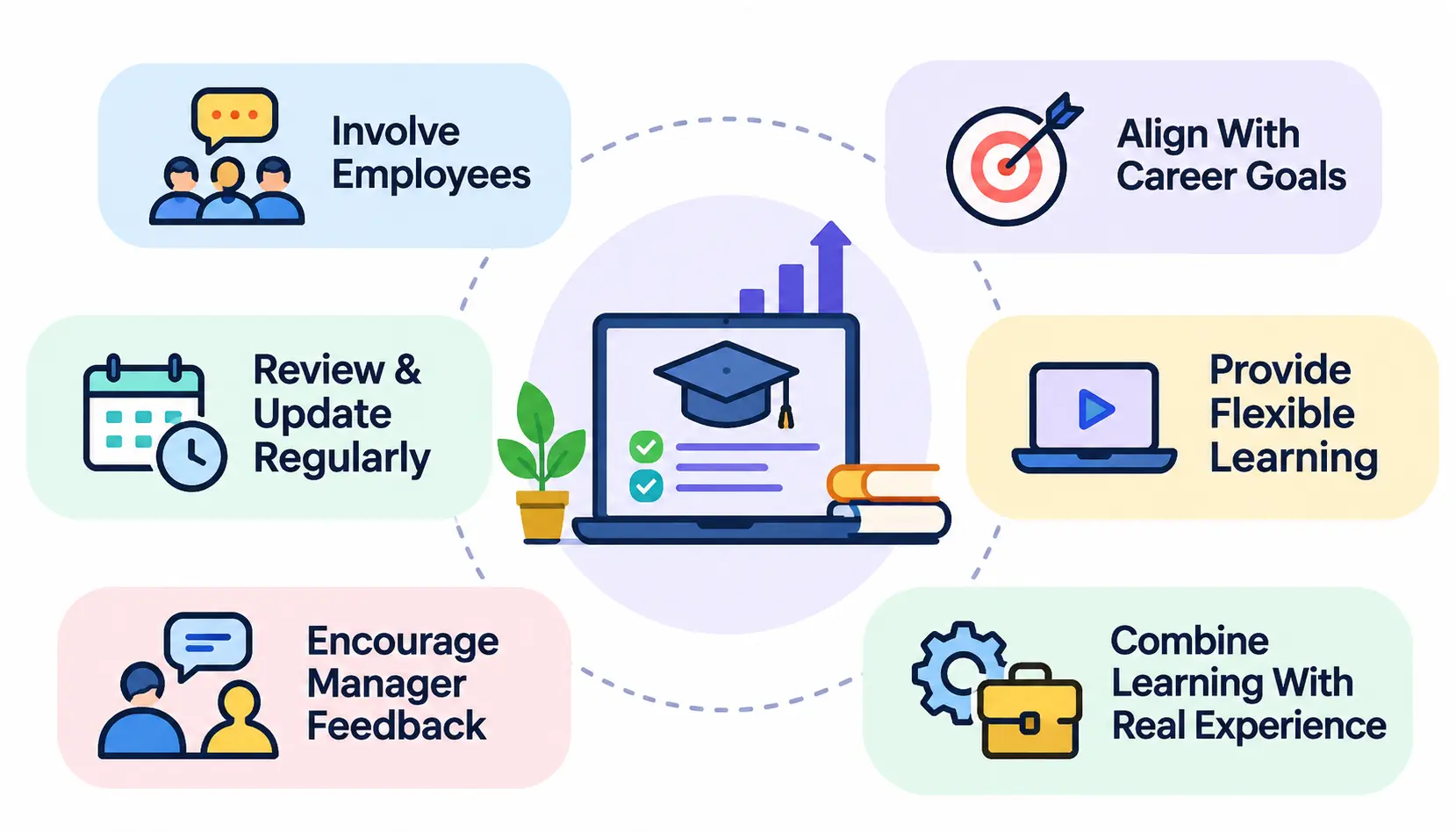
Best Practices for Managing and Improving Employee Learning Paths
Involve Employees in Learning Decisions
People commit to plans they helped shape. Let them suggest topics, pick between options, and set their own pace within limits.
Align Learning With Individual Career Goals
Ask where each person wants to be in two or three years. Then connect part of their path to that answer, even if it goes slightly beyond the current role.
Provide Flexible Learning Opportunities
Mix self-paced content with live sessions. Allow mobile access where possible. Shift workers and remote staff need options that fit their schedules.
Combine Digital Learning With Practical Experience
Courses build knowledge. Real tasks build skill. Give employees a stretch assignment, a shadowing opportunity, or a small project after each major lesson.
Encourage Manager Feedback and Mentorship
Managers have a big influence on whether learning sticks. Ask them to hold short, regular conversations about progress and to give feedback on applied skills.
Review and Update Learning Paths Regularly
Skills, tools, and roles change. Set a review date for each path and update it when business needs shift.
Frequently Asked Questions About Personalized Employee Learning Paths
1. What are personalized employee learning paths?
They are structured sequences of learning activities designed around an individual employee’s role, current skills, and career goals.
2. How do you create a personalized learning path for employees?
Set business goals, assess skills, build a skills matrix, define learning goals, choose methods, sequence activities with milestones, deliver through an LMS, and review results.
3. What are the benefits of personalized learning paths?
They can improve engagement, close skill gaps faster, support career growth and internal mobility, and align development with business priorities.
4. What should an employee learning path include?
A skill assessment, clear objectives, relevant resources, milestones, progress tracking, feedback, and a way to evaluate performance.
5. How do you identify employee skill gaps?
Compare required skills for a role with each person’s current level. Use assessments, performance reviews, manager input, and employee feedback.
6. How does AI personalize employee training?
AI analyzes a learner’s profile, skills, and activity, then recommends content or adjusts difficulty. Human review is still important for fairness and accuracy.
7. Can an LMS create personalized learning paths?
Yes, many can. Look for learning path management, role-based assignment, assessments, and reporting. Capabilities vary by product.
8. How do you measure the effectiveness of employee learning paths?
Track completion, skill improvement, engagement, workplace performance, retention, and ROI. Compare results against a baseline.
9. How often should employee learning paths be updated?
There is no fixed rule. A common approach is a formal review once or twice a year, with updates whenever a role, tool, or business goal changes.
10. What is the difference between personalized learning and traditional training?
Traditional training gives everyone the same content. Personalized learning adapts content, pace, or format to the individual’s needs.
Conclusion
Personalized employee learning paths work because they respect two things: the business needs results, and people need relevant development. When you start with clear goals, assess real skills, and build around the individual, training stops feeling like a chore.
You don’t need a large budget to begin. Pick one role, build a simple skills matrix, design a path for two or three employees, and measure what changes. Then improve and expand.
The companies that do this well treat learning paths as living plans. They check in, adjust, and keep them tied to how people actually work. That habit, more than any single tool, is what makes personalized employee learning paths pay off.