
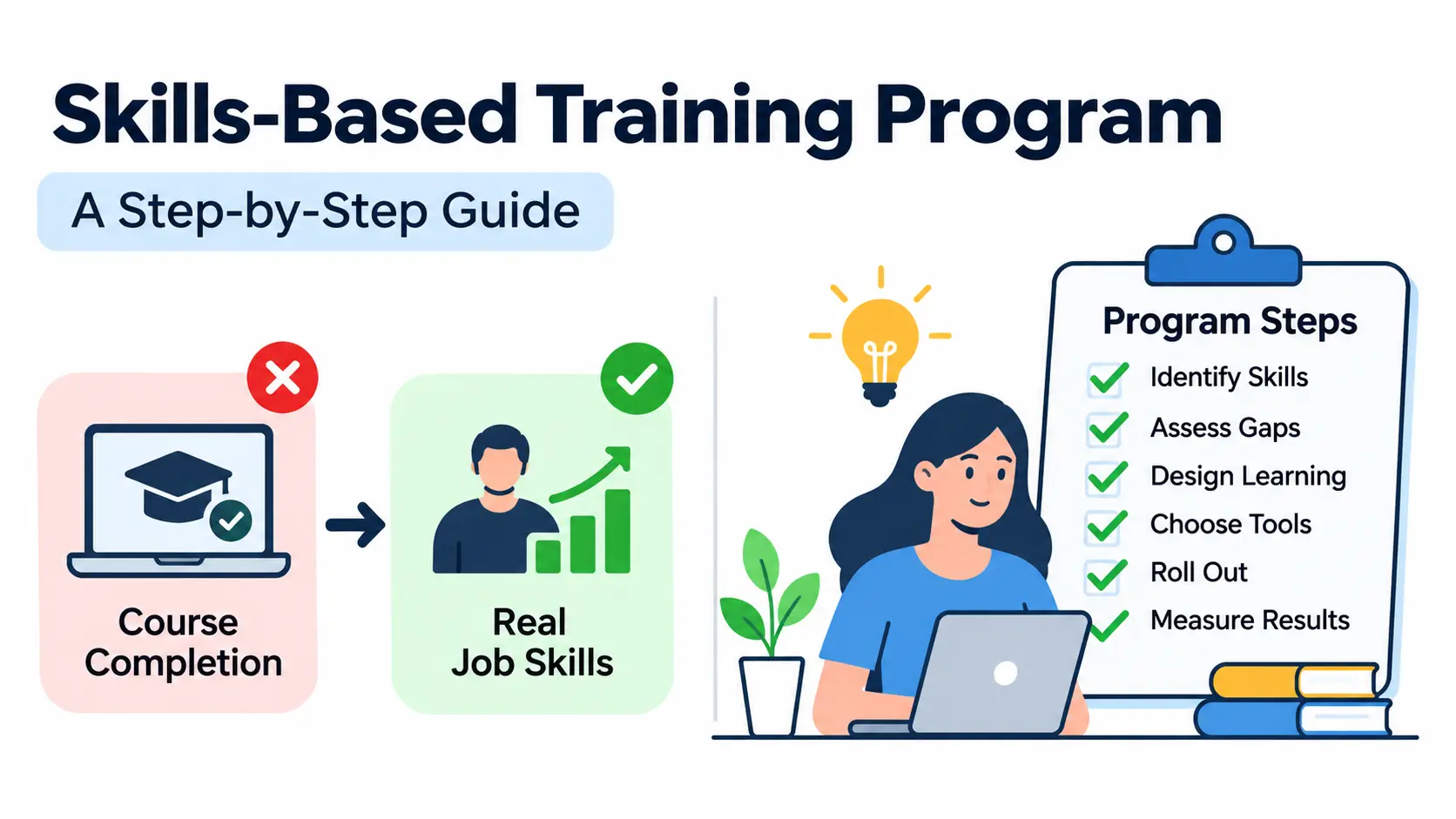
Most companies still measure training by one number: how many people finished the course. But finishing a course does not prove someone can do the job better. That gap is why more organizations are moving to a skills-based training program.
A skills-based approach starts with the skills your business needs, checks what your people can already do, and builds learning around the gaps. Progress is judged by what employees can demonstrate, not by hours spent in a classroom. Understanding how to build an effective employee training program also helps organizations structure learning activities around specific workforce requirements.
In this guide, you will learn how to identify skills, run a gap analysis, design learning paths, choose tools, roll out the program, and measure results. You will also see a worked example from a customer service team.
What Is a Skills-Based Training Program?
A skills-based training program is a structured approach to employee development that focuses on building and proving specific, job-relevant skills. Learning is tied to business goals, and progress is measured through practical assessments rather than course completion.
In plain English: instead of asking “Did you attend the training?”, you ask “Can you do the task at the standard we need?”
This shift matters because skills are what drive performance. When training targets the exact skills a role needs, it is easier to link learning to business results like faster onboarding, fewer errors, or better customer ratings.
Key Characteristics of Skills-Based Training
Most effective programs share five traits:
- Measurable skill development. Every skill has a clear definition and a way to measure it.
- Personalized learning pathways. Each person trains on their own gaps, not on content they already know.
- Practical assessments. Employees show the skill through tasks, simulations, or projects.
- Continuous feedback. Managers and peers give input throughout, not just at the end.
- Performance-based progression. People move forward when they show proficiency, not when time runs out.
Skills-Based Training vs. Traditional Training
Traditional training is usually built around a course or a calendar. Skills-based training is built around a capability. The table below shows the main differences.
| Feature | Traditional training | Skills-based training |
| Starting point | Course catalog or annual plan | Business goals and required skills |
| Content | Same for everyone | Personalized to each person’s gaps |
| Success measure | Attendance and completion | Demonstrated proficiency |
| Assessment | Often a quiz at the end | Practical tasks throughout |
| Pace | Fixed schedule | Based on progress |
| Link to business results | Indirect | Direct and trackable |
Traditional training still has a place, especially for compliance topics. But for building capability, a skills focus usually gives you clearer results.
Skills-Based Training vs. Competency-Based Training
These two terms are often mixed up. A skill is a specific ability, such as building a pivot table or handling a refund request. A competency is broader. It combines knowledge, skills, and behaviors needed to perform a role well, such as “customer relationship management.”
Think of competencies as the bundle and skills as the items inside it. Skills-based training works at the item level, which makes it easier to measure and update. If you want to read more on the broader idea, see this overview of competency-based learning
Why Is Skills-Based Training Important for Organizations?
Work changes faster than job descriptions. A skills-based program gives you a way to keep up without guessing. Here are the main benefits.
Closes Employee Skill Gaps
You cannot fix a gap you cannot see. By mapping required skills against current ability, you find exactly where the shortfalls are. Training money then goes to real needs instead of generic courses.
Improves Employee Performance and Productivity
When practice looks like real work, people apply it faster. A sales rep who rehearses objection handling in a simulation is more likely to use it on a live call than one who only watched a video.
Supports Employee Upskilling and Reskilling
Upskilling means deepening skills in a current role. Reskilling means learning new skills for a different role. A clear skills map makes both easier because you can see how close one role is to another.
Encourages Internal Mobility and Career Growth
When skills are visible, managers can spot internal candidates they would otherwise miss. Employees also see what they need to learn to reach the next role. That clarity often helps retention, because people can picture a future inside the company.
Helps Organizations Adapt to Technological Changes
AI tools, automation, and new software change daily tasks. A skills-based program lets you add or update a skill, such as prompt writing or data interpretation, without redesigning your whole training catalog.
What Are the Different Types of Skills to Include in a Training Program?
A balanced program usually covers four groups of skills.
Technical Skills
These are specialized abilities tied to tools or methods. Examples include programming, data analysis, cybersecurity, and proficiency in specific software.
Soft Skills and Behavioral Skills
These shape how people work with others. Examples include communication, leadership, teamwork, adaptability, and problem-solving. They are harder to measure, so use observable behaviors and structured rubrics.
Digital Skills
These cover how people use technology at work. Examples include digital literacy, working with AI tools, cybersecurity awareness, and data literacy. Nearly every role now needs some of these.
Functional and Role-Specific Skills
These are specific to a department or job. Examples include project management, customer service, sales operations, and financial reporting.
How to Develop a Skills-Based Training Program in 8 Steps
Here is the process in short, so you can scan it first:
- Align training goals with business objectives.
- Identify and define critical employee skills.
- Conduct a skills gap analysis.
- Set learning objectives and proficiency levels.
- Design personalized learning pathways.
- Choose the right training tools and technology.
- Implement the program and assess progress.
- Measure results and keep improving.
Let’s go through each one.
Step 1: Align Training Goals With Business Objectives
Start with the business, not the course catalog. Ask what the organization is trying to achieve in the next one to three years, and which skills will make or break those plans.
- Review company priorities with leadership.
- Talk to department heads and managers about where work is changing.
- Note upcoming tools, products, or markets that will need new skills.
- Link each skill goal to a measurable business outcome, such as shorter resolution times or fewer rework cycles.
Practical example: Say your company plans to launch AI-powered customer support. Agents will need technical skills, like reviewing and correcting AI-drafted replies. They will also need stronger communication skills for complex cases the AI cannot handle. Those two needs become your first training goals.
Step 2: Identify and Define Critical Employee Skills
Next, list the skills each role needs. Keep the list focused. A role with 40 “critical” skills has none.
- Review job descriptions, but do not rely on them alone. Watch how top performers actually work.
- Sort skills into technical, behavioral, digital, and functional groups.
- Write each skill as a clear, observable statement, such as “resolves billing disputes without escalation.”
- Decide what level of proficiency each role requires.
How to Create a Skills Taxonomy
A skills taxonomy is an organized list of skills that everyone in the company uses in the same way. A simple structure has four layers:
- Skill domain: a broad area, such as “Customer Support.”
- Skill cluster: a related group, such as “Issue Resolution.”
- Individual skill: a specific ability, such as “Diagnosing account issues.”
- Proficiency level: how well the skill is performed.
You do not need to build this from scratch. Public frameworks can give you a head start. TheSkills Framework for the Information Age (SFIA) describes IT and digital skills across defined levels of responsibility.ESCO is the European classification of skills, competences, qualifications, and occupations. Use them as references and adapt them to your own roles.
Step 3: Conduct an Employee Skills Gap Analysis
A skills gap analysis compares the skills people have today with the skills the role requires. The difference is your training need.
- Assess current skill levels for each person or team.
- Compare them with the required proficiency from Step 2.
- Collect input from both employees and managers.
- Rank the gaps by business impact, not just by size.
That last point matters. A small gap in a skill that affects revenue may deserve attention before a large gap in a nice-to-have skill.
Methods for Identifying Skills Gaps
Use more than one method, because each has blind spots.
- Self-assessments: Quick and useful, but people often rate themselves too high or too low.
- Manager evaluations: Add an outside view of day-to-day performance.
- Practical skills tests: The most objective option for hands-on skills.
- Performance reviews: Show patterns over time.
- 360-degree feedback: Gathers input from peers, direct reports, and managers.
Skills gap example: Imagine a support team where the required level for “CRM data entry” is Proficient. A practical test shows 6 of 10 agents at Developing level. The manager review confirms that incomplete records cause repeat contacts. That gap goes to the top of your list, because it directly affects customer experience.
Step 4: Set Learning Objectives and Proficiency Levels
Now turn gaps into goals. A good learning objective says what the person will be able to do, under what conditions, and to what standard.
Weak: “Understand the CRM.” Stronger: “Log a complete customer record within three minutes with no missing required fields.”
Define four levels so everyone knows what progress looks like:
| Level | What it looks like in practice |
| Beginner | Knows the basics and needs step-by-step guidance for most tasks |
| Developing | Completes routine tasks alone but needs help with exceptions |
| Proficient | Works independently, handles most exceptions, and meets quality standards |
| Advanced | Handles complex cases, improves the process, and coaches others |
Tie each level to observable behaviors for the specific skill. This keeps assessments fair and consistent across managers.
Step 5: Design Personalized Learning Pathways
A learning pathway is the sequence of activities that takes a person from their current level to the target level. Because gaps differ, pathways should too.
- Build paths from each person’s gap results.
- Break content into short modules.
- Mix theory with practice. Pair each concept with a task.
- Add mentoring or coaching from someone at a higher level.
- Let people move on when they show proficiency, not when a timer ends.
Popular Learning Methods for Skills-Based Training
- Instructor-led training: Good for complex topics and group discussion.
- Online courses and e-learning: Flexible and easy to scale.
- Microlearning: Short lessons, often a few minutes each. Read more about microlearning.
- Hands-on projects: Real tasks that produce real work.
- Job shadowing: Learning by watching an experienced colleague.
- Mentoring and coaching: One-on-one guidance. See the basics of mentorship.
- Simulations and role-playing: Safe practice for high-stakes or people-heavy situations.
No single method works for every skill. Technical skills often suit hands-on projects. Behavioral skills usually need role-play and feedback.
Step 6: Choose the Right Training Tools and Technology
Tools should support your design, not drive it. Decide what you need first, then compare options.
- LMS or LXP: A learning management system hosts and tracks courses. A learning experience platform (LXP) focuses more on recommendations and self-directed learning.
- Skills assessment tools: Look for platforms that test real tasks, not just multiple-choice recall.
- AI-powered recommendations: Useful for suggesting content based on a person’s gaps and role.
- Data integration: Connect learning data with HR and performance data so you can see the full picture.
- Progress tracking: Make sure employees and managers can see skill growth over time.
Examples of platforms in this space include Moodle (an open-source LMS), Cornerstone, Workday Learning, and Coursera for Business. Each has different strengths in cost, customization, and skills features, so check current capabilities and run a pilot before you commit.
Step 7: Implement the Training Program and Assess Employee Progress
A good rollout is mostly good communication. People should know why the program exists and what is in it for them.
- Introduce the program and explain how it connects to business goals and career growth.
- Share the objectives and how skills will be assessed.
- Assign learning activities with clear deadlines.
- Give employees time at work to practice. Training squeezed into spare time rarely sticks.
- Run regular assessments and share results quickly.
- Collect feedback from both employees and managers, then adjust.
Sample weekly schedule for one employee:
| Day | Activity | Time |
| Monday | Microlearning module on a target skill | 30 minutes |
| Tuesday | Hands-on exercise in a practice environment | 60 minutes |
| Wednesday | Coaching session with a mentor | 45 minutes |
| Thursday | Apply the skill on live work with manager observation | During normal work |
| Friday | Short practical assessment and feedback review | 30 minutes |
Adjust the load to fit the role. For many teams, two to four hours a week is realistic.
Step 8: Measure Results and Continuously Improve the Program
The last step feeds back into the first. Measure whether the program worked, then update it.
- Compare pre-training and post-training assessments.
- Track proficiency growth over time.
- Look at on-the-job performance, not just test scores.
- Review business outcomes tied to your Step 1 goals.
- Update the skills framework when roles and tools change.
Two well-known evaluation models can help. The Kirkpatrick Model looks at four levels: reaction, learning, behavior, and results. The Phillips ROI Methodology builds on that by adding a fifth level, return on investment, where you convert benefits into money and compare them with program costs.
Practical Example of a Skills-Based Employee Training Program
Here is how the process might look for a hypothetical 30-person customer service department preparing for a new CRM and an AI chat assistant. The numbers and details are illustrative.
Step 1: Identify Required Customer Service Skills
The manager meets with team leads and reviews recent customer complaints. Together they agree on five priority skills: communication, CRM management, problem-solving, product knowledge, and conflict resolution. Each is written as an observable behavior with a target level of Proficient.
Step 2: Assess Existing Employee Capabilities
Each agent completes a short self-assessment and a practical CRM task. Team leads rate each agent using a shared rubric. The results show that most agents communicate well, but many struggle with CRM records and de-escalation.
Step 3: Create Individual Learning Paths
An experienced agent who is strong in CRM skills skips that module and focuses on conflict resolution. A newer agent starts with CRM exercises and product demonstrations. Both paths lead to the same standard, but they begin in different places.
Step 4: Assign Training Activities and Assessments
Each skill gets a matching activity and a matching test, so practice and assessment line up.
| Skill | Training activity | Assessment method |
| Communication | Role-playing | Customer interaction simulation |
| CRM management | Hands-on exercises | Practical CRM task |
| Problem-solving | Case studies | Scenario-based evaluation |
| Product knowledge | Product demonstrations | Knowledge and practical test |
| Conflict resolution | Guided workshops | Role-play assessment |
Step 5: Evaluate Employee Performance
After eight weeks, agents repeat the practical tests. The team also reviews live metrics, such as repeat contact rates and customer satisfaction comments. Agents who reach Proficient move on to coaching roles or advanced topics. Others get another round of targeted practice.
How to Measure the Effectiveness of a Skills-Based Training Program
Course completion tells you who showed up. It does not tell you who improved. Tracking employee training progress through assessments, learning paths, and performance reports helps managers identify areas that need additional support. To judge a skills-based training program fairly, track outcomes at several levels.
Employee Skill Proficiency Improvement
Compare validated proficiency levels before and after training. Use the same rubric and, where possible, the same type of task so the comparison is fair.
Time to Competency
Time to competency is how long it takes a person to reach the required skill level. A shorter time, without a drop in quality, usually signals better training and better onboarding.
Employee Productivity and Performance
Look at work output and quality: resolution times, error rates, sales conversion, or project delivery. Be careful to note other factors that may have changed at the same time.
Employee Retention and Internal Mobility
Track whether employees in the program stay longer and move into new roles inside the company. These results take time to show, so look at them over quarters, not weeks.
Training Return on Investment (ROI)
Training ROI compares the value of the benefits with the cost of the program. The standard formula is: ROI (%) = (program benefits − program costs) ÷ program costs × 100. The hard part is isolating how much of a result came from training. Be honest about your assumptions.
| Metric | What it measures |
| Skill proficiency improvement | Growth in employee capabilities |
| Time to competency | Time required to reach target proficiency |
| Skill coverage ratio | Coverage of critical organizational skills |
| Training completion | Participation in assigned learning |
| Internal mobility rate | Employees moving into internal roles |
| Training ROI | Financial value generated relative to training investment |
Common Challenges in Implementing Skills-Based Training and How to Overcome Them
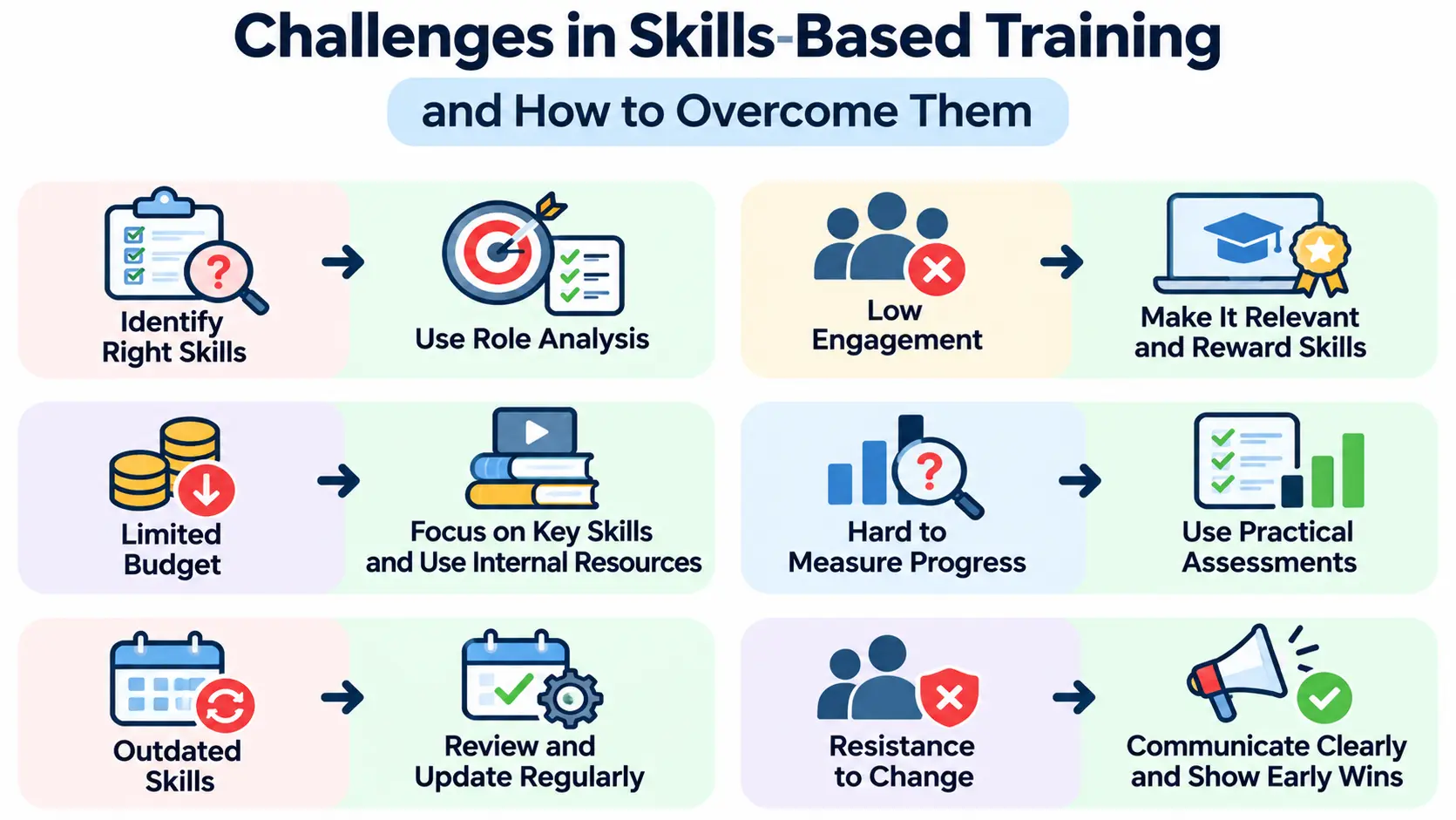
Difficulty Identifying the Right Skills
Start with role analysis. Watch top performers, review real tasks, and ask managers which skills cause the biggest problems when missing. Validate your list with a few employees before you finalize it.
Lack of Employee Engagement
People engage when training feels useful. Organizations can improve employee engagement through training by offering relevant learning experiences, personalized pathways, and opportunities for practical skill development. Offer personalized paths, give managers a clear role in coaching, and recognize verified skills with badges, promotions, or new responsibilities.
Limited Training Budgets
Prioritize the few skills that matter most. Use internal experts for peer teaching, and blend free or low-cost resources with paid courses. A small, focused program beats a large, vague one.
Difficulty Measuring Skill Improvement
Use practical assessments and standardized rubrics with clear behavior descriptions. Train managers to score consistently. Without that, ratings drift from one manager to the next.
Outdated Skills Frameworks
Skills change. Review your framework at least once or twice a year, and sooner when you adopt new tools. Remove skills that no longer matter, and add emerging ones.
Resistance to Organizational Change
Some employees worry that skills data will be used against them. Leaders should explain how the data will be used, share the plan openly, and show early wins. When people see the program helping their careers, resistance usually drops.
Best Practices for Building a Successful Skills-Based Training Program
- Start with business-critical skills. Do not try to cover every skill at once.
- Involve managers and employees. They know where the real gaps are.
- Use measurable learning objectives. If you cannot measure it, you cannot manage it.
- Combine multiple training methods. Different skills need different approaches.
- Prioritize practical application. Practice on real or realistic tasks.
- Provide continuous feedback. Do not wait for the final assessment.
- Recognize verified skills. Recognition keeps motivation high.
- Update content regularly. Retire outdated material and add new topics.
- Make learning part of everyday work. Build short practice moments into the workday.
Frequently Asked Questions About Skills-Based Training
1. What is an example of skills-based training?
A customer service team practicing de-escalation through role-play, then being scored on a simulated angry-customer call, is a skills-based training example. The focus is on showing the skill, not just attending a session.
2. How do you develop a skills-based training program?
Follow eight steps: align goals with business objectives, define critical skills, run a skills gap analysis, set learning objectives and proficiency levels, design personalized learning paths, choose tools, implement and assess progress, and measure results to improve the program.
3. What are the four types of skills in employee training?
A common grouping is technical skills, soft or behavioral skills, digital skills, and functional or role-specific skills. Some organizations use different labels, but most programs cover these areas.
4. What is the difference between skills-based and competency-based training?
Skills-based training targets specific abilities, such as using a CRM. Competency-based training targets broader capabilities that combine knowledge, skills, and behaviors, such as customer relationship management. Skills sit inside competencies.
5. How do you conduct a skills gap analysis?
List the skills each role requires and set target proficiency levels. Assess current skills through self-assessments, manager reviews, practical tests, and feedback. Compare the results with the targets, then rank the gaps by business impact.
6. How long does it take to implement a skills-based training program?
It depends on company size and scope. A small pilot for one team can often launch in a few weeks to a few months. A company-wide rollout with a full skills taxonomy usually takes longer, so most organizations start small and expand.
7. What tools are used for skills-based training?
Common tools include learning management systems, learning experience platforms, skills assessment platforms, and HR or performance systems. Examples include Moodle, Cornerstone, Workday, and Coursera for Business.
8. How do you measure the success of a skills-based training program?
Track skill proficiency improvement, time to competency, on-the-job performance, retention and internal mobility, and training ROI. Use models like Kirkpatrick or Phillips to organize the evaluation.
9. Can AI improve skills-based employee training?
Yes, in several ways. AI can suggest learning content based on a person’s gaps, help analyze skills data, and power practice simulations. It works best when people still review the results, since AI recommendations can be wrong or biased.
Conclusion
A skills-based training program shifts the focus from finishing courses to building real, provable capability. You start with business goals, define the skills that matter, find the gaps, and build personalized paths to close them.
Then you measure what changed and use the results to improve. That loop is what keeps the program useful as roles and technology evolve.
If you are just getting started, pick one team and one or two critical skills. Run a small pilot, learn from it, and expand. A modest program that shows clear results will earn support faster than a big plan that never launches.