


Starting a new job is stressful. Now imagine going through your first week armed with nothing but a stack of paper forms, a printed handbook, and an HR rep who is juggling five other new hires at the same time. This is still how a lot of companies do things, and it shows in the numbers. Poor onboarding is one of the top reasons new employees quit within their first 90 days.
This is exactly the problem employee onboarding software was built to solve. In this guide, we will break down what this software actually does, what features matter, how it compares to a traditional LMS, and how to pick the right one for your business. We will also look at some of the leading platforms on the market today, including where a combined LMS and onboarding tool like SkillForce LMS fits in.
What Is Employee Onboarding Software?
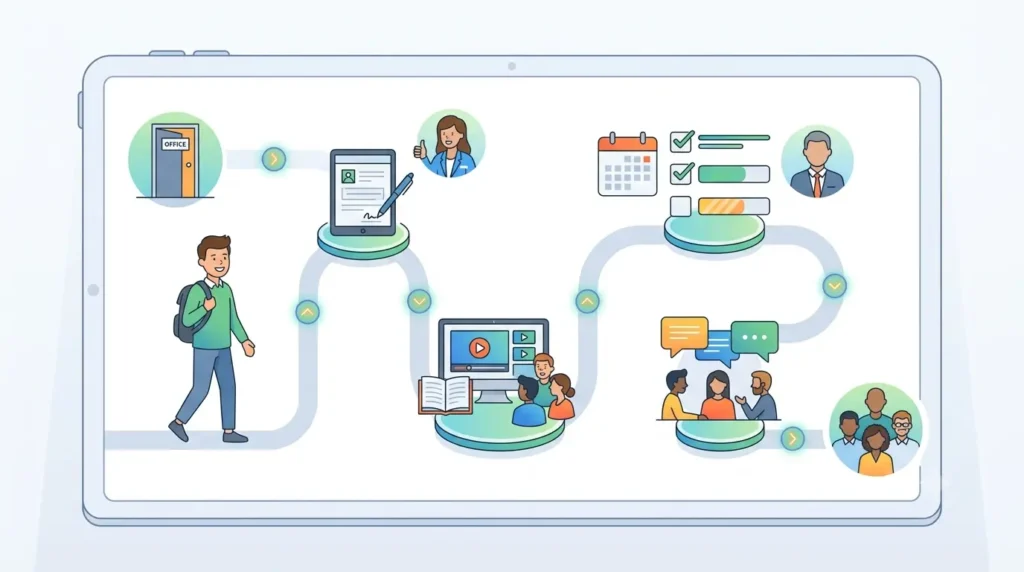
Employee onboarding software is a digital platform that helps HR teams and managers guide new hires through their first days, weeks, and months at a company. Instead of relying on spreadsheets, printed checklists, and scattered emails, everything happens inside one system: paperwork, training, task tracking, and communication.
Think of it as a digital roadmap for a new employee’s journey. It tells them what to do, when to do it, and who to talk to if they get stuck.
How Employee Onboarding Software Works
Most platforms follow a similar structure. Here’s the general flow:
- HR creates an onboarding workflow or template for a role or department.
- The new hire receives login access before or on their first day.
- Documents, contracts, and forms are signed electronically.
- Tasks and training modules get assigned automatically based on role, location, or start date.
- Managers and HR can track progress on a dashboard in real time.
- Reminders and notifications keep everyone on schedule.
Because most of this runs on autopilot once it’s set up, the same process can scale to ten new hires or a thousand without extra manual work.
Why Businesses Need Employee Onboarding Software
Manual onboarding tends to break down as a company grows. Forms get lost, training gets skipped, and every manager ends up running onboarding a little differently. That inconsistency creates a confusing experience for new hires and extra risk for compliance.
Software fixes this by standardizing the process while still allowing flexibility for different roles, departments, or locations. According to community discussions on humanresources on Reddit, HR professionals frequently cite disorganized onboarding and lack of a central system as one of their biggest day-to-day headaches, which is a strong signal for why demand for this software keeps growing.
Employee Onboarding Software vs Manual Onboarding
| Factor | Manual Onboarding | Employee Onboarding Software |
|---|---|---|
| Consistency | Varies by manager or HR rep | Standardized workflows |
| Speed | Slow, paperwork heavy | Fast, mostly automated |
| Visibility | Hard to track progress | Real-time dashboards |
| Compliance | Easy to miss steps | Built-in checklists and audit trails |
| Scalability | Difficult beyond a few hires | Scales easily |
Why Modern Businesses Are Investing in Employee Onboarding Software
A few clear trends are driving adoption:
- Faster onboarding. New hires can start contributing sooner instead of losing their first week to paperwork.
- Better new hire experience. A smooth, organized start builds trust and confidence from day one.
- Reduced administrative work. HR teams spend less time chasing signatures and more time on strategic work.
- Consistent onboarding process. Every new hire, in every department, gets the same quality of experience.
- Remote and hybrid workforce support. Distributed teams need a digital-first process since there’s no office tour or in-person orientation to fall back on.
This last point matters more than people realize. Remote onboarding without the right tools often leaves new hires feeling isolated in their first few weeks, which is a well-documented driver of early attrition.
Key Features of Employee Onboarding Software
Not all platforms are built the same. Here are the features worth prioritizing.
Digital Onboarding Workflows
This is the backbone of the software. It lets HR build step-by-step journeys for different roles, so a new sales rep and a new software engineer each get a path tailored to their job.
Task & Checklist Automation
Tasks like setting up email accounts, ordering equipment, or scheduling orientation calls get assigned automatically to the right person, whether that’s HR, IT, or the hiring manager.
Document Management & E-Signatures
Offer letters, tax forms, and policy acknowledgments can be signed digitally. This cuts down on printing, scanning, and lost paperwork.
Learning Management System (LMS) Integration
Onboarding doesn’t stop at paperwork. Many platforms connect to or include an LMS, so training content flows directly into the new hire’s onboarding path.
Employee Training & Learning Paths
Beyond basic orientation, good software lets you assign structured learning paths, think compliance courses, product training, or role-specific skill building, right from the start.
Progress Tracking & Reporting
Dashboards show who has completed what, and flag anyone falling behind. This gives HR visibility without having to chase people down for updates.
Automated Notifications & Reminders
Emails or app notifications nudge new hires and managers when a task is due, so nothing slips through the cracks.
Mobile Accessibility
Frontline and field employees especially benefit from being able to complete onboarding tasks from a phone rather than needing a desk and a laptop.
HRIS & Payroll Integrations
Good onboarding software connects with your existing HR and payroll systems, so employee data only needs to be entered once.
AI-Powered Automation
Newer platforms use AI to personalize onboarding paths, answer common new hire questions through chatbots, and flag onboarding steps that are likely to be delayed.
Benefits of Employee Onboarding Software
Improves New Hire Experience
A structured, digital process feels more professional and less chaotic. First impressions matter, and this is often a new hire’s first real interaction with company systems.
Speeds Up Employee Productivity
When training and access are set up before day one, new employees can start doing real work faster instead of waiting on approvals and account setups.
Reduces Manual HR Tasks
Automation frees HR teams from repetitive admin work like sending the same welcome emails or tracking down signatures.
Ensures Compliance
Built-in checklists and audit trails make it easier to prove that required training, policy acknowledgments, and paperwork were actually completed.
Improves Employee Retention
Research consistently links strong onboarding experiences to lower early turnover. A Wikipedia overview of onboarding notes that effective onboarding processes are associated with higher job satisfaction and better performance in the long run.
Standardizes the Onboarding Process
Every new hire, regardless of manager or department, gets a consistent baseline experience. This reduces confusion and makes onboarding easier to improve over time, since you’re measuring one process instead of dozens of informal ones.
Employee Onboarding Software vs Learning Management System (LMS)
People often confuse these two categories, so it helps to lay out the differences clearly.
| Factor | Employee Onboarding Software | Learning Management System |
|---|---|---|
| Purpose | Guide new hires through their first days and weeks | Deliver training and courses to employees over time |
| Primary Users | New hires, HR, hiring managers | All employees, trainers, L&D teams |
| Features | Checklists, e-signatures, task automation | Course creation, quizzes, certifications |
| Use Cases | Day-one setup, paperwork, orientation | Ongoing skill development, compliance training |
| Can They Work Together? | Yes | Yes |
The short answer is that onboarding software handles the first mile, while an LMS handles the ongoing journey. Many modern LMS platforms, including SkillForce LMS, now build onboarding features directly into the same system. This lets organizations manage new hire onboarding and long-term employee training from a single platform, rather than stitching two separate tools together.
I would recommend keeping this section objective. Since this is a commercial comparison article, don’t make SkillForce sound like an advertisement. Mention its strengths, then fairly compare it with other platforms.
Top Employee Onboarding Software Solutions
Choosing the right employee onboarding software depends on your organization’s size, onboarding process, training requirements, and long-term learning goals. While some platforms focus primarily on HR workflows and paperwork, others combine onboarding with employee training, compliance, and continuous learning. Below are some of the leading employee onboarding solutions available today.
SkillForce LMS
Best for: Organizations looking to combine employee onboarding with corporate training and continuous learning.
SkillForce LMS helps businesses deliver a structured onboarding experience while supporting employee development beyond the first day. HR teams can assign onboarding tasks, create role-based learning paths, deliver training courses, and monitor progress from a single platform. With AI-powered learning capabilities and analytics, organizations can automate onboarding and support continuous employee growth.
Key Features
- Employee onboarding workflows
- Role-based learning paths
- AI-assisted course creation
- Progress tracking and reporting
- Compliance training
- Assessments and certifications
- Mobile learning
- Integrations with business tools
BambooHR
Best for: Small and medium-sized businesses focused on HR management.
BambooHR offers onboarding tools that simplify paperwork, automate new hire tasks, and help HR teams manage employee records. It integrates onboarding with its broader HR management platform.
Zoho People
Best for: Businesses already using the Zoho ecosystem.
Zoho People provides onboarding automation, document management, task assignments, and employee record management. It integrates well with other Zoho applications to streamline HR operations.
Darwinbox
Best for: Mid-sized and enterprise organizations.
Darwinbox offers a digital onboarding experience with workflow automation, employee engagement features, document management, and HR analytics. It is designed for organizations managing large workforces.
Atlassian
Best for: Organizations using Jira and Confluence for internal collaboration.
Atlassian supports onboarding by helping teams document processes, automate workflows, assign onboarding tasks, and centralize company knowledge through its collaboration tools.
Beyond Intranet
Best for: Microsoft 365 organizations.
Beyond Intranet provides onboarding solutions built on Microsoft technologies, enabling organizations to automate onboarding tasks, manage documentation, and improve collaboration using SharePoint and Microsoft Teams.
Apps365
Best for: Companies using Microsoft 365 for HR operations.
Apps365 offers onboarding automation, document workflows, employee self-service features, and digital forms that help HR teams reduce manual administrative work.
Tango
Best for: Organizations that want interactive process documentation and employee guidance.
Tango allows businesses to create step-by-step guides and training documentation, making it easier for new employees to learn software and internal processes during onboarding.
Employee Onboarding Software Comparison
| Software | Best For | Employee Onboarding | Employee Training | AI Features | Integrations |
|---|---|---|---|---|---|
| SkillForce LMS | Corporate training & onboarding | ✅ | ✅ | ✅ | HRMS, SSO, APIs* |
| BambooHR | HR management for SMBs | ✅ | Limited | Limited | HR & payroll tools |
| Zoho People | Zoho ecosystem users | ✅ | Limited | Limited | Zoho apps |
| Darwinbox | Enterprise HR | ✅ | Limited | Some | HR systems |
| Atlassian | Team collaboration | Task-based | Limited | Some automation | Jira, Confluence |
| Beyond Intranet | Microsoft 365 businesses | ✅ | Limited | Limited | Microsoft 365 |
| Apps365 | Microsoft HR workflows | ✅ | Limited | Limited | Microsoft 365 |
| Tango | Process documentation | Partial | ✅ | Limited | Browser & workplace tools |
How to Choose the Right Employee Onboarding Software
Define Your Business Needs
Start by mapping out your actual onboarding process today, gaps and all. This tells you which features are must-haves versus nice-to-haves.
Look for Automation Features
Prioritize software that automates repetitive tasks like document collection, account provisioning, and reminders. This is where most of the time savings come from.
Prioritize Employee Training Capabilities
If onboarding is going to lead into ongoing training anyway, it’s worth choosing a platform that handles both instead of managing two disconnected systems.
Evaluate Integrations
Check that the software connects cleanly with your existing HRIS, payroll, and communication tools. Poor integrations often create more manual work, not less.
Consider Scalability
Think beyond your current headcount. A tool that works fine for 20 employees might struggle at 200 if it wasn’t built to scale.
Compare Pricing & Support
Look past the sticker price. Factor in implementation time, customer support quality, and whether pricing scales fairly as your team grows.
Best Practices for Successful Employee Onboarding
- Create a structured onboarding plan. Map out the first 30, 60, and 90 days instead of just the first week.
- Assign role-based learning paths. A new hire in sales shouldn’t get the same training as one in engineering.
- Combine onboarding with employee training. Treat onboarding as the start of a longer development journey, not a one-time event.
- Track employee progress. Use dashboards to catch anyone falling behind before it becomes a bigger problem.
- Gather feedback. Ask new hires what worked and what didn’t, ideally at the 30-day and 90-day marks, and actually use that feedback to improve the process.
READ MORE: Best Employee Onboarding Practices for Modern Businesses
Common Mistakes to Avoid
- Paper-based onboarding. It’s slow, easy to lose, and hard to track or audit.
- Delayed training. Waiting weeks to start real training leaves new hires idle and disengaged.
- Poor communication. New hires who don’t know who to ask for help often feel abandoned in their first weeks.
- Lack of progress tracking. Without visibility, small problems go unnoticed until they become resignations.
- Ignoring employee feedback. Onboarding should evolve based on what new hires actually experience, not just what looks good on paper.
The Future of Employee Onboarding Software
AI-Powered Onboarding
AI is increasingly used to personalize onboarding journeys, answer routine new hire questions instantly, and flag when someone is falling behind before it becomes a bigger issue.
Personalized Learning
Instead of one-size-fits-all training, software is moving toward learning paths shaped by role, prior experience, and even individual learning pace.
Automation
Expect more of the manual back-and-forth, like scheduling, approvals, and reminders, to disappear entirely into automated workflows.
Skills-Based Employee Development
Onboarding is increasingly tied to skills mapping, helping companies identify gaps and growth paths from an employee’s very first week.
Data-Driven Onboarding
Analytics will play a bigger role in showing which parts of onboarding actually correlate with retention and performance, letting HR teams fine-tune the process with real evidence instead of guesswork.
Frequently Asked Questions
What is employee onboarding software?
Employee onboarding software is a digital tool that helps companies guide new hires through paperwork, training, and orientation tasks in one organized system, instead of relying on manual processes.
What are the benefits of employee onboarding software?
It saves HR time, improves the new hire experience, ensures compliance, and has been linked to better employee retention and faster productivity.
What features should employee onboarding software have?
Look for digital workflows, task automation, e-signatures, training integration, progress tracking, and HRIS or payroll integrations at a minimum.
Can an LMS be used for employee onboarding?
Yes. Many modern LMS platforms, including SkillForce LMS, include built-in onboarding features, letting companies manage new hire onboarding and ongoing training in one place.
How long should employee onboarding take?
Most experts recommend planning onboarding across the first 90 days, not just the first week, since it takes that long for a new hire to fully settle into their role.
What is the difference between onboarding software and HR software?
Onboarding software focuses specifically on the new hire journey, while broader HR software covers the full employee lifecycle, including payroll, benefits, and performance management.
Which employee onboarding software is best for small businesses?
It depends on budget and needs, but small businesses often benefit from platforms like BambooHR for HR basics or SkillForce LMS if they also want built-in training capabilities from day one.
Conclusion
Employee onboarding software has become less of a nice-to-have and more of a baseline expectation, especially as remote and hybrid work make in-person hand-holding impossible. It replaces scattered paperwork and inconsistent processes with structured workflows that scale as a company grows.
The right choice depends on what your business actually needs. If you’re looking for a platform that combines onboarding, corporate training, and ongoing employee development in one place, SkillForce LMS is worth evaluating alongside other established players like BambooHR and Zoho People. Whichever route you take, the goal stays the same: give new hires a smooth, organized start, because that first impression tends to stick.