


Employee skills are really important for businesses these days.
As things change in the world of business like technologies and different things that customers want companies can not just use old ways of teaching employees anymore.
Employees need to keep learning things so they can do their jobs well and follow the rules.
This is why companies use software to help train their employees.
This software is used for things like teaching employees about the company and making sure everyone follows the rules to help people become better leaders and move up in the company.
The software helps companies make training programs that’re easy to use and really work.
In this guide you will learn about this kind of software , how it works and what good things it can do for your company. You will also learn what features to look for and how to pick the software for your company.
What Is Employee Training Software?
Employee training software is a digital platform that helps organizations create, deliver, manage, track, and optimize employee learning programs.
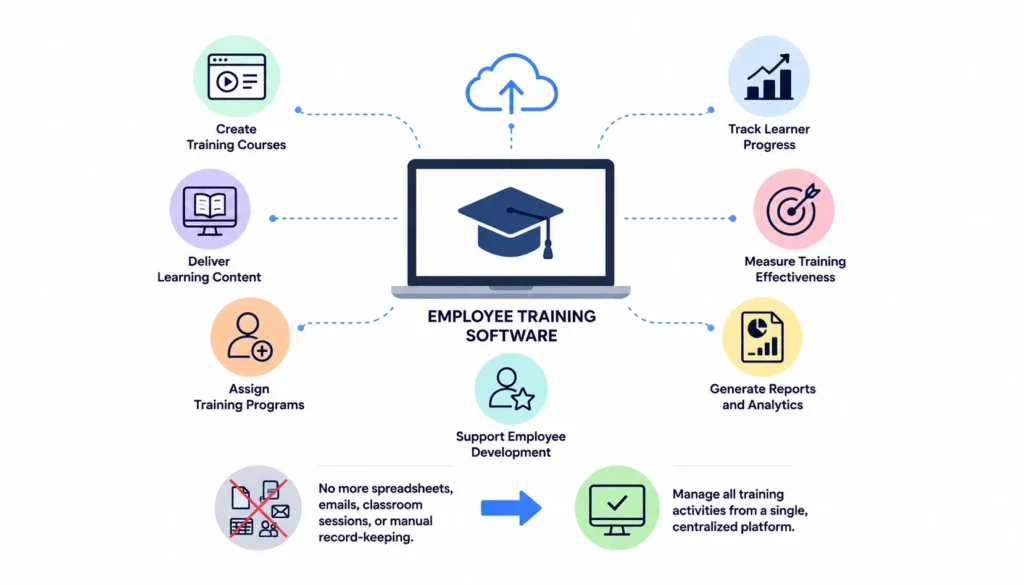
It serves as a centralized system where businesses can:
- Create training courses
- Deliver learning content
- Assign training programs
- Track learner progress
- Measure training effectiveness
- Generate reports and analytics
- Support employee development
Rather than relying on spreadsheets, emails, classroom sessions, and manual record-keeping, organizations can manage all training activities from a single platform.
Why Employee Training Software Matters
The modern workforce faces constant change.
Employees need to learn new technologies, adapt to evolving regulations, develop soft skills, and stay current with industry trends.
Traditional training methods often struggle because they are:
- Time-consuming
- Difficult to scale
- Expensive
- Hard to track
- Inconsistent
Employee training software solves these challenges by making learning accessible anytime and anywhere.
Organizations can deliver consistent training experiences while maintaining visibility into employee progress and performance.
How Employee Training Software Works
Employee training software acts as a centralized learning hub.
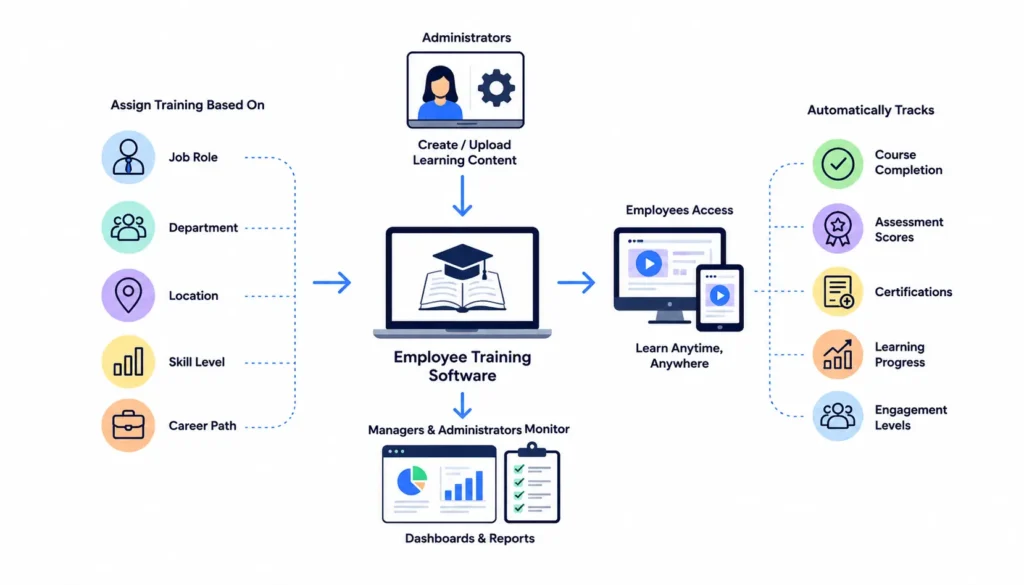
Administrators upload or create learning content and assign it to employees based on:
- Job role
- Department
- Location
- Skill level
- Career path
Employees access training through desktop or mobile devices and complete courses at their convenience.
The software automatically tracks:
- Course completion
- Assessment scores
- Certifications
- Learning progress
- Engagement levels
Managers and administrators can monitor results through dashboards and reports.
Key Features of Employee Training Software
Not all training platforms offer the same capabilities. However, the best employee training software solutions typically include several essential features.
Learning Content Management
Content management allows organizations to create, organize, and update training materials.
Supported content often includes:
- Videos
- Presentations
- PDFs
- Documents
- Interactive modules
- Quizzes
A centralized content library ensures employees can easily access learning resources.
Course Creation Tools
Modern platforms provide tools for building customized training programs.
Organizations can develop courses for:
- Onboarding
- Compliance
- Product training
- Customer service
- Leadership development
- Technical skills
Some systems also offer drag-and-drop course builders that simplify content creation.
Mobile Learning
Today’s employees expect flexibility.
Mobile learning enables staff to access training from smartphones and tablets.
Benefits include:
- Learning on the go
- Increased accessibility
- Higher completion rates
- Better learner engagement
This is especially valuable for remote and frontline workers.
Assessments and Quizzes
Training effectiveness depends on measuring knowledge retention.
Assessment features help organizations:
- Test learner understanding
- Validate knowledge acquisition
- Identify learning gaps
- Measure progress
Automated grading saves significant administrative time.
Progress Tracking
Training software continuously monitors learner activity.
Organizations can track:
- Enrollment status
- Completion rates
- Time spent learning
- Assessment performance
- Certification achievements
This visibility supports data-driven decision-making.
Reporting and Analytics
Comprehensive reporting helps businesses evaluate training effectiveness.
Reports may include:
- Learning engagement metrics
- Skill development trends
- Compliance completion rates
- Department performance
- ROI indicators
Analytics help L&D teams improve future training initiatives.
Certification Management
Many industries require employees to maintain certifications.
Employee training software can:
- Track certifications
- Send renewal reminders
- Maintain compliance records
- Automate recertification workflows
This reduces compliance risks and administrative burden.
Benefits of Employee Training Software
Organizations that invest in employee training software often experience significant improvements in workforce development and business performance.
Improved Employee Performance
Well-trained employees perform better.
Training software helps employees:
- Learn faster
- Apply skills effectively
- Improve productivity
- Increase confidence
Better-trained employees contribute directly to organizational success.
Consistent Training Delivery
Traditional training can vary depending on instructors and locations.
Employee training software ensures every learner receives the same high-quality experience.
Consistency improves learning outcomes and reduces knowledge gaps.
Increased Employee Engagement
Interactive learning experiences are more engaging than static training materials.
Features such as:
- Gamification
- Videos
- Microlearning
- Social learning
encourage participation and improve retention.
Reduced Training Costs
Organizations can significantly lower training expenses by reducing:
- Travel costs
- Instructor fees
- Venue expenses
- Printed materials
- Administrative work
Digital training offers a highly scalable solution.
Faster Onboarding
Effective onboarding helps new hires become productive sooner.
Employee training software streamlines onboarding through:
- Automated learning paths
- Digital documentation
- Progress tracking
- Role-specific training
This improves both efficiency and employee experience.
Better Compliance Management
Compliance failures can result in financial penalties and reputational damage.
Training software helps organizations:
- Deliver mandatory training
- Monitor completion rates
- Maintain training records
- Demonstrate compliance
This is especially important in regulated industries.
Types of Employee Training Software
Different organizations have different training needs.
Understanding available options helps businesses choose the right solution.
Learning Management Systems (LMS)
An LMS is the most common form of employee training software.
It focuses on:
- Course delivery
- Training management
- Learner tracking
- Reporting
LMS platforms are widely used across industries.
Learning Experience Platforms (LXP)
LXPs emphasize personalized learning experiences.
They use AI and recommendations to help employees discover relevant learning content.
LXPs are ideal for organizations promoting continuous learning.
Microlearning Platforms
Microlearning software delivers short, focused lessons.
Benefits include:
- Faster learning
- Better retention
- Higher engagement
- Mobile accessibility
These platforms are popular for busy workforces.
Skills Development Platforms
Skills development tools focus on closing workforce skill gaps.
They often include:
- Skill assessments
- Personalized learning paths
- Career development tracking
These platforms support strategic workforce planning.
How to Choose the Best Employee Training Software
Selecting the right platform requires careful evaluation.
Define Training Goals
Start by identifying objectives such as:
- Employee onboarding
- Compliance training
- Leadership development
- Upskilling initiatives
Clear goals guide platform selection.
Evaluate Ease of Use
Complicated software reduces adoption.
Look for platforms that offer:
- Intuitive interfaces
- Simple navigation
- Mobile accessibility
- User-friendly administration
A positive user experience encourages engagement.
Assess Integration Capabilities
Training software should integrate with existing systems such as:
- HR software
- CRM platforms
- Communication tools
- Performance management systems
Integration improves efficiency and data accuracy.
Consider Scalability
Your workforce will evolve over time.
Choose software capable of supporting future growth without major disruptions.
Review Reporting Features
Data is essential for measuring success.
Look for robust reporting and analytics that provide actionable insights.
Employee Training Software Best Practices
Technology alone does not guarantee successful training outcomes.
Organizations should follow proven best practices.
Create Role-Based Learning Paths
Different employees require different skills.
Customized learning paths increase relevance and engagement.
Use Microlearning
Short lessons improve knowledge retention and reduce learner fatigue.
Microlearning is especially effective for busy employees.
Encourage Continuous Learning
Training should be an ongoing process rather than a one-time event.
Create a culture where learning becomes part of everyday work.
Measure Training Effectiveness
Track key performance indicators such as:
- Completion rates
- Assessment scores
- Skill improvements
- Productivity gains
Continuous evaluation helps optimize programs.
The Future of Employee Training Software
The future of workplace learning is increasingly technology-driven.
Emerging trends include:
Artificial Intelligence
AI is transforming employee training through:
- Personalized learning paths
- Intelligent content recommendations
- Automated assessments
- Predictive analytics
Adaptive Learning
Training platforms are becoming more responsive to individual learner needs.
Adaptive systems adjust content based on performance and behavior.
Immersive Learning Technologies
Virtual Reality (VR) and Augmented Reality (AR) are creating highly engaging training experiences.
These technologies are particularly useful for:
- Technical training
- Safety instruction
- Equipment operation
- Simulation-based learning
Skills-Based Workforce Development
Organizations are shifting toward skills-focused talent strategies.
Training software will increasingly support:
- Skills mapping
- Career pathing
- Internal mobility
- Workforce planning
What Is Employee Training Software?
Employee training software is a digital platform that helps organizations create, deliver, manage, and track employee learning programs. It improves workforce development through online courses, assessments, progress tracking, reporting, and personalized learning experiences.
Frequently Asked Questions
What is employee training software used for?
We use employee training software to make and manage the things our employees learn at work. This includes helping new people get started and making sure everyone follows the rules. Employee training software is also used for leadership development and skills training, for our employees. It helps us deliver these programs to our employees. Then track how they are doing with the employee training software.
What are the benefits of employee training software?
The benefits of this system are that employees do better at their jobs. The company also saves money on training. This system helps the company follow the rules. New employees can start working. Employees are more involved in their work. The company can see how much the employees are learning. The benefits include things like improved employee performance and faster onboarding and increased engagement and better compliance management and reduced training costs and learning outcomes.
Is employee training software suitable for small businesses?
Yes. Many platforms offer scalable solutions that help small businesses provide professional training without significant costs or administrative burden.
How does employee training software improve productivity?
Employees gain knowledge and skills more efficiently, leading to improved job performance, fewer errors, faster onboarding, and increased workplace productivity.
What features should employee training software include?
Essential features include course management, mobile learning, assessments, reporting, analytics, certification tracking, content management, and integrations.
Can employee training software support remote teams?
Absolutely. Cloud-based platforms allow remote employees to access learning content from anywhere, ensuring consistent training experiences across distributed workforces.
Conclusion
Employee training software is really important for companies these days. Companies have to deal with employees not having the skills, new technologies coming out all the time and the need for people to keep learning.
Digital training platforms help with this because they are organized and can be used by a lot of people.
You can use employee training software for things like teaching employees the ropes, making sure everyone is doing what they are supposed to, helping leaders get better and supporting employees as they grow in their jobs. The right employee training software can make a difference and turn learning into something that helps the company instead of holding it back.
Companies that invest in employee training software now will have an advantage when it comes to building a strong and skilled workforce with employees who are engaged and ready for the future.