


If you’re trying to figure out how to reduce employee training costs without sacrificing quality, the short answer is this: stop cutting training, and start cutting waste. Most companies that “save money” on training do it by trimming hours, canceling programs, or switching to the cheapest tool available. That usually backfires. Skills gaps widen, mistakes go up, and you end up paying for retraining anyway.
The better approach is to look at where training budgets actually leak duplicate content, unused software licenses, low completion rates, travel costs, and training that never mapped to a real skill gap in the first place. Fix those leaks, and you can cut spending by a meaningful amount without touching the parts of training that actually build capability.
This guide walks through a full framework: what training costs really include, why they vary so much between companies, why aggressive cuts often backfire, and twelve practical strategies you can use to lower costs while keeping or even improving training quality.
What Are Employee Training Costs?
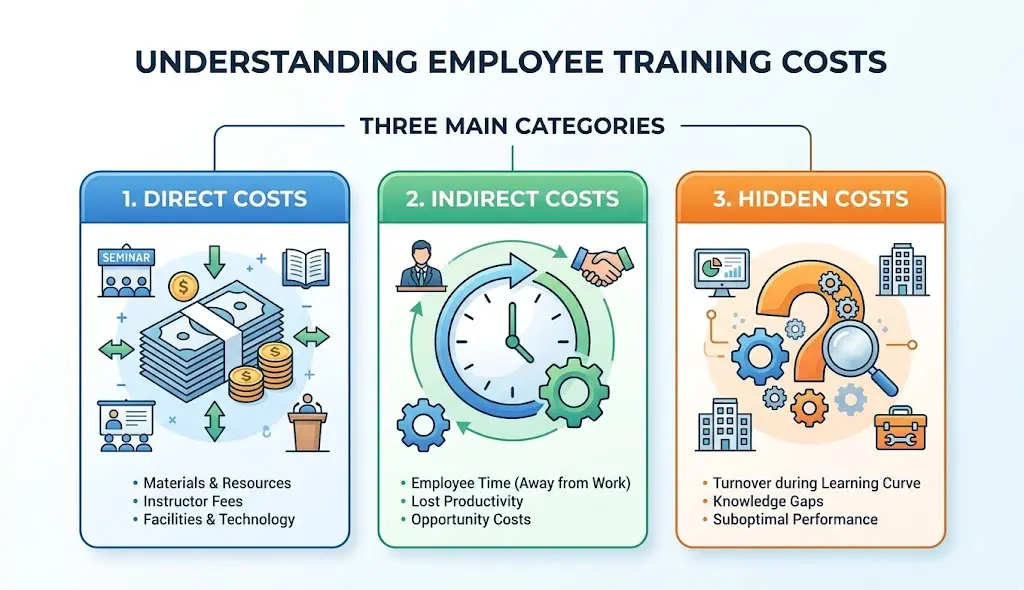
Employee training costs fall into three buckets: direct costs, indirect costs, and hidden costs. Most budget conversations only look at the first bucket, which is exactly why so many cost-cutting efforts miss the biggest opportunities.
Direct employee training costs
These are the costs you can see on an invoice or a budget line. They include:
- Trainers and facilitators
- Learning materials and handouts
- Software and authoring tools
- Learning Management System (LMS) licensing
- Venue rental for in-person sessions
- Travel and accommodation
- Equipment (laptops, simulators, VR headsets, etc.)
- Content development, whether in-house or outsourced
Indirect employee training costs
Indirect costs don’t show up as a line item, but they’re just as real. A widely cited estimate from the Association for Talent Development puts average annual training spend per employee in the low four figures, and that figure typically doesn’t fully capture indirect costs like these:
- Employee downtime while attending training
- Manager time spent coaching or reviewing progress
- Lost productivity during the learning curve
- Administrative time managing enrollment and records
- Retraining when the first attempt didn’t stick
- Onboarding delays that push back a new hire’s ramp-up time
Hidden training costs companies often overlook
This is where the real savings usually hide. Common culprits include:
- Rebuilding the same content over and over across departments
- Software or LMS seats that nobody uses
- Low attendance at scheduled sessions
- Low completion rates on assigned courses
- Outdated content that’s technically “live” but no longer accurate
- Assessments that don’t actually measure whether learning happened
- Training built for a skill gap that doesn’t exist
If you’ve never audited these hidden costs, that’s usually the first place to start often before you touch your delivery method or your LMS contract.
How Much Does Employee Training Cost?
Current employee training cost benchmarks
Training spend varies widely by company size and industry, so any single number should be treated as a rough benchmark rather than a target. ATD’s State of the Industry research is one of the most commonly cited sources for this, tracking both direct expenditure per employee and average learning hours per employee across industries. If you want a defensible number to compare against, that report (published annually) is a reasonable starting point just check the year, since figures shift.
Why training costs vary by company
A few factors explain most of the variation you’ll see between organizations:
- Company size (larger companies often get economies of scale on tools, but face more coordination overhead)
- Industry (regulated industries like healthcare and finance carry heavier compliance training loads)
- Employee location (distributed teams add travel or localization costs)
- Training complexity (technical or safety-critical skills cost more to teach well)
- Delivery method (classroom vs. digital vs. blended)
- Compliance requirements
- Technology stack and licensing
- Number of learners (cost per learner usually drops as volume increases)
How to calculate your company’s training cost
You don’t need complicated software to get a working number. Three formulas cover most of what you need:
Total training cost = Direct costs + Indirect costs + Hidden costs (for a given period)
Cost per learner = Total training cost ÷ Number of employees trained
Cost per training hour = Total training cost ÷ Total training hours delivered
Run these numbers before you start cutting anything. You can’t reduce what you haven’t measured, and this baseline is what you’ll compare against later to prove your cost-cutting strategy actually worked.
Why Cutting Training Costs Can Backfire
Cutting the training budget feels like an easy win on a spreadsheet. In practice, it often just moves the cost somewhere else, usually somewhere more expensive and harder to see.
1. Lower training quality
When budgets shrink without a plan, the easiest things to cut are usually the things that matter most: practice time, expert review, and feedback. What’s left often looks like training but doesn’t build real skill.
2. Higher error rates
Employees who are undertrained make more mistakes. In roles tied to safety, compliance, or customer-facing work, those mistakes carry real financial and reputational costs, often far more than what was saved on the training budget.
3. Longer time to proficiency
Rushed or thinned-out training usually means new hires and employees in new roles take longer to become fully productive. That extended ramp-up period is a real cost, even though it rarely appears on a training budget line.
4. Poor employee engagement
Generic, low-effort, or overly compressed training tends to disengage employees. Disengaged learners retain less, which undermines the entire point of running the training in the first place.
5. Increased retraining costs
If training doesn’t stick the first time, you end up paying for it twice, once for the original session and again for retraining. This is one of the most common ways “savings” quietly disappear.
6. Employee turnover and lost institutional knowledge
Employees who feel undertrained or unsupported are more likely to leave. Workforce research frequently discussed on platforms like LinkedIn consistently ranks career development and learning opportunities among the top reasons employees stay with or leave an employer. Turnover triggers a full new hiring and onboarding cycle, which is far more expensive than the training budget it was meant to protect.
How to Reduce Employee Training Costs Without Sacrificing Quality
Here’s the actual framework. Each strategy below targets waste, not learning value that distinction is the whole point.
1. Start With a Training Needs and Skills Gap Analysis
You can’t cut costs intelligently until you know exactly what training is actually needed. A skills gap analysis is the foundation everything else builds on. Once those gaps are identified, you can build a focused employee training program around the skills that actually matter.
Identify who actually needs training
Not every employee needs every course. Segment by role, tenure, and current competency level instead of assigning blanket training to everyone.
Identify the skills that are missing
Compare the skills a role requires against the skills employees currently have. Surveys, manager input, and performance data all help here.
Remove unnecessary training
If a course doesn’t map to an actual gap, it’s a cost with no return. Cutting it isn’t “sacrificing quality” it’s removing waste.
Prioritize high-impact skills
Focus remaining budget on the skills that move the needle most: safety, revenue-generating skills, compliance, and core job competency.
2. Move Suitable Training From Classroom to Digital Learning
Digital learning can cut travel, venue, and instructor costs significantly. But it’s not a universal fix; the key is knowing which content actually belongs there. For a deeper look at the advantages of digital delivery, see our guide to online employee training and how organizations can use it to make learning more flexible and scalable.
When eLearning makes sense
Knowledge-based content policies, product information, compliance basics, software walkthroughs usually convert well to self-paced digital formats.
When classroom training is still necessary
Hands-on skills, complex interpersonal training, and anything requiring live feedback (like leadership development or safety drills) often still need in-person or live virtual delivery. Don’t assume everything should go digital; some content genuinely loses value without a live instructor.
How virtual training reduces travel and venue costs
Live virtual sessions keep the interactivity of classroom training while cutting the travel and venue costs entirely. It’s a useful middle ground when full self-paced conversion isn’t appropriate.
3. Use Blended Learning Instead of One-Size-Fits-All Delivery
Blended learning combines multiple delivery methods, matching each part of the training to the format that teaches it best:
- Self-paced learning for foundational knowledge
- Live instruction for complex or nuanced topics
- Practice for skill application
- Coaching for individualized feedback
- Assessment to confirm the learning actually happened
Industry commentary on blended learning including material published by sales-training outlets like Selling Power supports the idea that different modalities serve different learning purposes; forcing every topic into one format usually reduces effectiveness even if it looks cheaper upfront.
4. Use Microlearning to Reduce Employee Time Away From Work
What microlearning is
Microlearning breaks training into short, focused units often five to ten minutes each covering one specific skill or concept.
When microlearning works
It’s effective for reinforcement, quick skill refreshers, software how-tos, and spaced repetition of key concepts.
When microlearning is not appropriate
Complex, multi-step skills or topics that require sustained practice (like negotiation or advanced technical troubleshooting) don’t compress well into micro-units.
How to convert long courses into focused learning units
Break existing long-form courses into standalone modules organized by single learning objectives. This also makes content easier to reuse and update later, which itself saves money.
5. Reuse and Repurpose Existing Training Content
Rebuilding training content from scratch is one of the most common and most avoidable training costs.
Build modular content
Design content in self-contained blocks that can be recombined for different courses or audiences.
Create reusable templates
Standardized templates for slides, videos, and job aids cut production time significantly.
Build an asset library
A central library of approved graphics, video clips, and modules prevents duplicate work across teams and departments.
Update only outdated sections
Instead of rebuilding an entire course when one policy changes, update just the affected module.
Repurpose long videos into microlearning
Long-form training videos can often be cut into shorter, topic-specific clips instead of being replaced entirely.
6. Use Internal Subject-Matter Experts
Identify internal experts
Your most experienced employees already have valuable, organization-specific knowledge. Formalizing it saves you from paying external consultants to teach it back to you.
Turn expertise into reusable training
Record interviews, walkthroughs, or process demonstrations with internal experts and convert them into standing training assets.
Use managers as coaches
Managers are often better positioned than outside trainers to reinforce skills in the context of real, day-to-day work.
Combine internal expertise with instructional design
Internal knowledge is valuable, but it still needs structure. Pairing subject-matter experts with instructional design keeps the content usable and effective rather than just informal.
7. Standardize and Automate Employee Onboarding
Onboarding is one of the most repeatable training processes in any company, which makes it a strong candidate for automation. Companies looking to automate this process can also explore employee onboarding software to manage onboarding tasks, training, and progress more efficiently.
Create reusable onboarding paths
Build a standard onboarding sequence by role so you’re not designing onboarding from scratch for every new hire.
Automate enrollment
Trigger course assignments automatically based on role, department, or start date.
Automate reminders
Automated nudges reduce the manager and administrative time spent chasing incomplete onboarding tasks.
Track completion automatically
Automated reporting removes manual tracking work and gives you real visibility into onboarding progress.
Personalize only where necessary
Standardize what can be standardized, and reserve personalization for role-specific or highly specialized onboarding needs.
8. Choose the Right LMS and Learning Technology
Features that can reduce training costs
Look for a platform that offers automation, reusable content structures, built-in reporting, assessments, mobile access, integrations with your HR systems, learning analytics, and personalization options.
Avoid paying for unused LMS features
Many companies pay for enterprise-tier LMS features they never use. Audit actual usage against your contract before renewing.
LMS vs LXP vs DAP
An LMS (Learning Management System) manages structured courses and compliance tracking. An LXP (Learning Experience Platform) focuses more on personalized, learner-driven content discovery. A DAP (Digital Adoption Platform) delivers guidance directly inside the software employees use daily. Choosing the right category, not just the cheapest option within a category, is often what determines real ROI.
9. Use Learning in the Flow of Work
Instead of pulling employees away from their tasks for training, “flow of work” learning delivers guidance at the exact moment it’s needed:
- In-app guidance and walkthroughs
- Knowledge bases
- FAQs
- Checklists
- Job aids
- Short tutorials embedded in the workflow
Digital Adoption Platforms are a strong example of this in practice; they deliver step-by-step guidance directly inside the software an employee is using, right when they need it, instead of requiring a separate training session beforehand.
10. Use AI to Reduce Training Production Costs
AI tools can meaningfully cut content production time, but they work best as an assistant to instructional design not a replacement for it.
AI for course outlines
AI can quickly draft a structural outline based on learning objectives, which a human designer then refines.
AI for quiz creation
Generating first-draft assessment questions from existing content is one of AI’s most reliable current use cases in training.
AI for scripts
AI can produce first-draft scripts for videos or e-learning narration, saving early-stage writing time.
AI-generated video
AI video tools can lower production costs for straightforward explainer content, though they still need human review for accuracy and tone.
AI translation and localization
AI translation tools can cut localization costs substantially for multi-region training programs.
Human review and quality control
None of this replaces expert review. According to LinkedIn’s 2025 Workplace Learning Report, organizations are increasingly connecting AI upskilling to broader career development and skills strategy. The emphasis is on using AI to support learning professionals, not to replace their judgment.
11. Use Free and Low-Cost Learning Resources Carefully
Open educational resources
University-published open courseware can supplement internal training on general or foundational topics.
Webinars
Live and recorded webinars from credible industry sources are a low-cost way to cover emerging topics.
Podcasts
Podcasts work well for ongoing professional development, though they’re better suited to reinforcement than core skill-building.
Public courses
Platforms offering free or low-cost public courses can fill gaps in general business or technical knowledge.
YouTube and other free resources
Free video content can be useful, but quality and accuracy vary enormously, so it needs more scrutiny than paid, vetted content.
How to verify quality, licensing, and relevance
Before using any free resource, check three things: is the information accurate and current, is it licensed for the use you intend, and does it actually match the skill gap you’re trying to close. As HQSoftware and similar industry sources point out, free resources save money upfront but can cost more later if they’re outdated or simply the wrong fit.
12. Use AR and VR Only Where They Deliver Real Value
Best use cases
AR and VR training earn their cost in high-risk or hard-to-replicate scenarios: safety drills, manufacturing, healthcare procedures, equipment operation, and hazardous environments where mistakes in real life are costly or dangerous.
When AR/VR is unnecessary
For knowledge-based or low-risk training, AR/VR is usually overkill. The hardware and development costs rarely pay off for content that eLearning or classroom training already handles well.
Calculate the total cost before investing
Factor in hardware, content development, maintenance, and the learning curve for both trainers and employees before committing. AR/VR can lower costs over time for the right use case, but the upfront investment is significant.
How to Maintain Training Quality While Cutting Costs
Cutting costs and cutting quality are not the same decision, even though they often get treated that way. Here’s what to protect no matter how aggressively you’re trimming the budget.
- Keep learning objectives intact. Every course should still teach what it was designed to teach.
- Keep practical application. Employees need chances to actually apply what they’ve learned, not just watch or read about it.
- Keep meaningful assessments. Assessments should measure real competency, not just completion.
- Keep expert review. Especially for AI-assisted or reused content, a subject-matter expert should still sign off.
- Keep accessibility. Cost-cutting should never mean training becomes harder to access for any employee.
- Keep reinforcement and feedback. Learning that isn’t reinforced tends to fade quickly — this is one of the least visible, most damaging cuts.
- Remove repetition, administration, and unnecessary content instead that’s where the real savings live.
The guiding principle worth repeating: cut waste before you cut learning.
How to Measure Whether Your Cost-Cutting Strategy Worked
Track these metrics before and after any cost-reduction initiative:
- Cost per learner
- Training completion rate
- Assessment scores
- Time to proficiency
- Knowledge retention
- Employee performance
- Manager productivity
- Learner satisfaction
- Business outcomes tied to training (sales, error rates, safety incidents, etc.)
If cost per learner drops but completion, assessment scores, or performance also drop, that’s a signal you cut too deep. If cost drops and quality metrics hold steady or improve, the strategy is working.
How to Calculate Training ROI
Training ROI formula
Training ROI (%) = [(Monetary benefit of training − Cost of training) ÷ Cost of training] × 100
What counts as a training benefit?
Training benefits can include increased productivity, reduced errors, fewer support requests, faster onboarding, increased sales, reduced compliance incidents, and reduced turnover.
Example training ROI calculation
Say a company spends $50,000 on a sales training program and, after training, the sales team generates an additional $200,000 in revenue attributable to improved close rates. Using the formula: [(200,000 − 50,000) ÷ 50,000] × 100 = 300% ROI. In practice, isolating training’s exact contribution to a business outcome takes careful measurement (control groups or before/after comparisons help), but the formula gives you a workable starting point.
Employee Training Cost Reduction Strategies Compared
| Strategy | Potential cost impact | Quality risk | Best use |
| eLearning | High | Low if well designed | Knowledge-based training |
| Microlearning | High | Medium | Short skill gaps |
| Blended learning | Medium to high | Low | Mixed learning needs |
| Internal SMEs | Medium | Medium | Organization-specific knowledge |
| Mentoring | Medium | Medium | Practical skills |
| Content reuse | High | Low | Repeated training |
| LMS automation | Medium to high | Low | Large-scale programs |
| DAP | Medium to high | Low | Software/process training |
| AI-assisted creation | Medium to high | Medium | Content production |
| AR/VR | Situation-dependent | Low when appropriate | High-risk simulation |
What Training Costs Should You Never Cut?
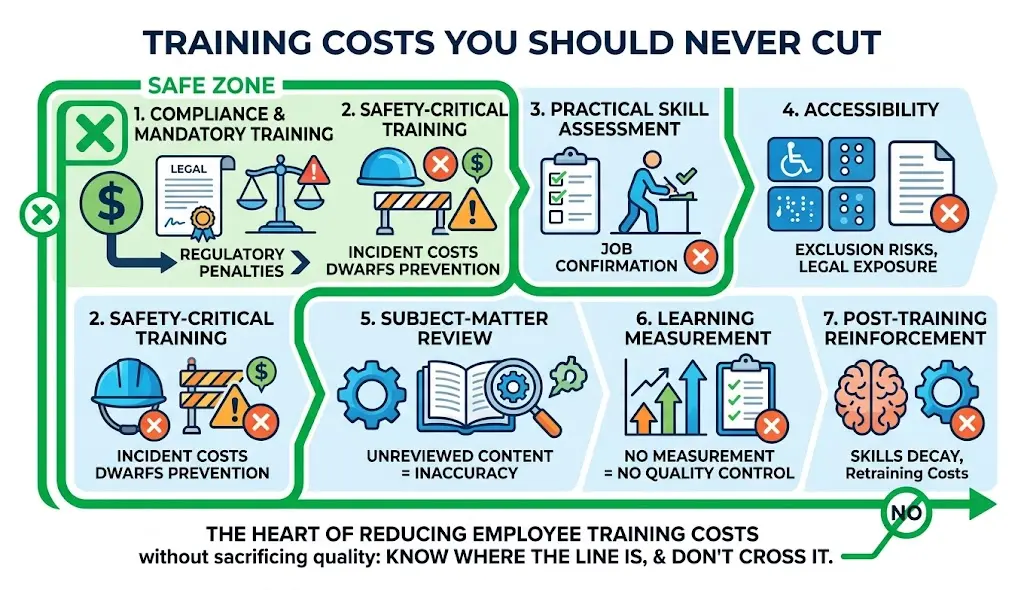
Some training costs protect the business in ways that far outweigh their price tag:
- Compliance and mandatory training – regulatory penalties usually cost far more than the training itself.
- Safety-critical training – the cost of an incident dwarfs the cost of prevention.
- Practical skill assessment – without it, you have no way to confirm employees can actually do the job.
- Accessibility – cutting this excludes employees and often creates legal exposure.
- Subject-matter review – unreviewed content risks spreading inaccurate information at scale.
- Learning measurement – without measurement, you can’t tell if training (or your cost cuts) are actually working.
- Post-training reinforcement – without it, skills decay and you end up paying for retraining.
This is really the heart of reducing employee training costs without sacrificing quality: know exactly where the line is, and don’t cross it.
Common Mistakes When Reducing Training Costs
- Cutting training hours without removing unnecessary content first
- Replacing every instructor-led session with eLearning regardless of fit
- Choosing the cheapest LMS instead of the best-fit LMS
- Using free content without checking quality or licensing
- Creating generic training for every role instead of segmenting
- Ignoring employee time as a real cost
- Producing new content instead of reusing existing assets
- Using AI-generated content without expert review
- Investing in expensive technology (like AR/VR) without a clear business case
- Measuring completion rates but not actual performance
- Cutting assessment and hands-on practice to save time
A Practical Employee Training Cost Reduction Plan
First 30 days
- Audit current training costs (direct, indirect, and hidden)
- Identify waste
- Analyze skills gaps
- Identify duplicate content across teams
Days 31 to 60
- Prioritize which programs to convert to digital delivery
- Standardize onboarding paths
- Build reusable content modules
- Identify internal subject-matter experts
- Identify automation opportunities in your LMS
Days 61 to 90
- Launch a pilot with your chosen changes
- Measure cost per learner
- Measure learning outcomes
- Compare results against your baseline
- Scale the approaches that worked
Employee Training Cost Reduction Checklist
- [ ] Calculate direct costs
- [ ] Calculate indirect costs
- [ ] Identify skills gaps
- [ ] Remove unnecessary training
- [ ] Evaluate digital delivery options
- [ ] Introduce microlearning where appropriate
- [ ] Reuse existing content
- [ ] Use internal experts
- [ ] Standardize onboarding
- [ ] Automate administration
- [ ] Review LMS costs and usage
- [ ] Evaluate AI opportunities
- [ ] Protect assessments and practice
- [ ] Measure training outcomes
- [ ] Calculate ROI
Frequently Asked Questions
1. How can companies reduce employee training costs?
Companies reduce employee training costs most effectively by running a skills gap analysis first, then removing training that doesn’t map to a real need, reusing existing content, automating onboarding, and choosing delivery methods (digital, blended, microlearning) that fit the content rather than defaulting to the cheapest option.
2. How can I reduce training costs without sacrificing quality?
Focus cost cuts on waste duplicate content, unused software, low-value sessions, and administrative overhead while protecting practical application, assessments, expert review, and reinforcement. The goal is removing inefficiency, not removing learning value.
3. What are the biggest hidden employee training costs?
The biggest hidden costs are usually repeated content creation across teams, unused LMS licenses or features, low training completion rates, outdated content still in circulation, and training built for skill gaps that don’t actually exist.
4. Is online employee training cheaper than classroom training?
Online training is usually cheaper for knowledge-based content because it eliminates travel, venue, and instructor-per-session costs. It’s not automatically cheaper or better for hands-on skills, safety training, or content requiring live feedback.
5. How does microlearning reduce training costs?
Microlearning reduces costs by cutting the amount of paid time employees spend away from work, making content easier and cheaper to update, and improving retention through focused, spaced-out lessons rather than long, one-time sessions.
6. Can an LMS reduce employee training costs?
Yes, a well-matched LMS reduces costs through automation, reusable content structures, and built-in reporting. However, paying for LMS features you don’t use can just as easily increase costs, so usage should be reviewed regularly.
7. How can companies reduce onboarding costs?
Standardizing onboarding paths by role, automating enrollment and reminders, and tracking completion automatically all reduce the administrative and manager time that makes onboarding expensive.
8. How can AI reduce employee training costs?
AI can lower production costs for course outlines, quiz questions, scripts, video, and translation. It works best as a support tool for instructional designers, with human review still required for accuracy and quality.
9. Should companies use internal trainers or external trainers?
Internal subject-matter experts are often more cost-effective for organization-specific knowledge, while external trainers may still be worth the cost for specialized skills the organization doesn’t have in-house. Many companies get the best results by combining both.
10. How do you calculate employee training ROI?
Training ROI is calculated as [(Monetary benefit of training − Cost of training) ÷ Cost of training] × 100. The hardest part is isolating training’s actual contribution to a business outcome, which usually requires before/after comparison or a control group.
11. What training costs should companies never cut?
Compliance training, safety-critical training, practical skill assessment, accessibility, subject-matter expert review, learning measurement, and post-training reinforcement should stay protected, since cutting any of these tends to cost more in the long run than it saves upfront.
Conclusion
Reducing employee training costs without sacrificing quality isn’t about spending less on training, it’s about spending correctly. Start with a real skills gap analysis, cut the waste hiding in duplicate content and unused tools, reuse what you already have, and let technology handle the repetitive parts of delivery and administration. Protect the parts of training that actually build skill: practice, assessment, expert review, and reinforcement. Do that, and you’ll come out with a leaner training budget and a workforce that’s just as capable or more so than before you started cutting.