


If you’ve ever tried to stand up a training program on Moodle for a 300-person sales team, you already know the drill. You spend three weeks fighting with plugins before you build a single course. I’ve helped L&D teams migrate off Moodle more times than I can count, and the reason is almost always the same: Moodle was built for classrooms, not corporate training. When you need compliance tracking, partner enablement, and reporting your CFO will actually read, you need something different.
This guide breaks down the best Moodle alternatives for corporate training in 2026, why teams are moving off Moodle in the first place, and how to pick the right replacement for your organization’s size, budget, and use case.
What Is Moodle?
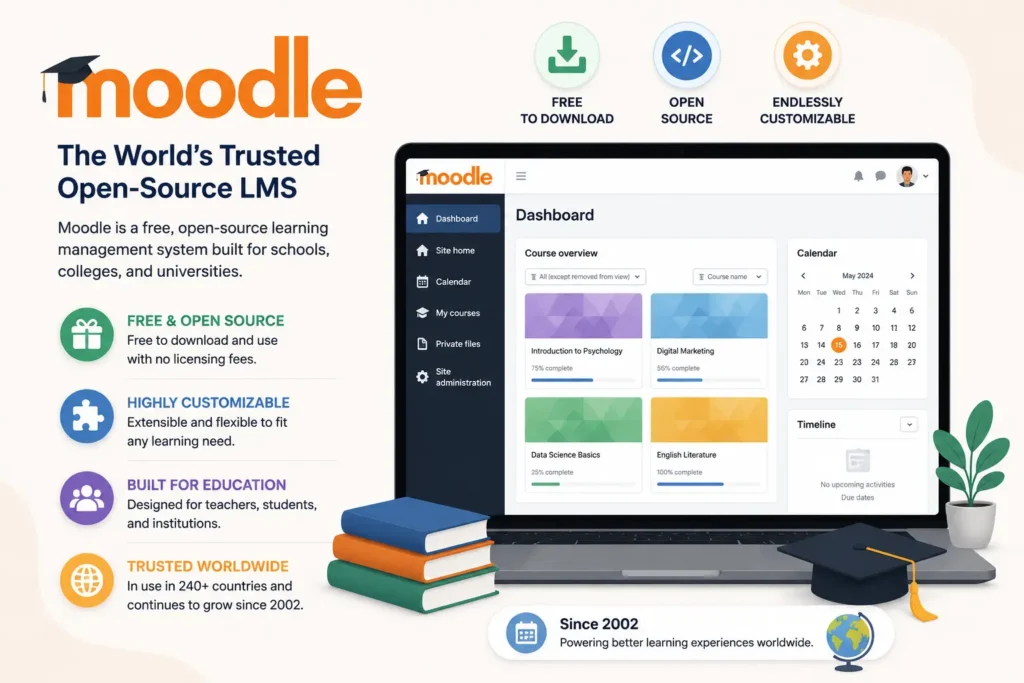
Moodle is a free, open-source learning management system originally built for schools, colleges, and universities. It’s been around since 2002, and it’s still one of the most widely used LMS platforms in the world, largely because it’s free to download and endlessly customizable if you have the developer resources to do it.
How Moodle Works
At its core, Moodle lets administrators create courses, upload content, run quizzes, and track student progress. Because it’s open source, you can install it on your own server or pay a Moodle Partner to host it for you. Everything from the grading system to the course layout can be modified with plugins and custom code, which is exactly why universities love it: they have IT departments whose entire job is customizing this kind of software.
Why Businesses Use Moodle
Plenty of businesses started with Moodle simply because it’s free and familiar. HR teams that came from an education background often default to it, and small companies like the idea of not paying a subscription fee. It handles basic course delivery, quizzes, and SCORM content well enough to get a training program off the ground.
The catch is that “free” software isn’t actually free once you count hosting, plugins, security patches, and the staff time needed to keep it running. That gap between Moodle’s sticker price and its real cost is exactly what pushes so many corporate teams to start shopping around.
Why Companies Look for Moodle Alternatives
Moodle wasn’t designed with corporate learning and development in mind, and it shows the moment your training needs get more complex than “upload a PDF and give a quiz.”
1. Complex Administration
Setting up Moodle is a lot of work. You have to deal with plugins and custom themes. You also have to do a lot of configuration if you want to do more than the simple things.
Moodle does not do some things automatically. For example it does not automatically add people to classes. It also does not give people levels of access based on their job.
If you want Moodle to automatically add people to classes or if you want to control what different people can do you have a problem. You can. Hire someone to make these things work or you can just not have them.
This is a problem if you want to use Moodle for groups of people like employees, partners and customers. You want to be able to control what each group can see and do.. Moodle does not make this easy to do.
2. Limited User Experience
Moodle’s interface still. Feels like a university course catalog from a long time ago. The employees who are used to using apps on their phones find Moodle really hard to use. This shows up in the fact that not as many people finish their courses. A corporate Learning Management System like Moodle should feel like an app that people actually like to open, not something that gets in the way of an employee getting their compliance certificate. The thing is people should want to use a Learning Management System, like Moodle but it just does not feel that way right now.
3. High Maintenance Costs
People are really surprised by this. Moodle is free to use. To make it work properly you need to pay for hosting and security updates and take care of the plugins. You might even need to hire someone to manage it for you. When you add up all these costs over a year Moodle can cost as much as a new Learning Management System that you pay for each month.. The thing is, you do not get all the nice features and help that comes with a new Learning Management System.
4. Reporting Challenges
Moodle’s reporting tools are not very good when you first get them. If you want a report that shows everything is okay with the rules, something your legal team will be happy with, or a dashboard that your Vice President of Sales will actually use you usually have to add tools or take the information out of Moodle and put it into a spreadsheet to make the report yourself. This is a lot of work. Moodle’s reporting tools just do not give you what you need so you have to find another way to get the information you want.
5. Scaling Difficulties
Moodle can handle a lot of users. It starts to slow down when there are thousands of people using it at the same time. This happens more when you add a lot of extra features. Some companies need to teach their employees, partners and customers all at once using the system. The problem is that Moodle was not made to handle all these groups of people. Moodle is not the choice when you have to deal with many different types of users. Moodle just gets too complicated when you try to use it for everything.
6. Limited AI Capabilities
Big companies are using learning systems that have artificial intelligence to create courses find out what skills are missing and give suggestions for what to learn next. Moodle is a system that a lot of people use but it does not have these features built in. So you have to add tools to it or wait for other people to create plugins that can do these things. Moodle is a system but it needs these extra tools to be as good as the other systems that big companies are using. Artificial intelligence and skills gap analysis and personalized learning recommendations are really important for a learning system and Moodle needs these features to be the best it can be.
What to Look for in a Corporate LMS
Before comparing specific platforms, it helps to know what actually matters for corporate training, as opposed to academic learning.
1. Ease of Administration
Your L&D team shouldn’t need a developer on staff to launch a course or change a permission. Look for drag-and-drop course building, bulk user management, and automation rules that don’t require touching code.
2. Employee Experience
People really like it when things are easy to use on their phone. If it is hard to log in people will wait until they get an email reminding them that the deadline is near. Then they will complain about having to do their training at the minute. A clean and simple interface makes it easier for people to complete their training.
3. Learning Analytics
You need real dashboards: completion rates by department, skill gaps by role, and manager-level visibility into who’s behind on required training, not just raw CSV exports.
4. Compliance Management
Automated re-enrollment certification expiry tracking and audit-ready reporting are really important, in industries. These industries include healthcare, finance and manufacturing.
They need to keep track of certifications and reports to stay compliant. Automated systems help them do this efficiently. Healthcare, finance and manufacturing are examples of industries where these systems are crucial.
5. Automation
When people get a role or join a department they can be signed up for training automatically. The system also sends out reminders about training on a basis. If someone is not doing their training their manager will be told. This means the people, in charge of learning and development do not have to spend a lot of time tracking down employees every month to make sure they are doing their training.
6. AI Features
AI course authoring and content summarization and personalized learning paths are becoming really important for teams that do not have a lot of people to design their courses. This is because AI course authoring and content summarization and personalized learning paths are now a thing that people expect to have. They are not something that is nice to have. Teams, without an instructional design staff, really need AI course authoring and content summarization and personalized learning paths to work properly.
7. Integrations
Your learning management system needs to work with your human resource information system, your customer relationship management system, your video conferencing tool and often your single sign- on provider. Look for systems that have connections, not just ones that say they have an application programming interface and expect you to build the connection yourself with your learning management system and other tools.
8. Security
When you are training a lot of people or handling information you need to have some basic security measures in place. This includes things like SOC 2 and ISO 27001. You also need to have SSO/SAML support and role-based access control. These are the requirements when you have a big group of people or when you are dealing with regulated data, like SOC 2 and ISO 27001.
9. Scalability
The platform needs to be able to handle a lot of employees. It has to work for 500 employees today. Then it has to work for 5,000 employees next year.
The platform also has to be able to handle portals, for the employees, partners or customers. These portals have to be branded. The big question is can the platform do all of this without having to migrate to a system.
10. Mobile Learning
Field teams and retail staff and remote employees all need training that they can do on their phone. This training should work when they do not have the internet. That way people who do not have a connection can still do the training. Field teams and retail staff and remote employees need to be able to do this training, on their phone when they’re not online.
Best Moodle Alternatives for Corporate Training
1. Docebo
Overview
Docebo is one of the most established names in enterprise learning management, and it’s usually the first alternative that comes up when a mid-size or large company is serious about replacing Moodle. Founded in Italy in 2005, Docebo has built its reputation on AI-powered content tools, multi-portal functionality, and the ability to train employees, partners, and customers from a single system without juggling three separate platforms.
Key Features
- AI-powered content creation and course recommendations
- Multi-portal “extended enterprise” functionality for separate branded audiences
- Social and community-based learning tools
- Advanced BI dashboards and customizable reporting
- SCORM and xAPI support for rich multimedia courses
- Content marketplace with off-the-shelf courses
Pros
Docebo scales well and genuinely supports complex, multi-audience training programs. Its AI features for content generation and recommendations are ahead of most competitors, and the interface is intuitive for both admins and learners once configured.
Cons
It’s priced for mid-market and enterprise budgets, so smaller teams often find it more platform than they need. Some admins also report that notification management and certification logic can be fiddly to configure correctly.
Best For
Mid-size to large organizations that need to train employees, partners, and customers from one system, particularly in regulated industries like finance, insurance, and manufacturing.
Pricing
Docebo doesn’t publish fixed pricing. Based on third-party benchmarks, expect contracts to start in the $25,000+ per year range, with typical per-user costs somewhere around $7–$10 per user per month depending on scale and tier (Elevate vs. Enterprise). A guided trial is available through the sales team rather than a self-serve free trial.
2. TalentLMS
Overview
TalentLMS, from Epignosis, is built for speed. It’s the LMS you pick when you want to go from “we need training” to “training is live” in under an hour, and its ease of use has made it a favorite among small and mid-size businesses.
Key Features
- Genuinely usable free plan (up to 5 users, 10 courses)
- AI course creator and AI Coach for learners
- Gamification on every paid tier
- TalentLibrary add-on with ready-made courses
- Branches for managing multiple departments or groups
- Microsoft Teams integration for live sessions
Pros
Setup speed is TalentLMS’s biggest selling point. The interface is clean, the free tier is a real product rather than a stripped-down demo, and pricing is transparent compared to most enterprise LMS vendors.
Cons
Advanced reporting, multi-tenant capabilities, and deep customization lag behind more enterprise-focused platforms. Larger organizations with complex compliance or analytics needs tend to outgrow it.
Best For
Small to mid-size businesses (roughly 5 to 500 employees) that want an affordable, fast-to-launch LMS without a lengthy procurement process.
Pricing
Plans start around $149/month for up to 100 users on the Core tier, scaling up through Grow and Pro tiers, with Enterprise custom-priced for larger deployments. A free forever plan and a 14-day free trial are both available.
3. LearnUpon
Overview
LearnUpon has built its name on one core idea: training employees, partners, and customers shouldn’t require three separate systems. Its “Portals” feature lets you run multiple branded, access-controlled learning environments from a single account, which makes it a strong fit for organizations juggling more than one training audience.
Key Features
- Multi-portal architecture for employees, partners, and customers
- Strong implementation support (LearnUpon reports high implementation and support satisfaction scores)
- E-commerce tools for selling courses
- SCORM, xAPI, and Tin Can content support
- Deep HRIS and CRM integrations
- Journeys for automated, sequenced learning paths
Pros
Support and onboarding consistently come up as a strength in user reviews, and the platform handles multi-audience training cleanly without feeling bolted together.
Cons
Pricing isn’t published, and LearnUpon is generally positioned for organizations with 50 or more users, so very small teams may find it more than they need, both in cost and complexity.
Best For
Mid-market to enterprise organizations training multiple distinct audiences (employees, partners, customers) that want strong implementation support during rollout.
Pricing
Quote-based, calculated on monthly active users. Third-party estimates commonly put costs in the $6–$9 per user per month range, with annual contracts often starting around $15,000–$18,000 and climbing based on user volume and feature tier (Essential, Premium, Enterprise).
4. Absorb LMS
Overview
Absorb LMS, from Calgary-based Absorb Software, has built a reputation for a clean, customizable interface and strong customer support, serving over 2,300 customers across healthcare, manufacturing, retail, and financial services.
Key Features
- Highly customizable branding and dashboards
- AI Assistant for personalized learning recommendations
- Observational checklists for on-the-job training and mentoring
- Multilingual support and localization
- 40+ native integrations, including HRIS and content libraries
- Strong mobile app with offline capabilities
Pros
Reviewers consistently praise the intuitive interface for both admins and learners, along with responsive customer support. The reporting tools and customization options are strong for a mid-market-to-enterprise platform.
Cons
Pricing isn’t publicly available, and some reviewers note that costs can climb once you add localization or advanced integrations. A few users mention gaps in course cancellation and waitlist handling.
Best For
Mid-size to large enterprises across regulated industries that want a customizable, easy-to-administer LMS with strong support.
Pricing
Custom quote only. Industry estimates suggest annual costs for around 100 users typically fall between $36,000 and $60,000, depending on plan tier and add-ons, though smaller deployments can start lower.
5. Tovuti LMS
Overview
Tovuti positions itself around interactive content and community-building as much as course delivery. Its native AI course authoring tool can turn a topic, outline, or uploaded document into a structured course, complete with quizzes, flashcards, and narration.
Key Features
- Native AI course authoring from documents or outlines
- Over 40 built-in gamified and interactive content types
- Virtual classrooms with live video and screen sharing
- E-commerce tools for selling courses externally
- Optional “LMS-as-a-Service” managed administration
- White-label branding for public-facing portals
Pros
Users consistently point to Tovuti’s ease of use and content-creation tools as standout strengths, and the customer support gets high marks in reviews.
Cons
Some reviewers note the platform isn’t as deeply customizable as larger enterprise competitors, and pricing transparency is limited, requiring a quote for most tiers.
Best For
Organizations that want to build interactive, gamified training in-house without relying on third-party authoring tools, including associations and mid-market companies.
Pricing
Reported starting points vary by source, generally in the $7,500–$10,000 per year range for around 100 users, including onboarding and support. Higher tiers, AI features, and managed services are priced separately.
6. 360Learning
Overview
360Learning takes a different approach from most LMS platforms on this list: rather than top-down content delivery, it’s built around “collaborative learning,” where subject matter experts inside your company create and refine courses together, with AI helping speed up the process.
Key Features
- Collaborative course authoring with peer feedback and comments
- AI-powered content builder and skills-gap detection
- Upskilling dashboard connecting learners to internal experts
- Blended learning paths mixing self-paced and live sessions
- 50+ integrations, including Workday, SAP, and Slack
- SOC 2 and GDPR compliance
Pros
The collaborative model is genuinely differentiated. Companies that have deep internal expertise but no dedicated instructional design team often get courses built faster because subject matter experts can contribute directly.
Cons
Organizations that just want simple, top-down course delivery may find the collaborative tools go unused, and the platform then feels more complex than necessary for their use case.
Best For
Mid-market to enterprise organizations that want to capture internal expertise and turn it into training quickly, rather than relying solely on a centralized L&D team.
Pricing
The Team plan is published at $8 per user per month for up to roughly 100 users. Business and Enterprise tiers require a custom quote and typically apply to larger, more complex deployments.
7. CYPHER Learning
Overview
CYPHER Learning (the company behind NEO LMS and MATRIX LMS) markets itself as an AI-native platform, with a strong emphasis on personalized learning paths, competency mapping, and automation that reduces manual admin work.
Key Features
- CYPHER Agent, an AI assistant for course creation and learner support
- Automation rules for enrollment, grading, and workflows
- Competency mapping and course mastery tracking
- Gamification with badges, leaderboards, and points
- Multi-organization administration for complex structures
- Strong integrations with Google Workspace and Microsoft 365
Pros
Reviewers consistently highlight the intuitive interface for both administrators and end users, plus a genuinely strong automation and gamification toolkit that keeps learners engaged.
Cons
Pricing is entirely custom, and the platform’s breadth of features can mean a longer setup period for organizations that want something simpler out of the box.
Best For
Organizations of any size that want AI-driven personalization and heavy automation, from franchises and training companies to mid-market corporate teams.
Pricing
Custom annual pricing, generally reported in the $10,000 to $100,000+ range depending on active learner count, number of portals, and feature tier (Enhanced vs. higher tiers).
8. AcademyOcean
Overview
AcademyOcean is a smaller, faster-moving player that focuses on getting a branded “academy” up and running quickly, whether that’s for employee onboarding, customer education, or partner certification. It’s built by a team with roots in Eastern Europe and has earned high marks for ease of use.
Key Features
- Multiple branded “academies” from one account
- Dynamic content personalization using learner variables
- AI copilot (Wave) for content creation
- Support for 30+ languages
- Unlimited course creation on all plans
- Engagement funnels, quizzes, and certificates
Pros
Users highlight how quickly they can launch a polished-looking training portal without developer help, and the platform’s dynamic content features stand out for personalizing lessons at scale.
Cons
The mobile experience could use more polish according to some reviews, and deeper HR-system integrations are more limited than what enterprise-focused competitors offer.
Best For
SMBs and mid-market companies that want a fast, visually polished way to launch customer onboarding or partner training academies without heavy IT involvement.
Pricing
Reported starting points range from roughly $225 to $300 per month depending on the source and plan tier (Essential, Professional, Enterprise), with final pricing quote-based.
9. Litmos
Overview
Litmos has been in the corporate LMS space since 2007 and has changed hands a few times, from CallidusCloud to SAP to Francisco Partners, but it’s remained a go-to option for companies that want a large, ready-made content library alongside their LMS. It tends to be the natural fit for organizations already running SAP SuccessFactors.
Key Features
- Extensive built-in content library covering compliance, soft skills, and technical topics
- AI Assistant for personalized learning journeys
- Video-based assessments with AI feedback
- White-labeling across browser, mobile app, and email
- Strong extended-enterprise and multi-audience support
- Native SAP integration
Pros
The out-of-the-box content library is a genuine time-saver for compliance-heavy industries, and the mobile experience is consistently rated as one of the platform’s strengths.
Cons
Reporting customization is a recurring complaint in reviews, and pricing tends to be too high for organizations training fewer than about 150 people.
Best For
Mid-market to large enterprises, especially those already invested in the SAP ecosystem or needing a large pre-built compliance course library.
Pricing
Quote-based, with third-party estimates suggesting roughly $6–$15 per user per month depending on volume and whether the content library is bundled in.
10. iSpring Learn
Overview
iSpring Learn is built around a simple, practical idea: most companies already have training content sitting in PowerPoint decks, so why not make it easy to turn those into trackable, interactive e-learning? It pairs the LMS with the iSpring Suite authoring toolkit, which converts presentations into SCORM-ready courses.
Key Features
- PowerPoint-to-e-learning conversion via iSpring Suite
- Pay only for active (logged-in) users, unlimited registered users
- On-the-job training checklists and observation tools
- Knowledge base for storing SOPs and documentation
- Mobile app with offline access
- No storage or bandwidth fees
Pros
This is consistently one of the most affordable options for 100–500 user deployments, and teams with existing PowerPoint content can get courses live in minutes rather than days.
Cons
The authoring tools are Windows-only, so Mac users need a virtual machine to build courses. AI features, social learning, and a content marketplace are all largely absent compared to competitors.
Best For
SMBs and mid-market companies with existing PowerPoint-based training content that want the most affordable path to a trackable, compliant LMS.
Pricing
Reported starting around $2.29 to $3.14 per active user per month depending on volume, with custom plans available for larger organizations.
Moodle vs Modern Corporate LMS Platforms
1. Feature Comparison
Moodle’s core strength is flexibility for education use cases: gradebooks, assignments, and academic-style course structures. Modern corporate LMS platforms trade some of that raw flexibility for features that matter more in a business context, like multi-audience portals, AI content generation, and compliance automation that works out of the box.
2. Administration
Moodle requires plugin configuration and often developer support to set up anything beyond basic courses. Corporate LMS platforms like Docebo, Absorb, and LearnUpon are built for admins without coding backgrounds, with drag-and-drop course builders and guided setup wizards.
3. Reporting
Moodle’s native reporting is limited without third-party plugins. Corporate platforms generally ship with dashboards built for business stakeholders, like completion-by-department views and exportable compliance audit trails, right out of the box.
4. Integrations
Moodle can integrate with other systems, but it usually takes custom development or third-party plugins. Corporate LMS vendors typically offer native connectors for common HRIS, CRM, and SSO tools, cutting implementation time significantly.
5. Security
Because Moodle is self-hosted (unless you pay a Moodle Partner for managed hosting), security is largely your responsibility, including patching and monitoring. Cloud-based corporate LMS platforms generally include SOC 2 or ISO 27001 certifications as part of the subscription.
6. Learning Experience
Moodle’s interface hasn’t changed dramatically in years and still reads as academic rather than consumer-grade. Most corporate platforms on this list invest heavily in a cleaner, more app-like learner experience, which tends to show up directly in completion rates.
7. AI Capabilities
This is one of the widest gaps. Moodle’s AI features depend on community plugins and third-party add-ons. Docebo, CYPHER Learning, 360Learning, and Tovuti all ship native AI course creation and personalization tools as core product features.
8. Scalability
Moodle can scale technically, but performance and admin overhead both increase as user counts and plugin stacks grow. Cloud-native corporate LMS platforms are generally built to absorb that growth without a re-architecture.
Best Moodle Alternatives by Business Need
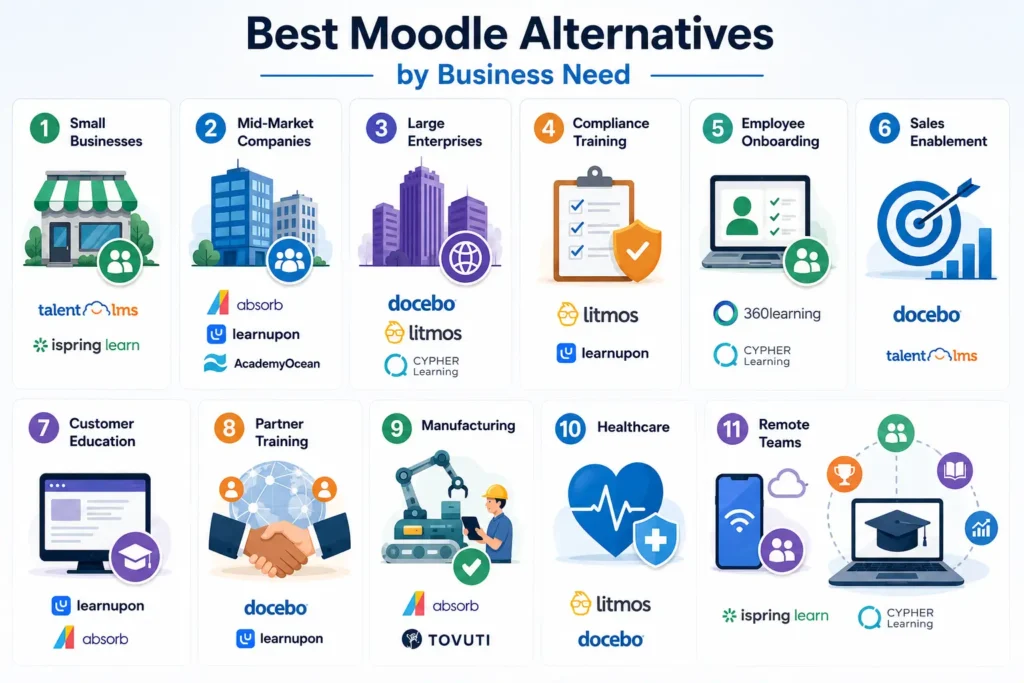
1. Small Businesses
TalentLMS and iSpring Learn both offer low-cost entry points with fast setup, making them a natural fit for companies under 100 employees that don’t need multi-portal complexity yet.
2. Mid-Market Companies
Absorb LMS and LearnUpon. Academyocean is pretty good, for companies that have a few hundred employees. These companies are getting big enough that they need to keep track of things. Absorb LMS and LearnUpon and AcademyOcean have a lot of features that can help with this. They do not cost too much.
3. Large Enterprises
Docebo, Litmos, and CYPHER Learning are built to handle thousands of learners, multiple business units, and complex compliance requirements without buckling under the load.
4. Compliance Training
Litmos and LearnUpon are both really good at helping companies in industries that have a lot of rules. They can automatically sign people up for classes again, keep track of who has certificates and make reports that are easy to check. This is really helpful, for companies that need to make sure they are doing everything correctly. Litmos and LearnUpon have all of these features built in so companies do not have to worry about them.
5. Employee Onboarding
360Learning and CYPHER Learning are really good at this. They have tools that automatically do things for you. They also have tools that let people work together to make content. This makes it easy to keep the steps you take to train people up to date when the jobs people do and the rules of the company change. 360Learning and CYPHER Learning make it simple to keep these steps current when things, like roles and policies change.
6. Sales Enablement
Docebo and TalentLMS are commonly used for sales training, thanks to their AI-driven content tools and gamification features that keep frontline reps engaged with short, focused modules.
7. Customer Education
LearnUpon and Absorb LMS both support branded, external-facing portals well, which matters if you’re training customers on how to use your product rather than just internal staff.
8. Partner Training
Docebo’s multi-portal “extended enterprise” model and LearnUpon’s Portals feature are both purpose-built for training external partners and resellers under separate branding.
9. Manufacturing
Absorb LMS and Tovuti both handle safety and compliance training well, with observational checklists and certification tracking suited to shop-floor and field environments.
10. Healthcare
Litmos and Docebo both have a strong presence in regulated healthcare training, where certification expiry tracking and audit trails aren’t optional.
11. Remote Teams
iSpring Learn and CYPHER Learning both offer solid mobile and offline access, which matters for distributed teams that can’t always count on a reliable connection.
How to Migrate from Moodle Successfully
1. Migration Planning
Start by inventorying everything currently in Moodle: courses, quizzes, certificates, user data, and any custom plugins you rely on. Map each of those to a feature in your new platform before you sign a contract, not after.
2. Course Migration
Most modern LMS platforms support SCORM and xAPI import, which covers the bulk of Moodle course content. Anything built with heavily customized Moodle plugins will likely need to be rebuilt rather than imported directly.
3. User Migration
Bulk CSV upload is standard across nearly every platform on this list. Make sure user roles, group memberships, and completion history are all mapped correctly before you cut over, since retroactive fixes are painful.
4. Data Migration
Export historical completion records, certificates, and assessment scores from Moodle before migration. Some vendors offer migration assistance as part of onboarding; others charge for it as a professional services add-on, so ask upfront.
5. Testing
Run a pilot with a small group, ideally one team from each major use case (compliance training, onboarding, sales enablement), before rolling the new LMS out company-wide. This is where you’ll catch integration issues and content formatting problems.
6. Rollout Strategy
A phased rollout by department, rather than an all-at-once cutover, gives your L&D team time to fix issues without disrupting the entire organization’s training schedule.
7. Common Migration Mistakes
The most common mistake is underestimating how much custom Moodle configuration exists that nobody documented. A close second is skipping the pilot phase and discovering integration issues only after the full company has already logged in.
Frequently Asked Questions
1. Is Moodle good for corporate training?
Moodle can technically handle corporate training, but it was built for academic institutions, so most companies find themselves fighting its limitations around administration, reporting, and multi-audience support as their programs grow.
2. What is the best free alternative to Moodle?
TalentLMS offers the most usable free tier among corporate-focused platforms, though it’s capped at 5 users and 10 courses, which works only for very small teams or a pilot program.
3. Which LMS is cheapest for small businesses?
iSpring Learn and TalentLMS are generally the most affordable options for companies under 500 employees, both starting in the low single digits per user per month.
4. Which LMS is best for compliance training?
Litmos and LearnUpon both have strong reputations for compliance tracking, automated re-enrollment, and audit-ready reporting in regulated industries.
5. How long does it take to migrate from Moodle to a new LMS?
Timelines range from a few weeks for simpler platforms like TalentLMS or iSpring Learn to a few months for enterprise deployments involving custom integrations, like Docebo or Litmos.
6. Do these platforms support SCORM content from Moodle?
Yes, virtually every platform on this list supports SCORM and xAPI import, which covers most standard Moodle course content without a full rebuild.
7. Which LMS has the best AI features?
Docebo, CYPHER Learning, and 360Learning are generally considered the front-runners for AI-driven course creation, personalization, and skills-gap detection as of 2026.
Conclusion
There’s no single best Moodle alternative for corporate training, only the best one for your specific situation. If you’re a small business that just needs to get training live fast, TalentLMS or iSpring Learn will get you there without a steep learning curve or a big budget. If you’re mid-market and training more than one audience, LearnUpon or Absorb LMS are worth serious consideration for their multi-portal support and strong implementation help. And if you’re running a large, multi-audience enterprise program with real compliance stakes, Docebo, Litmos, or CYPHER Learning are built to handle that scale.
Whatever you choose, the goal is the same one that pushed you away from Moodle in the first place: a platform that gets out of the way of actually training your people, instead of becoming a project of its own.