


Keeping track of employee training sounds simple until you actually try to do it across dozens or hundreds of people. Suddenly there are course completions to check, quiz scores to review, certificates to renew, and half a dozen spreadsheets that never quite agree with each other.
Manually tracking courses, assessments, and certifications tends to fall apart fast. Someone forgets to update a spreadsheet, a certification quietly expires, or a manager has no real way of knowing whether their team actually finished a required course.
Proper tracking fixes this. When HR and L&D teams have a clear, reliable view of training progress, they can spot skill gaps early, catch employees who are falling behind, and make training decisions based on real data instead of guesswork.
In this guide, we will walk through what training progress tracking actually involves, the metrics that matter most, practical methods for tracking progress, and how tools like a Learning Management System can make the whole process far less painful.
What Is Employee Training Progress Tracking?
What Training Progress Tracking Includes
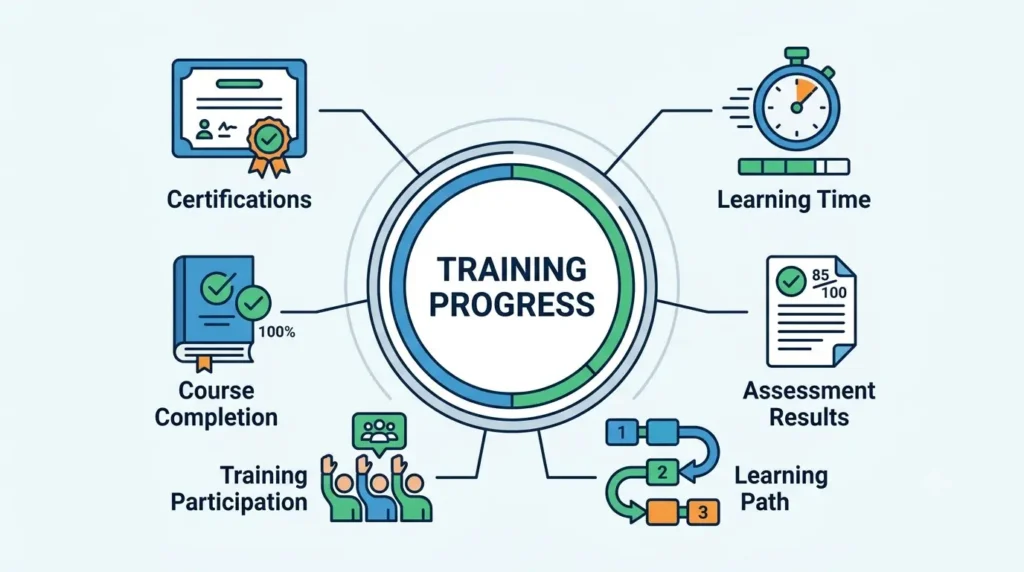
Training progress tracking is not just about checking a box when someone finishes a course. It covers a wider set of activities, including:
- Course completion
- Assessment results
- Learning time
- Certifications
- Learning paths
- Training participation
Each of these pieces tells a slightly different story about how training is actually going, which is why relying on just one metric rarely gives the full picture.
Why Businesses Need to Track Employee Training
Businesses invest real time and money into training, so it makes sense to know whether that investment is paying off. Tracking training progress helps confirm that employees are actually learning the skills they need, that compliance requirements are being met, and that the training budget is being spent on programs that work rather than ones that quietly get ignored.
Why Tracking Employee Training Progress Matters
Identify Skill Gaps
When you track progress consistently, patterns start to emerge. You might notice that an entire team is struggling with the same module, which usually points to a real skill gap worth addressing directly.
Improve Training Completion Rates
Visibility tends to improve follow through. When managers can see who has not started or finished a course, gentle reminders become much easier to send before deadlines slip.
Monitor Employee Performance
Training data, when paired with performance data, can highlight whether the learning employees are doing actually shows up in their day to day work.
Ensure Compliance
For many industries, certain training is not optional. Tracking certifications and required courses helps businesses stay compliant and avoid the headaches that come with missed deadlines.
Improve Training Effectiveness
If a course consistently produces poor assessment scores, that is useful information. It might mean the content needs to be reworked rather than assuming employees simply are not trying.
Make Better Training Decisions
Solid tracking data takes the guesswork out of planning future training. Instead of assuming what employees need, you can base decisions on what the numbers are actually showing.
What Employee Training Metrics Should You Track?
Not every metric matters equally, but a handful consistently give the clearest picture of how training is going.
| Metric | What It Measures | Why It Matters |
|---|---|---|
| Course completion rate | Completed training | Shows participation |
| Assessment scores | Knowledge gained | Measures learning |
| Time spent learning | Training engagement | Identifies participation patterns |
| Certification status | Required credentials | Supports compliance |
| Training attendance | Participation | Shows engagement |
| Skill improvement | Knowledge or skill growth | Measures training impact |
How to Track Employee Training Progress Efficiently
1. Set Clear Training Goals
Before tracking anything, it helps to define what employees should actually learn. Vague goals lead to vague results, so tie each training goal back to a specific business objective whenever possible.
2. Create Role Based Learning Paths
Not every employee needs the same training. Assigning courses based on job roles keeps learning relevant and avoids wasting time on content that does not apply to someone’s actual work.
3. Use a Learning Management System
A Learning Management System, usually shortened to LMS, can centralize almost everything related to training in one place, including:
- Courses
- Employee records
- Progress
- Assessments
- Certifications
- Reports
Instead of juggling scattered spreadsheets and email threads, everything lives in a single, searchable system.
4. Monitor Course Completion
Regularly checking completion rates helps catch employees who are falling behind before it becomes a bigger problem. It also gives a quick sense of overall engagement with a program.
5. Track Assessment and Quiz Results
Assessment scores reveal whether training content is actually sinking in. Consistently low scores on a particular topic often mean the course itself needs a closer look.
6. Monitor Certifications and Renewal Dates
Certifications with expiration dates need active tracking. A missed renewal can create compliance risk, so this is one area where automated reminders genuinely earn their keep.
7. Use Training Dashboards and Reports
Dashboards turn raw training data into something you can actually act on. Instead of digging through records, you get a clear snapshot of where things stand at a glance.
8. Collect Employee Feedback
Numbers do not tell the whole story. Asking employees what they thought of a course often surfaces issues that completion rates and quiz scores never would.
9. Review Progress Regularly
Tracking only matters if someone is actually looking at it. Building in a regular review cadence, whether weekly or monthly, keeps training data from becoming something that just sits unused.
How an LMS Helps Track Employee Training Progress
Real Time Progress Tracking
An LMS updates progress as employees work through courses, so there is no lag between what is happening and what shows up in reports.
Automated Training Assignments
New hires and role changes can automatically trigger the right learning paths, removing the need for manual assignment every single time.
Progress Dashboards
Dashboards give HR and L&D teams a bird’s eye view of training across the whole organization, or filtered down to a specific team or individual.
Automated Reminders
Instead of manually chasing people down, the system can send reminders for incomplete courses or upcoming certification renewals.
Assessment Tracking
Quiz and assessment results are captured automatically, making it easy to spot trends across teams or departments.
Certification Management
Certification status, expiration dates, and renewal requirements can all be tracked in one place instead of scattered across different records.
Reporting and Analytics
Built in reporting tools turn training activity into digestible insights, saving hours that would otherwise go into building reports manually.
Employee Self Service
Employees can check their own progress, upcoming deadlines, and completed certifications without ne
eding to ask HR directly, which cuts down on back and forth.
Manual Tracking vs LMS Based Training Tracking
| Factor | Manual Tracking | LMS Based Tracking |
|---|---|---|
| Progress tracking | Spreadsheets and manual updates | Automated |
| Reporting | Time consuming | Real time |
| Reminders | Manual | Automated |
| Certifications | Difficult to manage | Centralized |
| Scalability | Limited | High |
| Data visibility | Limited | Centralized |
The difference tends to become obvious the moment a company grows past a small team. What works fine with ten employees usually starts breaking down well before you reach a hundred.
How to Use Training Data to Improve Employee Performance
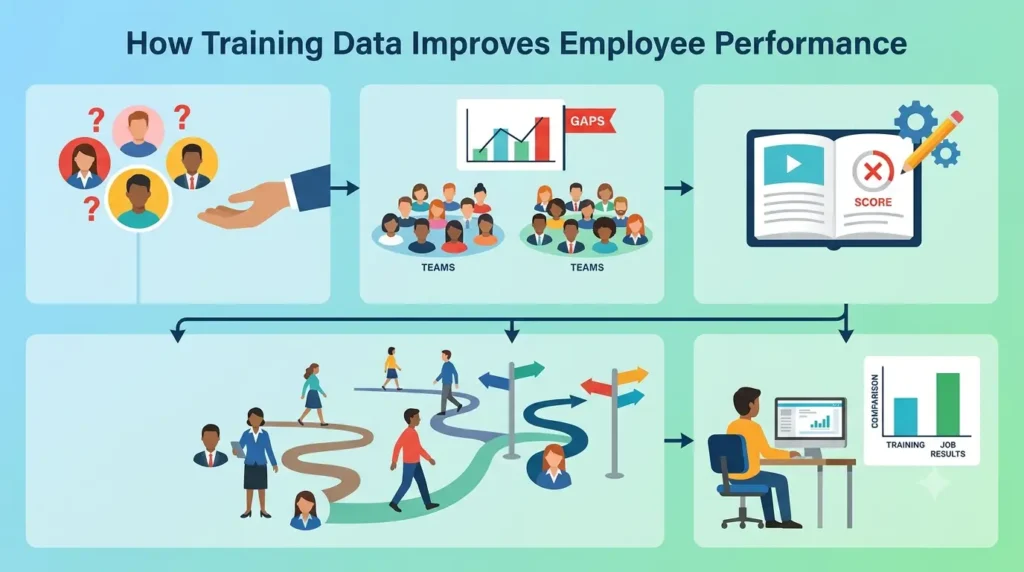
Identify Employees Who Need Additional Support
Training data can flag employees who are consistently struggling, giving managers a chance to step in with extra support before performance suffers.
Find Training Gaps Across Teams
Looking at data across an entire department can reveal gaps that are not obvious when looking at individuals one at a time.
Improve Training Content
If a course keeps producing poor results across many employees, that is a strong signal the content itself needs revising rather than assuming everyone just needs to try harder.
Personalize Learning Paths
Training data can help tailor learning paths to individual strengths and weaknesses, rather than pushing everyone through an identical program.
Connect Training Results With Job Performance
Comparing training outcomes with actual job performance helps confirm whether the training is genuinely making a difference, not just keeping people busy.
Common Challenges in Tracking Employee Training Progress
Incomplete or Inaccurate Data
Manual entry naturally leads to mistakes. Missing records or outdated numbers can quietly undermine an otherwise solid tracking process.
Low Employee Participation
Even the best tracking system cannot fix low engagement on its own. Getting employees genuinely invested in training remains a separate challenge worth addressing directly.
Too Much Manual Work
Spreadsheets and manual updates eat up time that HR and L&D teams could spend on more valuable work.
Difficulty Tracking Remote Employees
Remote and hybrid teams add another layer of complexity, since there is no in person way to confirm participation or completion.
Managing Training Across Multiple Teams
Different teams often have different training needs, which can make centralized tracking feel messy without the right system in place.
Measuring Actual Skill Improvement
Completion does not always equal competence. Measuring whether a skill has genuinely improved is harder than simply checking whether a course was finished.
Best Practices for Tracking Employee Training Progress
Track the Right Metrics
Focus on metrics that actually reflect learning and performance rather than tracking everything just because it is available.
Set Measurable Learning Objectives
Clear, measurable objectives make it much easier to judge whether training is actually working.
Use Automated Tracking
Automation reduces errors and frees up time that would otherwise go into manual updates and chasing down records.
Review Reports Regularly
Set a consistent schedule for reviewing training reports so issues get caught early rather than months later.
Give Employees Feedback
Sharing progress and results with employees keeps them engaged and gives training a sense of purpose beyond just checking a box.
Keep Training Records Updated
Outdated records lead to bad decisions. Regular maintenance keeps the data trustworthy.
Connect Training With Business Goals
Training that ties directly into business objectives tends to get taken more seriously by both employees and leadership.
How AI Can Improve Employee Training Tracking
Personalized Learning Recommendations
AI can suggest relevant courses based on an employee’s role, past performance, and existing skill gaps, making learning paths feel more tailored.
Identifying Skill Gaps
By analyzing patterns across assessment results, AI tools can help surface skill gaps that might not be obvious from looking at individual scores alone.
Predicting Training Needs
Based on trends in performance and role changes, AI can help anticipate what training employees are likely to need next.
Automated Progress Insights
Instead of manually digging through reports, AI can highlight notable trends or outliers that deserve a closer look.
AI Powered Learning Analytics
AI powered analytics can process large amounts of training data quickly, though it still works best as a support tool alongside human judgment rather than a full replacement for it.
Employee Training Progress Tracking Checklist
Use this as a quick reference to keep your tracking process on point:
- Define training objectives
- Assign role based courses
- Track course completion
- Monitor assessment scores
- Track certifications
- Review employee feedback
- Identify skill gaps
- Analyze training reports
- Provide additional training where needed
- Review and improve the training program
Frequently Asked Questions
How do you track employee training progress?
Most organizations track training progress through a mix of course completion records, assessment scores, and certification status, often managed through a Learning Management System rather than manual spreadsheets.
What metrics should be used to measure employee training?
Useful metrics include course completion rate, assessment scores, time spent learning, certification status, training attendance, and measurable skill improvement.
How does an LMS track employee training?
An LMS automatically records course progress, assessment results, and certification status in real time, then presents that data through dashboards and reports.
What is the best way to track employee training completion?
An LMS with automated tracking and reporting is generally the most reliable method, since it removes the risk of manual entry errors and outdated spreadsheets.
How do you track employee certifications?
Certifications are typically tracked by recording issue dates, expiration dates, and renewal requirements, ideally within a centralized system that can send automated reminders.
How can you measure employee training effectiveness?
Training effectiveness is usually measured by combining assessment scores with real world performance data, rather than relying on completion rates alone.
Can employee training progress be tracked automatically?
Yes. A Learning Management System can automate most of the tracking process, including completion status, assessment results, and certification renewals.
Why is employee training progress tracking important?
It helps businesses identify skill gaps, improve training programs, maintain compliance, and confirm that training investments are actually delivering results.
Conclusion
Tracking employee training progress is not just an administrative task to check off. Done well, it becomes a genuinely useful tool for understanding how your workforce is growing and where support is still needed.
The key is going beyond simple completion tracking. Businesses that also monitor assessments, skills, certifications, engagement, and business outcomes get a much fuller picture of what their training programs are actually accomplishing.
This is exactly where a platform like SkillForce LMS can help. By bringing learning paths, progress tracking, assessments, certifications, and reporting into one centralized system, SkillForce LMS makes it far easier for HR and L&D teams to manage training without drowning in spreadsheets, giving them the visibility they need to make smarter, data backed decisions about employee development.