


If you have ever wondered how companies train thousands of employees at once, or how universities deliver courses to students sitting in different corners of the world, the answer is simple. They use a Learning Management System.
Over the last few years, organizations have moved away from classroom training and printed manuals. The shift to digital learning has been fast, and it keeps accelerating. Remote work, global teams, and a growing need for ongoing skill development have pushed businesses and educators to find smarter ways to train people.
That is where an LMS comes in. It gives you one central place to create, deliver, track, and manage learning. Whether you are a small business onboarding new hires or a university managing thousands of students, an LMS makes the whole process easier and more organized.
In this guide, you will learn what an LMS is, how it works, what features to look for, who uses it, and how to pick the right one for your needs.
What Is a Learning Management System?
LMS Definition
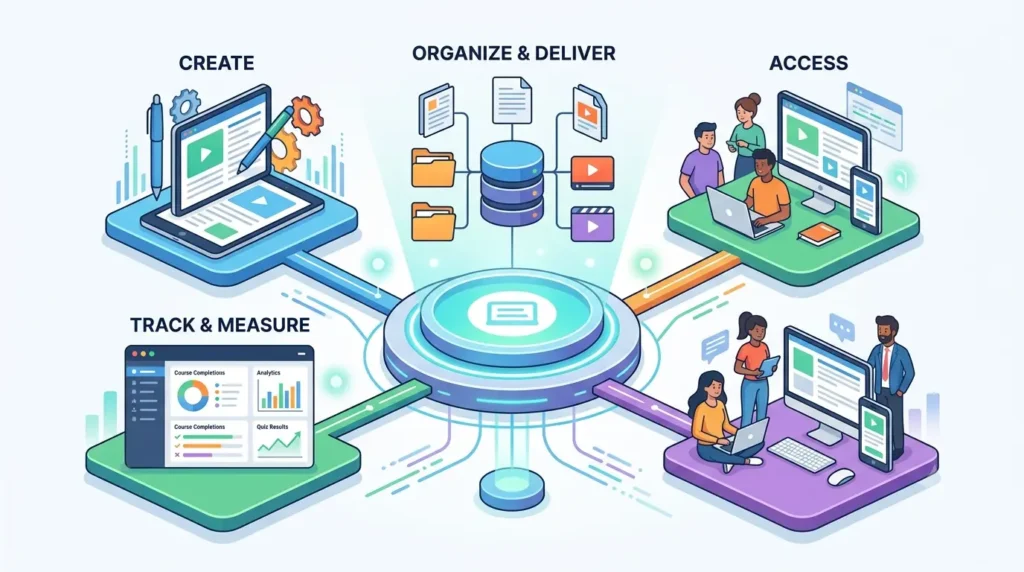
A Learning Management System, commonly known as an LMS, is a software platform that helps organizations create, organize, deliver, and track educational content and training programs.
Think of it as a digital hub for all your learning activities. Instead of scattered files, emails, and spreadsheets, everything related to training lives in one place. Learners can access their courses anytime. Managers can track who completed what. And trainers can update content without printing anything new.
The purpose of an LMS is to make learning more accessible, structured, and measurable. It does not just store content. It manages the entire learning experience from start to finish.
What Does LMS Stand For?
LMS stands for three simple words that describe exactly what the platform does:
- Learning refers to the educational content, courses, and training materials that are created and delivered through the system.
- Management refers to how the platform organizes users, content, groups, enrollments, and reporting all in one place.
- System refers to the software itself, which ties everything together and makes the process run smoothly.
Why Learning Management Systems Matter Today
The world of work has changed a lot. Organizations can no longer rely on annual training sessions or in-person workshops alone. The demand for continuous learning is higher than ever, and businesses need tools that keep up with that demand.
Here is why LMS platforms have become so important:
- Digital transformation: Companies across every industry are going digital. Their training and development programs need to match that pace.
- Remote and hybrid workplaces: With employees working from home or across different cities, organizations need a way to train people without requiring them to be in the same room.
- Continuous employee development: Skills become outdated quickly. Workers need regular upskilling, and an LMS makes it easy to keep learning material fresh and available at all times.
- Compliance requirements: Many industries require employees to complete mandatory training and certifications. An LMS automates this process and keeps records that prove compliance.
How Does a Learning Management System Work?
An LMS works through a set of connected steps that guide learners from enrollment to course completion. Here is a breakdown of how the process works.
Content Creation
Everything starts with creating or uploading learning content. An LMS supports a wide variety of formats so that trainers can design engaging courses. Common content types include:
- Video lessons and recorded lectures
- PDF documents and reading materials
- Quizzes and knowledge checks
- Interactive assessments and case studies
- Presentations and slide decks
Most modern LMS platforms also support SCORM and xAPI formats, which are industry standards for e-learning content. This means you can import courses built in other tools and they will work seamlessly inside your LMS.
User Enrollment
Once the content is ready, the next step is getting learners into the right courses. An LMS gives administrators full control over how this is handled.
- Assigning learners: Admins can manually assign courses to individual employees or set up automatic enrollment based on job role or department.
- Creating groups: Learners can be grouped by team, location, or department so that training is relevant to their specific roles.
- Role-based access: Different users have different permissions. An employee can only see their own courses. A manager can view team progress. An admin can manage everything.
Learning Delivery
An LMS supports multiple ways of delivering learning, depending on what works best for the organization and its learners.
- Self-paced learning: Learners go through courses at their own speed, pausing and resuming whenever they want. This is ideal for busy employees.
- Instructor-led training: Some LMS platforms support live sessions, virtual classrooms, and webinars where a trainer leads the session in real time.
- Blended learning: A mix of both approaches, combining self-paced online modules with live sessions or in-person workshops.
Tracking and Reporting
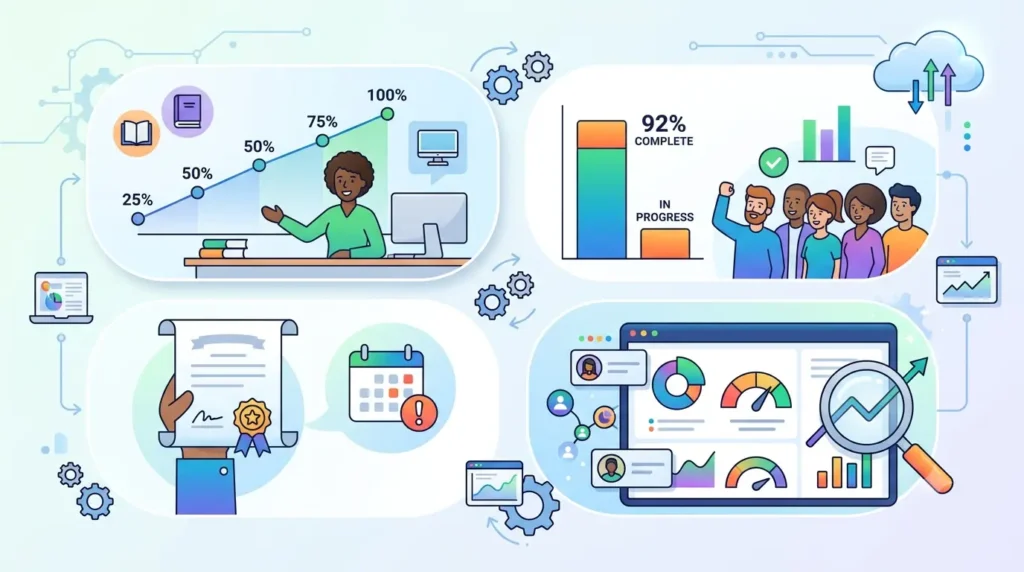
One of the biggest advantages of an LMS is its ability to track everything. You no longer have to guess whether employees completed their training.
- Progress monitoring: See exactly where each learner is in a course, what they have completed, and what is still pending.
- Completion rates: Track how many people have finished a course and how many are still in progress.
- Certification tracking: Automatically issue certificates when learners complete a course and track when those certifications need to be renewed.
- Analytics dashboards: Get visual reports on learning activity, performance scores, engagement levels, and overall training effectiveness.
Key Features of a Learning Management System
Not all LMS platforms are the same. But there are some core features that any good LMS should have. Here is what to look for.
Course Management
A solid LMS makes it easy to build, organize, and update courses. You should be able to upload different content types, arrange them in a logical order, and make edits without disrupting learners who are already enrolled.
User Management
Managing users efficiently is essential, especially for large organizations. The LMS should let you add, remove, and organize learners, assign roles, create groups, and handle bulk enrollments without a lot of manual work.
Assessments and Quizzes
Learning is only effective when it is measured. A good LMS includes built-in tools for creating quizzes, tests, and knowledge checks. You should be able to set passing scores, randomize questions, and review results in detail.
Learning Paths
Learning paths allow you to group courses in a sequence so that learners progress through topics in the right order. For example, a new employee might need to complete a company overview course before moving on to their role-specific training.
Certification Management
For organizations that need to track compliance or professional credentials, certification management is a must. The LMS should automatically issue certificates, track expiry dates, and send reminders when renewals are due.
Reporting and Analytics
Data is what makes an LMS valuable over time. Look for a platform that offers detailed reports on learner progress, quiz scores, time spent on courses, and overall training effectiveness. The more visibility you have, the better decisions you can make.
Mobile Learning
Learners are not always sitting at a desk. A good LMS should work just as well on a phone or tablet as it does on a desktop. Mobile-friendly design means employees can complete training during commutes, breaks, or whenever it fits their schedule.
Gamification
Gamification brings a sense of fun and competition to learning. Features like points, badges, leaderboards, and completion rewards motivate learners to stay engaged and finish their courses.
AI-Powered Learning Features
Many modern LMS platforms now include artificial intelligence to make learning smarter and more personalized. Key AI features include:
- AI course creation: The system can help trainers build courses faster by generating content outlines, quiz questions, and summaries automatically.
- Personalized learning recommendations: Based on a learner’s role, progress, and interests, the AI suggests the most relevant courses to take next.
- Automated assessments: AI can grade open-ended responses, generate adaptive quizzes, and adjust difficulty based on how a learner performs.
Benefits of Using a Learning Management System
Switching to an LMS is not just about convenience. It delivers real, measurable value for businesses and learners alike.
Improved Training Efficiency
An LMS eliminates the repetitive work that comes with traditional training. You build a course once and it is ready for everyone. No booking rooms, no printing materials, no scheduling headaches. Trainers spend less time on logistics and more time on improving content quality.
Reduced Training Costs
In-person training comes with a price tag. Travel costs, venue bookings, printed materials, and trainer fees add up quickly. An LMS cuts most of these costs. Once your digital courses are built, you can train hundreds of people at a fraction of the cost.
Better Employee Engagement
Interactive content, gamification, and progress tracking keep learners motivated. Unlike sitting through a long classroom session, online learning lets employees move at their own pace, revisit material they found difficult, and complete courses on their own schedule.
Consistent Learning Experiences
When training is delivered by different people in different locations, the quality can vary. An LMS ensures that every employee gets the same course, the same information, and the same standard of training, no matter where they are.
Easy Compliance Training
Industries like healthcare, finance, and manufacturing have strict compliance requirements. An LMS makes it easy to assign mandatory training, track completions, and generate reports that prove your organization meets regulatory standards.
Scalable Workforce Development
As your team grows, your training program grows with it. An LMS can support ten learners or ten thousand without any major changes to the system. You do not need to hire more trainers or build more classrooms.
Data-Driven Decision Making
The reporting tools in an LMS give you a clear picture of how your training is performing. You can see which courses have low completion rates, which topics employees struggle with, and where the gaps in your training program are. That kind of insight helps you make smarter decisions about learning and development.
Types of Learning Management Systems
LMS platforms come in different forms. The right type depends on your organization’s size, budget, and technical capabilities.
1. Cloud-Based LMS
A cloud-based LMS is hosted on the provider’s servers and accessed through a web browser. You do not need to install anything or manage any hardware.
Advantages:
- Quick and easy to set up
- Automatic updates and maintenance handled by the provider
- Accessible from anywhere with an internet connection
- Lower upfront costs compared to on-premise options
Disadvantages:
- Requires a reliable internet connection
- Less control over data and server infrastructure
- Ongoing subscription fees
2. On-Premise LMS
An on-premise LMS is installed and run on the organization’s own servers. Your IT team manages the system internally.
Advantages:
- Full control over data and security
- Can be customized extensively to meet specific needs
- Works even without an internet connection
Disadvantages:
- High upfront cost for servers and installation
- Requires an internal IT team to manage and maintain
- Updates and upgrades must be done manually
3. Open-Source LMS
An open-source LMS is free to download and use, with the source code available for anyone to modify. Moodle is one of the most well-known examples.
Advantages:
- No licensing fees
- Highly customizable
- Large community of developers for support and plugins
Disadvantages:
- Requires technical expertise to set up and maintain
- Support can be inconsistent without a paid plan
- Hidden costs for hosting, customization, and development
4. AI-Powered LMS
AI-powered LMS platforms represent the newest generation of learning technology. These platforms use machine learning and automation to make training more intelligent and personalized.
Key benefits include faster course creation, smarter content recommendations, automated reporting, and adaptive learning paths that adjust based on each learner’s performance. As AI continues to improve, these platforms are quickly becoming the preferred choice for forward-thinking organizations.
Who Uses Learning Management Systems?
LMS platforms are not limited to one type of organization. They are used across industries and sectors for very different purposes.
Businesses and Enterprises
Companies of all sizes use LMS platforms to onboard new employees, deliver role-specific training, run leadership development programs, and keep their teams updated on company policies. Large enterprises especially benefit from the ability to train employees at scale across multiple offices and time zones.
Educational Institutions
Schools, colleges, and universities use LMS platforms to deliver course content, manage assignments, grade students, and communicate with learners. Many institutions made the shift to digital learning permanent after the global move to remote education.
Healthcare Organizations
Hospitals and healthcare providers use an LMS to deliver mandatory compliance training, certify medical staff, and keep clinicians up to date on new procedures, safety protocols, and regulatory requirements.
Manufacturing Companies
In manufacturing, safety training is not optional. Companies use LMS platforms to train workers on equipment handling, safety procedures, and quality standards. The ability to track completions and certifications is particularly important in this industry.
Government Agencies
Government bodies use LMS platforms to train public servants, run compliance programs, and deliver policy updates at a national or regional level. The scale and audit trail features make an LMS a natural fit for this sector.
Coaching and Training Providers
Independent coaches, training consultants, and online course creators use LMS platforms to build and sell their learning programs. The platform handles enrollment, payments, content delivery, and certification all in one place.
Real-World Learning Management System Examples
To understand how an LMS is used in real life, here are some of the most common scenarios.
Employee Onboarding
When a new employee joins a company, they need to learn about the organization, its culture, their role, and the tools they will use. An LMS makes onboarding structured and consistent. New hires get access to a set of courses on day one, work through them at their own pace, and are ready to contribute faster.
Compliance Training
Many industries require employees to complete training on topics like workplace safety, data privacy, anti-harassment, and financial regulations. An LMS automates the assignment of these courses, tracks completions, and generates reports that prove compliance during audits.
Sales Enablement Training
Sales teams need to know their products, understand the competition, and master their pitch. An LMS helps sales managers build product training courses, run assessments, and ensure every salesperson is ready before they talk to a customer.
Customer Education
Companies use LMS platforms to train their own customers on how to use their products or services. A software company might offer video tutorials and certification programs for its users, improving customer satisfaction and reducing the number of support tickets.
Partner Training Programs
Organizations that work with resellers, distributors, or franchise partners can use an LMS to train those external partners. This ensures that everyone representing the brand understands the products, processes, and standards.
Academic Learning
In schools and universities, an LMS is used to share lecture notes, assign homework, collect submissions, run discussions, and grade students. Platforms like Canvas, Blackboard, and Moodle are widely used in academic settings around the world.
Learning Management System vs Traditional Training
Here is a quick comparison to show the difference between using an LMS and sticking with traditional classroom-based training:
| Feature | LMS | Traditional Training |
| Accessibility | Available 24/7 from any device | Limited to scheduled sessions and physical locations |
| Cost | Lower long-term cost after initial setup | Higher ongoing costs for venues, materials, and trainers |
| Scalability | Train thousands simultaneously | Difficult and expensive to scale |
| Tracking | Automated and detailed | Manual and inconsistent |
| Flexibility | Learners choose their own pace and schedule | Fixed schedule with little flexibility |
Key Takeaways
- An LMS gives learners the freedom to train at their own pace, from anywhere in the world.
- It reduces the cost of delivering training over time, especially for large organizations.
- Tracking and reporting give managers real visibility into training completion and effectiveness.
- Traditional training still has its place, but it works best when combined with digital learning tools.
How to Choose the Right Learning Management System
With so many LMS platforms on the market, picking the right one can feel overwhelming. Here is a practical framework to guide your decision.
Define Training Goals
Before you look at any platform, be clear about what you want to achieve. Are you focused on employee onboarding? Compliance training? Sales enablement? The answer will shape everything from the features you need to the type of LMS that fits best.
Evaluate Essential Features
Make a list of must-have features based on your goals. For most organizations, this includes course creation tools, user management, progress tracking, certification management, and reporting. Nice-to-have features might include gamification, mobile apps, and AI recommendations.
Consider Scalability
Think about where your organization will be in three to five years. Choose a platform that can grow with you. A system that works well for 50 employees should also be able to handle 5,000 without major disruptions or cost spikes.
Assess Integration Capabilities
Your LMS will not work in isolation. It needs to connect with the tools your team already uses, such as your HR system, CRM, or communication platforms. Check whether the LMS offers ready-made integrations or supports API connections.
Review Security Standards
Learning platforms store sensitive data, including employee records, performance scores, and personal information. Make sure the LMS you choose complies with relevant data protection regulations and offers strong security features like role-based access controls and data encryption.
Analyze Reporting Features
Good reporting is what separates an average LMS from a great one. Look for a platform that gives you real-time dashboards, customizable reports, and the ability to export data easily. The more insight you have into how learning is happening, the better decisions you can make.
Compare Pricing Models
LMS pricing varies a lot. Some platforms charge per user per month. Others charge a flat annual fee. Some are free up to a certain number of users. Always factor in hidden costs like implementation fees, customer support charges, and costs for additional storage or integrations.
Future Trends in Learning Management Systems
The LMS industry is evolving fast. Here are the trends that are shaping the future of workplace and academic learning.
Artificial Intelligence
AI is transforming how LMS platforms work. From generating course content to recommending learning paths and grading assessments, AI is making the entire learning process smarter, faster, and more personalized. Expect AI to become a standard part of every major LMS platform in the coming years.
Adaptive Learning
Adaptive learning adjusts the content and pace of a course based on how a learner is performing. Instead of everyone following the same path, the system identifies strengths and weaknesses in real time and adjusts the experience accordingly. This leads to faster skill development and better retention.
Microlearning
Microlearning involves delivering training in short, focused bursts rather than long sessions. A lesson might be a three-minute video, a quick quiz, or a single infographic. This format fits naturally into a busy workday and has been shown to improve knowledge retention.
Mobile-First Learning
More learners are using smartphones as their primary device for everything, including training. Modern LMS platforms are being built with a mobile-first approach, ensuring that courses look and work perfectly on small screens without any compromise in quality.
Learning Experience Personalization
The one-size-fits-all approach to training is becoming outdated. Learners now expect experiences tailored to their roles, skill levels, and learning preferences. LMS platforms are using data and AI to create increasingly personalized journeys for each individual.
Advanced Analytics
The next generation of LMS reporting goes beyond completion rates. Advanced analytics tools can predict which learners are at risk of dropping out, identify the content that drives the most engagement, and even connect training activity to business performance metrics like sales numbers or customer satisfaction scores.
Why Businesses Are Choosing AI-Powered LMS Platforms
The demand for AI-powered learning tools is growing rapidly, and for good reason. Organizations that have adopted AI-powered LMS platforms are seeing real improvements in how quickly they can build training programs, how engaged their learners are, and how effectively they can measure results.
Traditional course creation can take weeks or months. AI tools can cut that time dramatically by helping trainers generate content outlines, write course descriptions, and create quiz questions in minutes.
Personalized learning experiences mean that employees are not wasting time on courses that are not relevant to them. They get the training they actually need, when they need it.
One platform worth exploring in this space is SkillForce LMS. It is designed to help organizations build and deliver training programs faster using AI-powered tools, while giving administrators the analytics they need to continuously improve their learning programs. Whether you are running onboarding for a growing team or managing compliance training across multiple locations, SkillForce LMS is built to handle it.
Frequently Asked Questions
What is a Learning Management System?
A Learning Management System (LMS) is a software platform that helps organizations create, deliver, manage, and track online training and educational programs from one central location.
What are the main functions of an LMS?
The main functions of an LMS include course creation, user enrollment, learning delivery, progress tracking, certification management, and reporting.
Who uses Learning Management Systems?
LMS platforms are used by businesses, schools, universities, healthcare organizations, government agencies, manufacturing companies, and independent training providers.
What are the benefits of using an LMS?
Key benefits include reduced training costs, improved efficiency, better learner engagement, consistent training quality, easy compliance management, and data-driven insights.
Is an LMS suitable for small businesses?
Yes. Many LMS platforms offer affordable plans specifically designed for small teams. Even a small business can benefit from structured onboarding, compliance tracking, and consistent training delivery.
What is the difference between an LMS and an LXP?
An LMS focuses on managing and delivering structured training set by administrators. A Learning Experience Platform (LXP) is more learner-driven, encouraging self-directed exploration of content and peer-to-peer learning. Many modern platforms now combine both approaches.
How much does an LMS cost?
Pricing varies widely. Some platforms start free for small teams. Paid plans typically range from a few dollars per user per month to enterprise-level contracts that can cost several thousand dollars per year. Always ask about total costs including onboarding and support.
Can an LMS support remote employee training?
Yes. This is actually one of the strongest use cases for an LMS. Remote employees can access courses from any device, at any time, making distributed team training practical and efficient.
What features should I look for in an LMS?
Look for course creation tools, user management, progress tracking, certification management, mobile access, integrations with your existing systems, and strong reporting capabilities. AI features are increasingly important for organizations that want to scale their learning programs.
How does AI improve Learning Management Systems?
AI improves LMS platforms by automating course creation, personalizing learning recommendations, adapting content difficulty based on performance, and providing predictive analytics that help organizations improve their training programs over time.
Conclusion
A Learning Management System is no longer a luxury for large corporations. It has become a practical necessity for any organization that takes learning and development seriously.
Whether you are trying to onboard new employees faster, meet compliance requirements, or build a culture of continuous learning, an LMS gives you the tools to do it in a way that is scalable, measurable, and cost-effective.
The rise of AI-powered platforms has made it even easier to get started. You do not need a large team or a big budget to create professional, engaging training programs. You just need the right platform.
If you are evaluating your training needs and looking for a solution that supports long-term growth, now is a good time to explore what a modern LMS can do for your organization. Start by identifying your core training goals, the features you need most, and the type of learner experience you want to create. From there, the right platform will become clear.