


If you are in charge of teaching a team in 2026 you have probably thought about this question at least one time: should we spend money on a Learning Management System or keep using the classroom style of teaching that has worked for a long time? This is not a decision. It affects how much money you have, how much time your team has and how fast new employees can actually do their jobs.
I have worked with training teams in healthcare, manufacturing and technology and I can tell you the truth: it depends on what you’re teaching people to do. Learning Management System platforms and traditional teaching methods are not competing against each other to see who wins.
They solve problems. This guide explains the differences between the Learning Management System and traditional training so you can decide what really works for your company instead of just doing what is popular.
By the end you will know when a Learning Management System is a good idea, when a classroom or workshop is still the best choice and why most companies, in 2026 are using a mix of both Learning Management System and traditional training.
LMS vs Traditional Training: Quick Comparison
Here’s the short version, if you’re in a hurry.
| Factor | LMS | Traditional Training |
| Delivery | Online, self-paced or blended | In-person, instructor-led |
| Cost over time | Lower per learner as you scale | Higher — travel, venue, printed materials |
| Flexibility | Learn anytime, anywhere | Fixed schedule, fixed location |
| Best for | Compliance, onboarding, remote teams | Hands-on skills, leadership, safety drills |
| Tracking | Automated dashboards and reports | Manual attendance sheets, paper tests |
| Setup effort | Upfront platform and content build | Lower tech barrier, higher recurring cost |
Key difference: an LMS is a technology platform that delivers, tracks, and manages learning digitally. Traditional training is a delivery method built around a human instructor in a physical room.
Best use case in one line: use an LMS when you need to train many people, consistently, at scale use traditional training when the skill can only be learned by doing it in front of someone who can correct you in real time.
Quick recommendation: most mid-size and large organizations in 2026 use a blend of both, leaning on LMS for scale and traditional training for high-stakes, hands-on skills.
What Is a Learning Management System (LMS)?
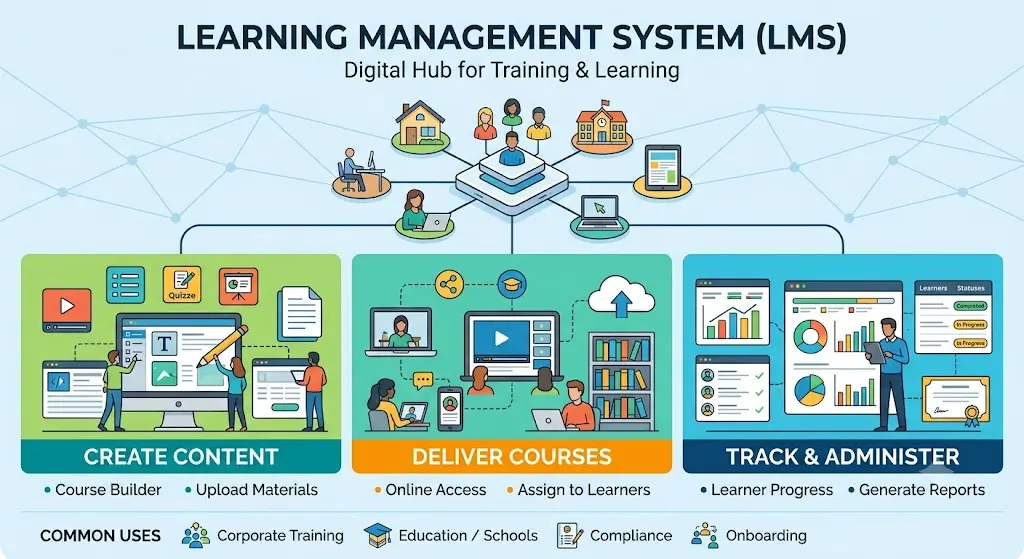
A Learning Management System is software that lets you create, deliver, and track training content online. Think of it as the digital classroom, gradebook, and content library rolled into one platform. According to Wikipedia’s overview of learning management systems, LMS platforms are used across corporate, educational, and government settings to administer, document, track, and deliver courses or training programs.
Most companies use an LMS for onboarding, compliance training, product training, and ongoing skill development, anything that needs to reach a large, often distributed, group of people consistently.
Core Features
A modern LMS typically includes course authoring or content upload tools, quizzes and assessments, progress tracking, certification management, and reporting dashboards. Many also support video hosting, discussion forums, and mobile access.
The better platforms in 2026 add AI-driven recommendations, automated skill-gap detection, and integrations with HR systems. These aren’t gimmicks; they’re what separates a simple content repository from an actual learning strategy tool.
How LMS Works
At a basic level, an admin uploads or builds courses, assigns them to specific learners or groups, and the system tracks who started, who finished, and how they scored. Learners log in, work through the material at their own pace, and the platform records everything automatically.
This is what makes LMS reporting so valuable you’re not chasing down attendance sheets. The data is already there, timestamped and searchable.
Common LMS Types
Cloud LMS : hosted by the vendor, accessed through a browser, no server maintenance on your end. This is the most common choice for small and mid-size companies today.
On-premise LMS: installed and run on your own servers. Gives you more control over data, which some regulated industries prefer, but it costs more to maintain.
Open-source LMS: free to use and customize, like Moodle, but you’ll need internal technical resources to set it up and keep it running.
Enterprise LMS: built for large organizations with complex needs: multiple departments, compliance tracking across regions, and deep integrations with existing HR or CRM systems.
What Is Traditional Training?
Traditional training refers to any learning delivered in person, led by a human instructor, without relying on a digital platform to manage the process. This is the training model most of us grew up with classrooms, workshops, and hands-on demonstrations.
It’s not outdated by default. For certain skills, it’s still the fastest and most effective way to teach.
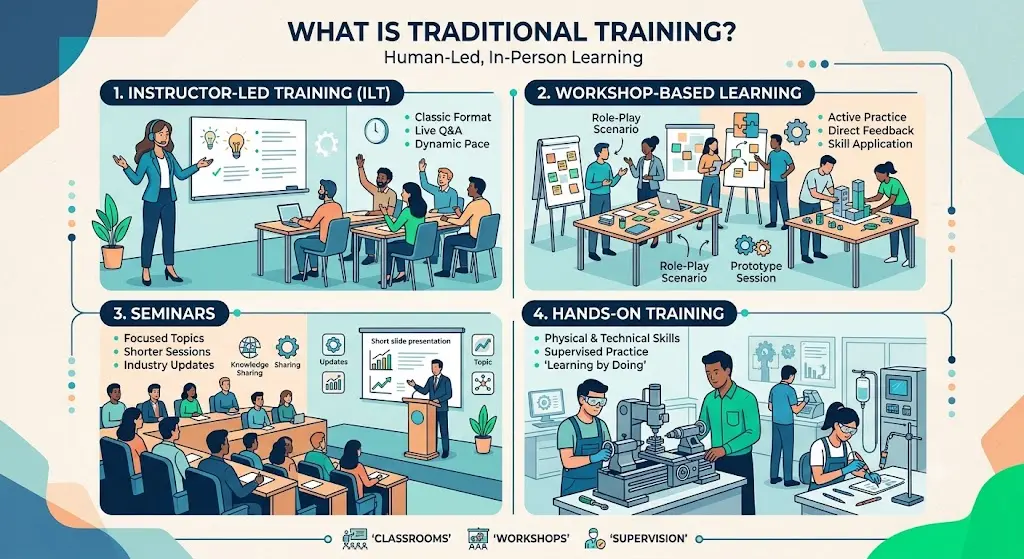
1. Instructor-Led Training
This is the classic format: a trainer stands in front of a group and walks them through material, answers questions live, and adjusts pace based on how the room is reacting. It works well when the topic is nuanced or when learners need to ask follow-up questions in real time.
2. Workshop-Based Learning
Workshops are more hands-on than a lecture. Participants practice a skill directly through negotiation role-play or a coding workshop with the instructor giving feedback as they go.
3. Seminars
Seminars are usually shorter, topic-focused sessions, often used for updates on regulations, new tools, or industry trends. They’re less about deep skill-building and more about awareness and alignment.
4. Hands-On Training
This applies mainly to physical or technical skills operating machinery, using medical equipment, or handling lab procedures. There’s often no substitute for doing the task under supervision.
LMS vs Traditional Training: Side-by-Side Comparison
Let’s go deeper into the specific factors that actually matter when you’re comparing LMS vs traditional training for your team.
1. Learning Experience
LMS platforms offer a self-directed experience learners control pace and can revisit material. Traditional training offers a shared experience, where the group learns together and can build on each other’s questions in real time.
2. Flexibility
LMS wins here almost every time. Employees can complete modules whenever it fits their schedule, which matters a lot for shift workers or global teams across time zones. Traditional training requires everyone to be in the same place at the same time.
3. Accessibility
A cloud LMS can be accessed from any device with internet access, which is a major advantage for remote and hybrid teams. Traditional training requires physical presence, which limits who can realistically attend.
4. Cost
Traditional training carries recurring costs: venue rental, instructor fees, travel, printed materials every single time you run a session. LMS has a higher upfront cost (platform license, content creation) but the cost per learner drops sharply as you scale.
5. Scalability
If you need to train 20 people, either method works fine. If you need to train 2,000 people across 15 countries, an LMS is really the only practical option.
6. Personalization
Modern LMS platforms can adapt content based on a learner’s role, prior performance, or even predicted skill gaps. Traditional training can personalize too, but it depends entirely on the instructor’s ability to read the room; it doesn’t scale well beyond a small group.
7. Engagement
This one’s genuinely debated. Some learners engage more with an instructor’s energy and peer interaction in person. Others engage more with gamified LMS content they can control. A 2023 discussion thread on humanresources touched on this exact tension. HR professionals there noted that engagement really comes down to content quality, not just delivery method.
8. Knowledge Retention
Hands-on, in-person practice tends to support stronger retention for physical or procedural skills. Microlearning through an LMS short, spaced-out lesson tends to support stronger retention for knowledge-based content, thanks to the spacing effect well documented in learning science.
9. Analytics
LMS platforms track everything: completion rates, quiz scores, time spent, drop-off points. Traditional training relies on manual sign-in sheets and post-session surveys, which are far less precise.
10. Compliance
For industries with strict regulatory requirements, LMS platforms make it far easier to prove who completed what training and when critical during audits. Traditional training can meet compliance needs too, but the paper trail is harder to maintain accurately.
11. Assessment
LMS platforms support instant, automated quizzes and scoring. Traditional training assessment often depends on an instructor’s manual grading or observation, which takes longer and can be more subjective.
12. Certifications
Both methods can issue certifications, but LMS platforms automate the process certificates generate the moment a learner passes, and expiration reminders can be automated too.
13. Reporting
This overlaps with analytics but deserves its own mention: LMS reporting is built for managers who need a quick answer to “who hasn’t finished their compliance training yet?” That answer takes seconds in an LMS and much longer with paper records.
14. Collaboration
Traditional training naturally builds relationships people meet face-to-face, which strengthens team bonds. LMS platforms can support collaboration through discussion boards or live cohorts, but it takes more deliberate design to replicate that in-person connection.
15. Technical Requirements
LMS requires a device, internet access, and some basic digital literacy. Traditional training requires none of that, which can matter in environments with limited connectivity or older workforces less comfortable with technology.
Advantages of LMS
1. Lower Costs
Once built, a course can be reused for thousands of learners at almost no additional cost. That’s the core economic advantage over traditional training.
2. 24/7 Learning
Employees aren’t limited to a training calendar. They can learn during downtime, which matters especially for global or shift-based teams.
3. Automation
Enrollment, reminders, certificates, and reporting can all run without manual intervention, freeing up your L&D team for higher-value work.
4. Reporting
As mentioned above, real-time dashboards replace manual tracking, giving managers instant visibility into training progress.
5. Learning Analytics
Beyond simple completion tracking, good LMS analytics can show where learners struggle, which questions get missed most often, and where content needs revision.
6. AI Personalization
AI-driven LMS platforms can recommend the next course based on a learner’s role, performance, and career path, something a static training calendar can’t do.
7. Microlearning
Breaking content into short, focused lessons improves completion rates and retention, particularly for busy employees who can’t commit to a full-day session.
8. Gamification
Points, badges, and leaderboards can meaningfully boost engagement, especially for younger workforces used to app-based experiences.
Advantages of Traditional Training
1. Face-to-Face Interaction
There’s real value in reading body language, tone, and reactions something no LMS video fully replicates.
2. Immediate Feedback
An instructor can correct a mistake the moment it happens, which matters enormously for skill-building.
3. Hands-On Practice
Physical skills operating equipment, performing a medical procedure, handling tools safely are best learned by doing them under direct supervision.
4. Team Building
In-person sessions double as relationship-building opportunities, something that’s harder to replicate through a screen.
5. Instructor Guidance
A skilled trainer can adapt on the fly, sensing confusion and adjusting the explanation in real time, a level of responsiveness that pre-built LMS content can’t match.
Disadvantages of LMS
1. Implementation Costs
Choosing the right platform, migrating content, and training your team to use it takes real time and budget upfront.
2. User Adoption
Even a great LMS fails if employees don’t use it. Low adoption is one of the most common reasons LMS rollouts underdeliver.
3. Technical Challenges
Integration issues, login problems, or a clunky interface can frustrate learners and quietly kill engagement.
4. Content Development
Building high-quality courses, not just uploading PDFs takes instructional design skills that many companies underestimate.
Disadvantages of Traditional Training
1. Travel Costs
Flying trainers or employees to a central location adds up fast, especially for distributed teams.
2. Scheduling Issues
Getting everyone in the same room at the same time is genuinely hard, especially across departments or time zones.
3. Limited Scalability
Running the same workshop 50 times for different groups is expensive and inconsistent quality can vary by instructor and session.
4. Lack of Analytics
Without a digital system, it’s hard to prove training effectiveness or track long-term retention accurately.
ROI Comparison: LMS vs Traditional Training
1. Cost Breakdown
Traditional training costs scale roughly linearly with headcount: more people means more sessions, more materials, more travel. LMS costs are front-loaded: platform fees and content creation, then a much lower marginal cost per additional learner.
2. Time Savings
Automated enrollment, tracking, and certification in an LMS can save an L&D team dozens of hours a month compared to manually managing in-person sessions.
3. Employee Productivity
Self-paced LMS learning means employees aren’t pulled away from work for a full day at once they can learn in shorter blocks, reducing productivity loss.
4. ROI Formula
A simple way to estimate ROI: (Value of improved performance − Total training cost) ÷ Total training cost × 100. The tricky part is quantifying “value of improved performance,” which usually means tracking metrics like reduced errors, faster onboarding time, or improved sales numbers before and after training.
Industry-Wise Recommendations
1. Healthcare
Compliance training (HIPAA, safety protocols) fits an LMS well. Clinical skills like using new equipment — still need hands-on, supervised practice.
2. Manufacturing
Safety training benefits from hands-on demonstration on the actual floor. Policy and procedural training works fine through an LMS.
3. IT
Highly LMS-friendly. Technical certifications, coding skills, and software training translate well to self-paced digital formats.
4. Retail
High turnover and distributed locations make LMS a strong fit for onboarding and product knowledge, with occasional in-person coaching for customer service skills.
5. Education
Blended models dominate LMS platforms managing assignments and grading, while classroom instruction still delivers core teaching.
6. Government
Compliance-heavy and often large-scale, which favors LMS for consistency and audit trails, though leadership development often stays in-person.
7. Finance
Regulatory training is a natural LMS use case given the volume of mandatory courses and the need for airtight completion records.
When Should You Choose LMS?
1. Remote Teams
If your workforce isn’t in one location, an LMS is close to a necessity for consistent training delivery.
2. Compliance
When you need proof of completion for audits, LMS reporting makes this dramatically easier than paper records.
3. Rapid Growth
Fast-hiring companies need onboarding that doesn’t depend on scheduling a live trainer every time someone joins.
4. Global Workforce
Time zones and language differences make self-paced, translatable LMS content far more practical than synchronous sessions.
When Should You Choose Traditional Training?
1. Practical Skills
Anything involving physical technique from surgery to welding needs supervised, hands-on practice.
2. Leadership Workshops
Leadership development benefits heavily from group discussion, role-play, and real-time coaching.
3. Safety Training
High-risk environments often require in-person demonstrations to meet legal and practical safety standards.
4. Hands-On Equipment
Operating specialized machinery is usually best taught in person, on the actual equipment, with a qualified supervisor present.
The Best of Both Worlds: Blended Learning
Most organizations I’ve worked with in 2026 aren’t choosing LMS or traditional training; they’re combining both. This is usually called blended learning, and it tends to outperform either method used alone.
1. Hybrid Models
A common pattern: employees complete foundational knowledge through an LMS, then attend a shorter, more focused in-person session to practice and ask questions. This cuts classroom time significantly while keeping the hands-on benefits.
2. Virtual Instructor-Led Training (VILT)
VILT combines live instruction with remote delivery, think of a live video session with an instructor, but accessible from anywhere. It keeps real-time interaction while solving the travel and scheduling problem.
3. Microlearning + Workshops
Short LMS lessons build the baseline knowledge, then a workshop reinforces it through practice. This combination tends to improve both retention and engagement compared to a single long session.
How AI Is Changing Corporate Learning
AI is reshaping what an LMS can do, and it’s worth understanding even if you’re not ready to adopt every feature yet.
1. Adaptive Learning
AI can adjust course difficulty and sequencing based on how a learner performs, rather than forcing everyone through the same fixed path.
2. AI Tutors
Some platforms now offer AI chat-based tutors that answer learner questions instantly, reducing the need for a live instructor for basic clarification.
3. Skill Gap Analysis
AI can compare an employee’s current skills against role requirements and recommend specific courses to close the gap, something that used to require a manual skills audit.
4. Predictive Analytics
Some LMS platforms can flag learners at risk of falling behind or disengaging, based on patterns in login frequency and course progress, letting managers intervene early.
How to Successfully Implement an LMS
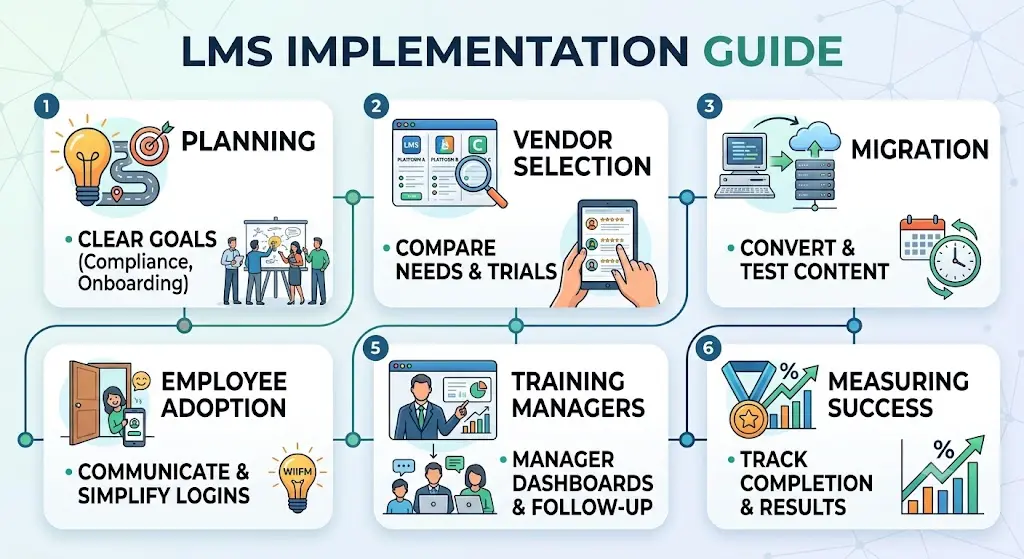
1. Planning
Start with clear goals: what problem is the LMS solving? Compliance tracking, faster onboarding, and skill development each require different features and content priorities.
2. Vendor Selection
Compare platforms based on your actual needs, not just feature lists. Ask for a trial, check integration compatibility with your HR systems, and read independent reviews professional discussions on LinkedIn from L&D practitioners can be a genuinely useful, unbiased source here.
3. Migration
Moving existing training materials into a new LMS takes longer than most teams expect. Budget extra time for content conversion and testing.
4. Employee Adoption
Communicate the “why” clearly, and make the first experience as frictionless as possible. A confusing first login can tank adoption before it starts.
5. Training Managers
Managers need to know how to pull reports and follow up with their teams an LMS is only as useful as the people acting on its data.
6. Measuring Success
Track completion rates, assessment scores, and most importantly whether the training actually changed on-the-job performance.
Common Mistakes to Avoid
1. Choosing Based on Price Alone
The cheapest platform often costs more in the long run through poor support, limited features, or low adoption.
2. Ignoring Adoption
A powerful LMS that nobody logs into delivers zero value. Adoption planning deserves as much attention as the platform itself.
3. Poor Content
Great software can’t fix boring, poorly structured courses. Content quality matters more than platform features.
4. Lack of Leadership Support
If managers don’t visibly support and use the training, employees notice and engagement drops accordingly.
Frequently Asked Questions
1. Is LMS better than traditional training?
Neither is universally better; LMS is better for scale, flexibility, and compliance tracking, while traditional training is better for hands-on and interpersonal skills.
2. What is the main difference between LMS and traditional training?
An LMS delivers and tracks learning digitally and asynchronously, while traditional training relies on a live instructor in a physical setting.
3. Can an LMS fully replace classroom training?
For most physical or highly interactive skills, no, but for knowledge-based content like compliance or product training, it often can.
4. Is an LMS cheaper than traditional training? Usually, yes, once you factor in scale the cost per learner drops significantly as more people use the same course content.
5. What industries benefit most from LMS?
IT, finance, retail, and any industry with heavy compliance requirements or distributed teams tend to benefit the most.
6. What is blended learning?
Blended learning combines LMS-based self-paced content with in-person or live instruction to get the benefits of both.
7. Do employees prefer LMS or in-person training?
It varies by individual and by content type; many prefer LMS for flexibility but still value in-person sessions for complex or social topics.
8. How long does it take to implement an LMS?
Depending on company size and content volume, implementation typically takes anywhere from a few weeks to a few months.
9. What features should I look for in an LMS?
Look for course authoring tools, robust reporting, mobile access, integrations with your HR system, and strong customer support.
10. Is traditional training still relevant in 2026?
Yes, particularly for hands-on skills, leadership development, and safety-critical training where real-time feedback matters.
11. What is VILT? Virtual Instructor-Led Training delivers live, instructor-led sessions remotely through video conferencing, combining flexibility with real-time interaction.
12. How do you measure LMS ROI?
Compare training costs against measurable outcomes like reduced errors, faster onboarding, or improved performance metrics.
13. What is microlearning?
Microlearning breaks training content into short, focused lessons usually a few minutes long designed to improve retention and fit into busy schedules.
14. Can small businesses use an LMS effectively?
Yes, many cloud-based LMS platforms offer affordable plans scaled for smaller teams without the enterprise price tag.
Conclusion
So, LMS vs traditional training, which one should you actually choose? Honestly, the smartest answer for most organizations in 2026 is both, used deliberately. Lean on an LMS for scale, consistency, compliance, and flexibility. Lean on traditional training for hands-on skills, leadership development, and anything that genuinely benefits from a human instructor watching and correcting in real time.
The companies getting the best results aren’t the ones picking a side, they’re the ones designing a blended approach that matches the method to the skill being taught. Start by mapping out what you’re actually training people to do, then let that decide the format, not the other way around.