


Picking the right Learning Management System is one of those decisions that can quietly shape how your entire organization learns and grows. Make the right call and training becomes seamless. Make the wrong one and you end up with a tool that frustrates your team, limits your reporting, and costs more to fix than it ever saved.
The challenge is that there are hundreds of LMS platforms out there, each claiming to have everything you need. Sorting through the noise is genuinely difficult, especially when you are not entirely sure what to look for in the first place.
Most businesses run into the same set of problems. They choose a platform based on price alone, only to discover it cannot scale with their team. Or they pick something with a sleek interface but realize months later that the reporting tools are too basic to measure anything meaningful. Some choose a system without checking whether it connects to their existing HR software, and end up managing two separate tools manually.
The good news is that choosing the right LMS becomes a lot easier when you know exactly which features to evaluate. This guide gives you a clear, practical checklist of what every business LMS should include, plus the nice-to-have extras that can make a real difference depending on your situation.
Why Your LMS Features Matter
The features built into your LMS are not just technical specifications on a product page. They directly shape what the learning experience feels like for your employees, how efficiently your training team operates, and whether senior leaders can actually see the value of their investment.
Here is why getting this right matters across the board:
- Employee learning experience: A platform with well-designed features makes learning feel intuitive and accessible. A clunky, hard-to-navigate system makes learners disengage before they even finish their first course.
- Business scalability: A feature that works fine for 50 employees may completely fall apart at 500. You need a platform that can grow with your organization without requiring a full migration every two years.
- Training efficiency: The right tools reduce the administrative load on your training team. Automated enrollment, progress tracking, and certification management can save dozens of hours each month.
- Compliance and reporting: For industries with regulatory requirements, your LMS needs to generate audit-ready reports and track certification renewals automatically. Doing this manually is both time-consuming and risky.
- Long-term return on investment: A well-featured LMS delivers measurable results. You can connect training activity to performance improvements, reduce onboarding time, and lower the cost per trained employee over time.
Essential LMS Features Every Business Should Have
These are the features that belong on every shortlist. If a platform cannot deliver on these, it is worth looking elsewhere regardless of how attractive the pricing is.
Course Management
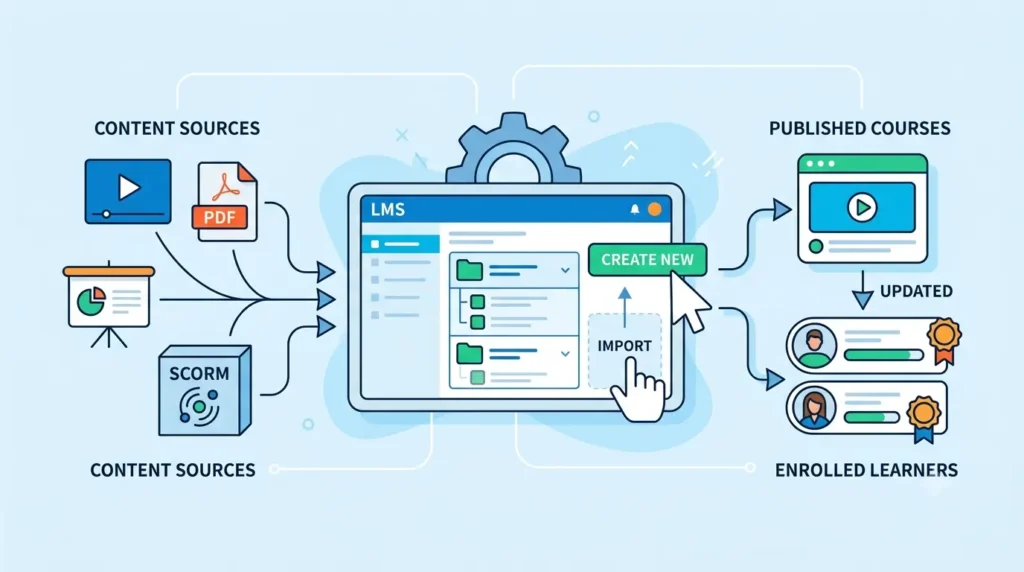
At its core, an LMS exists to house and deliver training content. The course management tools need to be flexible enough to handle whatever you want to teach.
A good LMS should allow you to create courses from scratch using a built-in editor, or import content you have already built in other tools. It should support multiple content formats including videos, PDFs, presentations, and interactive SCORM files. Updating a course after it is live should be straightforward, without breaking the experience for learners who are already enrolled.
User and Role Management
Training does not work the same way for everyone in your organization. A new customer service rep needs different training from a senior product manager. Your LMS needs to reflect that.
Look for a platform that lets you enroll employees individually or in bulk, organize them into departments or teams, and assign different levels of access based on their role. Administrators should be able to see everything. Managers should be able to track their own team’s progress. Learners should only see what is relevant to them.
Learning Paths
A learning path is a structured sequence of courses that guide an employee through a topic step by step. Rather than letting learners pick and choose at random, learning paths ensure they build knowledge in the right order.
This is especially valuable for onboarding, where new employees need to complete a specific set of courses before they are ready to work independently. A good LMS should allow you to create custom paths, lock courses until prerequisites are completed, and personalize the journey based on role or skill level.
Assessments and Quizzes
Training without any form of testing is difficult to take seriously. Without assessments, you have no way of knowing whether learners have actually absorbed the material or simply clicked through to the end.
Your LMS should make it easy to create a range of assessment types, including multiple choice questions, true or false, short answers, and scenario-based questions. It should support automatic grading so results are available immediately, and issue certificates or mark a course complete only once a learner has passed. Assignment submissions for more practical tasks are a bonus for more advanced programs.
Progress Tracking and Reporting
This is one of the features that separates a basic LMS from one that actually supports business decisions.
You need to be able to see which employees have completed which courses, how they scored on assessments, and how long they spent on training. Managers should have a dashboard that gives them a real-time view of their team’s progress. HR and L&D teams need to generate custom reports that can be filtered by department, date, course, or individual learner.
Without solid reporting, you cannot prove that your training program is working. And if you cannot prove it, it is very hard to justify the investment.
Mobile Learning
A growing number of employees do their training on a phone or tablet, particularly those in field-based or frontline roles. If your LMS does not work well on mobile, you are immediately cutting off a significant portion of your workforce.
Mobile learning means more than just a platform that technically opens on a smartphone. It means the interface is genuinely easy to use on a small screen, videos load quickly on mobile data, and the experience feels as good as it does on a desktop. Some platforms also offer offline learning, which allows employees to download content and complete it without an internet connection.
AI-Powered Features
Artificial intelligence is no longer a futuristic add-on in the LMS space. It is rapidly becoming a core part of how modern platforms work, and it is worth paying close attention to.
The most useful AI features for businesses include:
- AI course creation: Automatically generate course outlines, lesson content, and quiz questions based on a topic or document you provide. This can cut course creation time from days to hours.
- Personalized learning recommendations: The system analyzes each learner’s role, progress, and performance to suggest the most relevant courses for them to take next.
- AI-generated quizzes: Automatically produce questions from existing course content, saving trainers significant time and ensuring assessments are well-aligned with the material.
- Learning insights: AI tools can identify patterns in learner behavior, flag disengagement risks, and highlight which content is most effective across your organization.
Gamification
Gamification uses elements borrowed from games to make learning more motivating and enjoyable. It sounds simple, but the impact on completion rates and engagement can be significant.
Look for features like points and badges that learners earn as they progress, leaderboards that create a sense of friendly competition, milestone celebrations when key stages are completed, and rewards for consistent learning activity. These elements work particularly well for sales teams, onboarding programs, and any training that covers topics employees might otherwise find dry.
Certifications
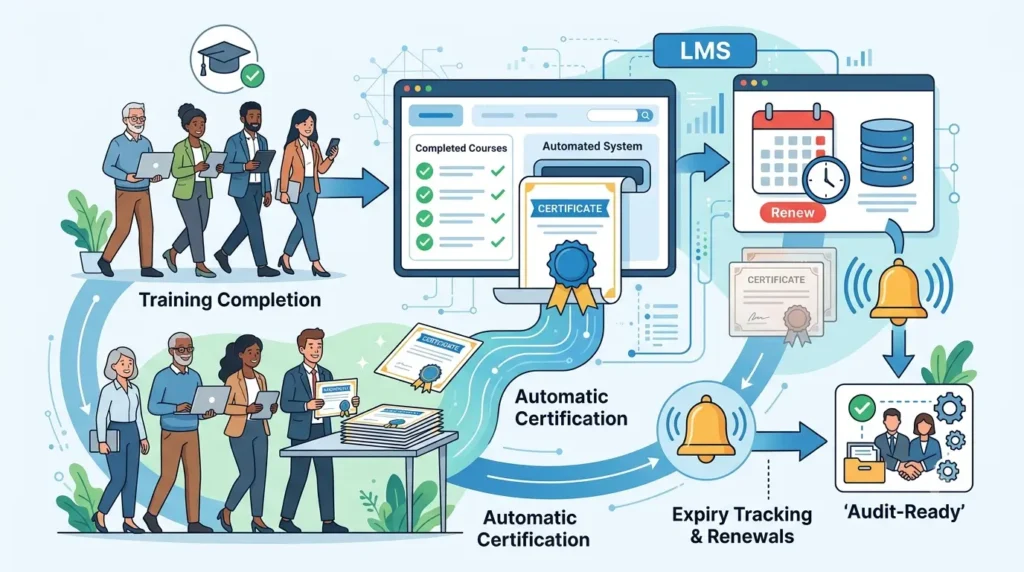
For many businesses, certifications are not optional. They are a core part of compliance management and professional development.
Your LMS should automatically generate and distribute certificates when a learner completes a course or program. For compliance-related certifications, it should also track expiry dates and send automated reminders when renewals are due. This removes the manual burden of chasing employees and ensures your organization is always audit-ready.
Notifications and Reminders
Even the best training program will have low completion rates if employees forget it exists. Automated notifications are what keep training on people’s radar without requiring your training team to chase everyone individually.
A good LMS sends reminders when courses are due, alerts when deadlines are approaching, announcements when new training is assigned, and follow-ups for learners who have not logged in for a while. These automated touchpoints make a real difference to engagement without adding any administrative work.
Collaboration Tools
Learning does not have to be a solitary experience. When employees can discuss topics with each other, ask questions, and share insights, the training becomes richer and more memorable.
Look for an LMS that includes discussion forums where learners can comment on lessons and share perspectives, peer-to-peer interaction features, instructor feedback tools for assignments and assessments, and social learning elements that encourage teams to learn together rather than in isolation.
Content Library
A built-in content library saves your training team from building every course from scratch. Many LMS platforms offer ready-made libraries of pre-built courses covering topics like workplace safety, compliance, leadership, and professional skills.
Your LMS should also support a wide range of content formats in the library, including video files, PDFs, SCORM packages, interactive content, and course templates. The more formats it supports, the more flexibility you have when building or importing training material.
Integrations
Your LMS does not exist in isolation. It needs to connect with the other tools your organization already relies on. Poor integration support means double data entry, mismatched records, and a lot of manual work to keep things in sync.
Priority integrations to look for include:
- HRMS and HR software so that employee records stay consistent across both systems
- CRM platforms for businesses that use the LMS to train sales teams or customer-facing staff
- Microsoft Teams and Zoom for delivering live training sessions directly through the LMS
- Google Workspace for easy content sharing and collaboration
- Single Sign-On (SSO) so that employees can log in to the LMS using the same credentials they use for everything else, without needing a separate username and password
Security and Data Protection
Your LMS stores sensitive information about your employees, including training history, assessment scores, and personal data. Protecting that information is not optional.
Check that the platform uses role-based access controls so that users only see the data they are supposed to see. Look for strong data encryption both in transit and at rest. Make sure the platform has clear backup and disaster recovery processes. If your organization operates in regulated industries or regions, verify that the LMS complies with relevant standards such as GDPR or SOC 2.
Analytics and Insights
Reporting and analytics are closely related but serve different purposes. Reporting tells you what happened. Analytics help you understand why it happened and what to do next.
A strong analytics suite in an LMS should show you overall training performance trends across the organization, department-by-department comparisons, early warning signals for learners who are struggling or disengaging, and tools to help you calculate the return on your training investment over time. This level of insight is what allows L&D teams to move from reactive to proactive in how they manage training.
Nice-to-Have LMS Features
The following features are not essential for every business, but they can add significant value depending on your size, industry, or specific training goals.
- Multilingual support: Essential for organizations with teams across multiple countries. Learners should be able to access training in their preferred language without needing a separate platform.
- White-label branding: Lets you apply your company’s logo, colors, and style to the LMS interface so it feels like a native part of your brand rather than a third-party tool.
- Custom dashboards: Allows different users to configure their own view of the platform based on the metrics and content most relevant to them.
- E-commerce support: Useful for training providers or businesses that sell courses externally. Enables payment processing, enrollment management, and revenue tracking within the platform.
- API access: Lets your technical team build custom integrations with tools that are not natively supported by the LMS.
- Automation workflows: Triggers automated actions based on learner behavior, such as enrolling an employee in the next course once they complete the previous one, or sending a manager a report when a team member passes a certification.
LMS Features Checklist
Use this checklist when evaluating any LMS platform. It gives you a quick reference to compare features across different options and identify which ones meet your requirements.
| Feature | Essential | Nice to Have |
| Course Management | Yes | |
| User and Role Management | Yes | |
| Learning Paths | Yes | |
| Assessments and Quizzes | Yes | |
| Progress Tracking and Reporting | Yes | |
| Mobile Learning | Yes | |
| AI-Powered Features | Yes | |
| Certifications | Yes | |
| Notifications and Reminders | Yes | |
| Integrations (HRMS, SSO, etc.) | Yes | |
| Security and Data Protection | Yes | |
| Analytics and Insights | Yes | |
| Collaboration Tools | Yes | |
| Content Library | Yes | |
| Gamification | Yes | |
| White-Label Branding | Yes | |
| Multilingual Support | Yes | |
| E-Commerce Support | Yes | |
| API Access | Yes | |
| Automation Workflows | Yes |
How to Choose an LMS Based on Your Business Needs
The right LMS for a 20-person startup looks very different from the right LMS for a global enterprise with 10,000 employees. Here is a practical breakdown by business type.
Small Businesses
If you are a small business, simplicity and affordability are your top priorities. You likely do not have a dedicated L&D team, so the platform needs to be easy to set up and manage without technical help.
Focus on course management, user management, basic reporting, and mobile access. Look for platforms with straightforward pricing, good customer support, and an interface that non-technical users can navigate without training. AI course creation tools are particularly valuable here since they let you build courses quickly without needing an instructional design background.
Mid-Sized Companies
As a mid-sized company, you are probably managing training across multiple departments with different needs. You need more structure than a small business LMS provides, but you may not need the full complexity of an enterprise solution.
Prioritize learning paths, role-based access, integrations with your HR system, and solid reporting tools. Gamification and certifications become increasingly important at this stage, particularly if you are managing compliance training or trying to improve engagement across departments.
Large Enterprises
Enterprise organizations need everything on the essential features list, plus the ability to handle training at serious scale. You likely have multiple teams, locations, and possibly multiple countries to consider.
In addition to the core features, look closely at security and compliance certifications, multilingual support, custom dashboards, API access for custom integrations, and advanced analytics. The ability to manage thousands of users across different regions, each with their own access levels and training requirements, is non-negotiable at this scale.
Training Providers
If you are a business that sells or delivers training to external clients, your LMS needs go beyond internal training management.
E-commerce support, white-label branding, and the ability to manage multiple client accounts from a single platform are essential. You also need strong certification management so that learners can receive credentials they can share externally, and analytics that allow you to report on outcomes to your clients.
Common Mistakes to Avoid When Selecting an LMS
Even experienced HR and L&D professionals can fall into these traps. Knowing about them in advance makes it much easier to avoid them.
- Choosing based only on price: The cheapest option is rarely the best long-term choice. A platform that lacks key features will cost you more in workarounds, frustration, and lost productivity than a slightly more expensive tool that does the job properly.
- Ignoring scalability: A platform that works well for your current team size may not keep up as you grow. Always ask vendors directly how the platform performs at two to three times your current user count.
- Overlooking reporting capabilities: Weak reporting is one of the most common complaints from businesses that rush their LMS selection. Make sure you can see the specific data you need before committing.
- Not checking integrations: If the LMS does not connect to your existing HR, communication, or productivity tools, you will end up managing two separate systems manually. Always confirm integration support before signing a contract.
- Ignoring the employee experience: Administrators often evaluate LMS platforms from an admin perspective without properly testing what it feels like to be a learner. Always pilot the platform with a group of actual employees before making a final decision.
- Missing AI capabilities: Platforms without AI features are already falling behind. If you are signing a multi-year contract, make sure the platform is investing in AI development so you are not stuck with outdated technology in two years.
Why Modern Businesses Prefer AI-Powered LMS Platforms
The shift toward AI-powered learning platforms is not just a trend. It reflects a genuine change in what businesses need from their training infrastructure.
- Faster course creation: AI tools can generate a full course outline, draft lesson content, and create assessment questions in a fraction of the time it used to take. This is transformative for organizations that need to keep training material current and produce new courses regularly.
- Personalized learning: One training program delivered to everyone the same way is no longer good enough. AI allows each learner to receive content and recommendations that are relevant to their specific role, skill gaps, and learning preferences.
- Better learner engagement: AI-driven personalization and adaptive content keep learners more engaged because what they are learning actually feels relevant to them. Generic training often fails because it does not connect to what the learner actually needs.
- Automated reporting: AI-powered analytics do not just show you what happened. They surface patterns, flag issues, and generate insights automatically so that training managers are not spending hours pulling reports manually.
- Improved productivity: When employees learn skills that are directly relevant to their role and can access training in short focused bursts that fit into their working day, the productivity gains are real and measurable.
SkillForce LMS brings all of these capabilities together in a single platform built specifically for business training. Whether you are running onboarding for a fast-growing team, managing compliance certification across departments, or building a full learning and development program from the ground up, SkillForce gives you the tools to do it efficiently and at scale.
Frequently Asked Questions
1. What features should an LMS have?
Every business LMS should include course management, user and role management, learning paths, assessments and quizzes, progress tracking, mobile learning, certifications, notifications, integrations with existing tools, and strong security. AI-powered features and analytics are increasingly important for organizations that want to get the most out of their training investment.
2. What is the most important feature in an LMS?
This depends on your priorities, but reporting and analytics are often underestimated and turn out to be the most critical. Without solid reporting, you cannot measure whether training is working, prove ROI to stakeholders, or identify where your program needs improvement. That said, no single feature works in isolation. The best LMS is one where all the core features work together seamlessly.
3. How do I choose the right LMS?
Start by identifying your specific training goals and the size of your organization. Build a list of must-have features based on your needs and use this checklist as a guide. Request demos from your shortlisted platforms, involve a sample group of employees in the testing process, and ask vendors about integration support, pricing, and their product roadmap before making a final decision.
4. Do small business features important in an LMS?
Reporting gives you visibility into whether your training is actually working. Without it, you are investing time and money into training programs without knowing whether they are having any impact. Good reporting helps you identify gaps, demonstrate ROI to leadership, manage compliance obligations, and make data-driven decisions about your learning and development strategy.
5. What are AI-powered LMS features?
AI-powered LMS features use artificial intelligence to make training smarter and more efficient. Examples include AI course creation tools that generate content automatically, personalized learning recommendations based on each learner’s role and progress, AI-generated quiz questions, adaptive assessments that adjust to performance, and analytics that surface insights and patterns from training data.
6.Can an LMS integng important for employee training?
It is becoming increasingly essential. A significant proportion of employees, particularly those in frontline, retail, and field-based roles, prefer to access training on a smartphone or tablet. A mobile-friendly LMS removes that barrier and allows training to happen during commutes, breaks, or any spare moment in the working day. Platforms with offline mobile learning capabilities are especially valuable for employees who work in areas with limited connectivity.
Conclusion
Choosing an LMS is not something to rush. The platform you pick will shape how your employees learn, how your training team operates, and how your organization measures the value of its learning and development investment.
The features covered in this guide are not just boxes to tick on a product comparison sheet. Each one addresses a real operational need that businesses face when managing training at scale. Course management, user roles, learning paths, assessments, reporting, mobile access, AI tools, integrations, and security are all features that will affect your day-to-day experience of running a training program.
Use the checklist in this guide when you sit down to evaluate platforms. Take your time testing each shortlisted option with real users from your team. Ask vendors the hard questions about scalability, integration depth, and where the product is heading over the next two to three years.
The right LMS will save your team time, make training more effective, improve learner engagement, and give your leadership team the data they need to see that the investment is worthwhile. The wrong one will create friction, limit your reporting, and leave your team workarounds that cost more than the platform itself.
Take this checklist seriously, involve the right stakeholders in the decision, and choose a platform built for where your business is going, not just where it is today.