


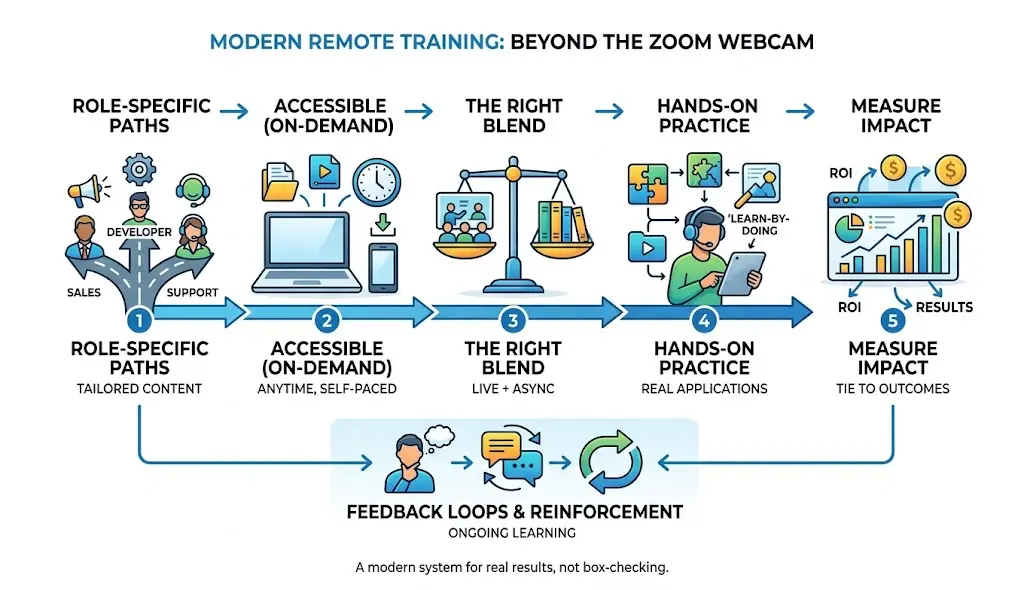
To train people who work from home you need to teach them the things they need to know for their job. They should be able to learn at their pace. You need to have a mix of live classes and classes they can take on their own. They need to be able to practice what they learn.. You need to be able to see if the training is actually working. If you do not do all of these things the training is not going to be very good.
A lot of companies started having people work from home so they just moved their classes to Zoom.. That is not really training people who work from home. It is like being in a classroom but with a computer. Good training for people who work from home is different. It starts from the beginning. It is made just for them. It includes teaching them the things they need to know for their job, having classes they can take when they want using the tools, letting them practice giving them feedback and reminding them of what they learned over time. It also includes measuring how well the training is working. This guide will show you how to make a training system for people who work from home one step, at a time.
What Is Remote Employee Training?
Remote employee training is a learning program for employees who do not work in an office. These employees work from places. Remote employee training can be for people who work from home all the time or some of the time. It can also be for people who work in areas.
Remote employee training includes things. It includes training for employees. It includes refreshers on rules that employees must follow. Remote employee training also includes helping employees learn skills. All of this is done without everyone being in the room. Remote employee training is a way to help employees learn and grow.
How remote employee training differs from in-person training
In person training is when a trainer teaches people in a room. They watch how the people are doing and make changes as they go. They also use things they can touch or show examples. Remote training is different. It does not have a trainer in the room with the people. So it needs to be planned carefully. The instructions need to be easy to understand. The lessons need to be like packages that have everything the people need.
There need to be stops along the way to make sure the people are doing okay. This way the people do not get confused when they are learning by themselves without a trainer standing by them. Remote training and in person training are different. Remote training can still work well if it is done correctly like, with clear instructions and self contained modules and that is what makes remote training successful.
Why remote training requires a different approach
Remote employees face distractions, have the internet deal with time-zone differences and don’t have the option to tap someone on the shoulder to ask for help. A training program that doesn’t consider these issues will have dropout rates even if the content is excellent. Design needs to take into account the environment that learners are, in, not the environment that a classroom assumes.
Remote employee training vs remote onboarding
Onboarding is a part of training. The first 30, 60 or 90 days are really important for getting a new employee settled in making sure they follow the rules and getting them to do their job well. Onboarding is the beginning. Remote employee training is a system that includes onboarding and a lot of other things. It helps employees learn skills, remember the rules, become better leaders and adjust to new roles as they work with the company for a long time. Remote employee training and onboarding are both important for the employee.
How an LMS Supports Remote Employee Training
An (learning management system) LMS makes remote employee training easier by keeping courses, learning materials, assessments, and progress tracking in one place. Employees can access training at their own pace, while managers can monitor completion, scores, and learning progress. This makes an LMS especially useful for keeping distributed teams organized and ensuring everyone receives consistent training.
Why Effective Remote Employee Training Matters
Faster onboarding and time to productivity
A structured remote onboarding path helps new employees start working. This is because they do not have to wait for meetings to get answers to questions. The company provides self-paced modules and clear documentation. These things let new employees work at their speed. They can move as fast as they want to. This way new employees can start contributing to the company. A structured remote onboarding path is very helpful, for employees.
Higher employee engagement and retention
People are more likely to stay at a company that invests in their growth. According to research shared widely on LinkedIn’s Workplace Learning Report, employees who feel their company supports their learning and development are more likely to stay long-term. Training signals investment, and investment builds loyalty.
Better productivity and fewer errors
Employees who understand a process correctly the first time make fewer costly mistakes. This is especially true for technical or compliance-heavy roles where a misunderstood step can create real business risk.
Consistent processes across distributed teams
When teams are spread across cities or countries, informal “ask the person next to you” training breaks down. Structured remote training keeps everyone working from the same playbook regardless of location.
Stronger cybersecurity and compliance
Remote work introduces new security risks home networks, personal devices, shared workspaces. Regular, well-designed training is one of the most effective ways to reduce human error, which remains a leading cause of security incidents.
Continuous upskilling and reskilling
Skills gaps close faster when learning is built into the regular rhythm of work rather than treated as a once-a-year event. Remote-friendly formats make it realistic to keep skills current without pulling people away from their jobs for days at a time.
Common Challenges of Training Remote Employees
Communication gaps
Without hallway conversations, questions can sit unanswered for hours or days, stalling progress.
Low engagement and distractions
Home environments, kids, notifications, and multiple browser tabs compete for attention during training sessions.
Technical problems
Spotty internet, unfamiliar software, and access issues can derail a session before the content even starts.
Time-zone differences
Scheduling live sessions that work for a global team is often impossible without excluding someone.
Limited access to managers
Remote employees can’t casually swing by a manager’s desk with a quick question, so small confusions can turn into bigger problems.
Information scattered across multiple tools
When training material lives across email, Slack, a shared drive, and three different apps, people give up looking for it.
Lack of hands-on practice
Watching a video isn’t the same as doing the task, and remote settings make hands-on practice easy to skip.
Difficulty measuring training impact
Without clear KPIs, it’s hard to know if training actually worked or just felt busy.
| Challenge | Solution |
| Communication gaps | Async Q&A channels, documented FAQs, response-time SLAs |
| Low engagement | Interactive content, microlearning, real work tie-ins |
| Technical problems | Pre-session tech checks, low-bandwidth content options |
| Time-zone differences | Record sessions, rotate live times, regional cohorts |
| Limited manager access | Scheduled check-ins, peer mentors, self-serve resources |
| Scattered information | Single LMS or knowledge hub as the source of truth |
| Lack of hands-on practice | Simulations, sandbox environments, supervised tasks |
| Hard to measure impact | Defined KPIs tied to business outcomes from day one |
How to Train Remote Employees Effectively: 10-Step Process
1. Identify skills gaps and training needs
Assess current skills
Start with an honest picture of where employees stand today. Skip this and you’ll build training for problems that don’t exist while missing the ones that do.
Identify role-specific competencies
A sales rep and a software engineer need almost entirely different skill sets training should reflect that instead of using one generic curriculum for everyone.
Use surveys, assessments, and manager feedback
Combine self-reported gaps, quiz or test data, and manager observations to get a fuller picture than any single source would give you.
2. Set measurable training goals
Use SMART learning objectives
Goals should be Specific, Measurable, Achievable, Relevant, and Time-bound “understand the product” is not a training goal, but “complete product certification with 90% score within 30 days” is.
Connect learning goals to business outcomes
Every training initiative should trace back to something the business cares about, whether that’s faster ramp time, fewer support tickets, or higher sales conversion.
3. Build role-based learning paths
New hires
Focus on orientation, tools, culture, and the fundamentals of the role.
Existing employees
Focus on skill refreshers, new processes, and career development.
Managers
Add training on remote leadership, performance conversations, and coaching from a distance.
Technical teams
Emphasize hands-on labs, documentation, and technical certifications.
Customer-facing teams
Prioritize product knowledge, communication skills, and scenario-based practice.
4. Choose the right training format
Synchronous learning
Live sessions, video calls, live workshops are good for complex topics that benefit from real-time discussion.
Asynchronous learning
Self-paced content videos, modules, reading good for flexibility across time zones and learning speeds.
Blended learning
A mix of both, which is usually the most realistic approach for distributed teams. And follow guide effectively for employe training.
| Format | Best for | Advantages | Limitations |
| Synchronous | Complex topics, team building | Real-time Q&A, connection | Hard to schedule across time zones |
| Asynchronous | Foundational knowledge, refreshers | Flexible, scalable, repeatable | No real-time feedback |
| Blended | Most remote training programs | Combines flexibility with connection | Requires more planning to design well |
5. Create accessible and engaging training content
Short instructional videos
Keep them under 5-7 minutes so people actually finish them.
Interactive modules
Let learners click, choose, and respond rather than passively scroll.
Quizzes and assessments
Use these to check understanding and reinforce key points, not just to check a completion box.
Job aids and downloadable resources
Quick-reference guides and cheat sheets that employees can pull up while doing the actual task.
Microlearning
Break big topics into small, focused pieces employees can complete in a few minutes.
Mobile-friendly content
Design for phones and tablets, since remote employees don’t always have a laptop open when they need an answer.
6. Use the right remote training technology
LMS
A Learning Management System hosts courses, tracks completion, and manages assessments.
LXP
A Learning Experience Platform focuses on personalized content discovery, more like a Netflix-style recommendation feed for learning.
Video conferencing
Tools for live workshops, demos, and Q&A sessions.
Communication tools
Chat platforms and forums where employees can ask questions and get support outside scheduled sessions.
Collaboration and whiteboarding tools
Digital whiteboards and shared docs that recreate group problem-solving remotely.
Assessment tools
Quiz and testing platforms that measure knowledge retention.
Learning analytics
Dashboards that show completion rates, scores, and engagement trends.
AI-powered learning tools
Tools that personalize content, generate practice scenarios, or answer learner questions on demand.
How to Keep Remote Employees Engaged During Training
Use interactive learning
Passive content loses attention fast. Build in clicks, choices, and decisions rather than pure video-watching.
Add quizzes, polls, and scenarios
These break up content and force active recall, which improves retention.
Use gamification selectively
Points, badges, and leaderboards can boost motivation, but overusing them can feel gimmicky and use them where they genuinely fit the content.
Encourage peer learning
Buddy systems and peer discussion groups replace some of the informal learning that happens naturally in an office.
Schedule regular check-ins
Short, recurring check-ins keep employees accountable and give them a chance to ask questions before they fall behind.
Let employees learn at their own pace
Rigid schedules don’t account for different learning speeds or time zones built in flexibility wherever the content allows it.
Connect training to real work
Employees engage more when they can immediately see how a lesson applies to a task they’re doing that week.
Balance Live and Asynchronous Training
When to use live training
Reserve live sessions for topics that benefit from real-time interaction complex problem-solving, culture-building, or sensitive conversations like performance feedback.
When to use self-paced training
Use asynchronous formats for foundational knowledge, policy training, and anything employees might need to revisit later.
When blended learning works best
Most programs benefit from a blend: async content for the “what,” live sessions for the “why” and “how,” and practice opportunities to close the loop.
How to design an async-first training program for global teams
Start with self-paced content as the default, then layer in optional live sessions at rotating times so no single region is always excluded.
Sample weekly schedule:
| Day | Activity | Format |
| Monday | New module release | Async |
| Tuesday | Optional live Q&A (rotating time) | Sync |
| Wednesday | Practice assignment | Async |
| Thursday | Peer discussion thread | Async |
| Friday | Quick quiz and recap | Async |
Use Microlearning and Learning in the Flow of Work
What is microlearning?
Microlearning breaks training into short, focused pieces often 3-10 minutes that target one specific skill or concept at a time.
When microlearning works best
It works best for reinforcement, quick skill refreshers, and just-in-time answers rather than deep, foundational learning that needs more context.
Examples of remote microlearning
A two-minute video on handling a specific customer objection, a one-page guide on formatting a report, or a short quiz reinforcing last week’s training.
Job aids, knowledge bases, and just-in-time training
A searchable knowledge base lets employees find answers exactly when they need them, instead of digging through a full course to find one detail.
Give Remote Employees Hands-On Practice
Watching a demo and being able to do the task yourself are two different skills, and this gap is where a lot of remote training programs fall short. Many training guides focus heavily on how to deliver content, but spend far less time on how to help employees actually transfer that learning into job performance. This is where the real differentiation happens.
Simulations and role-play
Let employees practice conversations or workflows in a low-stakes environment before doing them live.
Real-world assignments
Give employees actual (small, supervised) tasks tied to what they just learned.
Supervised practice
Have a manager or mentor observe early attempts and give immediate feedback.
Peer feedback
Structured peer review builds both skill and accountability.
Manager coaching
Ongoing coaching after formal training is what actually locks in the skill — training without follow-up tends to fade within weeks.
How to Train Employees Across Multiple Time Zones
Use an asynchronous-first approach
Default to self-paced content so no region is left waiting on a live session that happens at 2 a.m. their time.
Record live sessions
Always record and share live sessions so people who can’t attend live don’t miss out.
Rotate session times
If live sessions are necessary, rotate the time slot so the same region isn’t always inconvenienced.
Create regional cohorts
Group learners by region for live components while keeping async content shared globally.
Maintain shared training documentation
A single, well-organized knowledge hub keeps everyone working from the same source of truth regardless of when they log in.
What Should Remote Employees Be Trained On?
Remote-work technology
Tools like video conferencing, project management software, and collaboration platforms.
Cybersecurity and data protection
Password hygiene, phishing recognition, and secure handling of company data a topic covered in depth by resources like the SANS Security Awareness program, which trains employees to recognize and respond to human-targeted cyber risks.
Company policies and culture
Values, expectations, and norms that don’t transfer automatically in a remote setting.
Role-specific skills
The technical and functional skills needed to do the actual job well.
Communication and collaboration
How to communicate clearly and asynchronously without losing tone or context.
Time management and self-management
Skills for staying productive without direct supervision.
Leadership and management
How to lead, coach, and evaluate performance for people you may rarely see in person.
Compliance
Industry and legal requirements relevant to the role or region.
Diversity, equity, inclusion, and respectful workplace behavior
Building an inclusive culture even when teams rarely interact face-to-face.
Upskilling and career development
Ongoing skill-building tied to career growth, not just current job requirements.
AI for Remote Employee Training
Personalized learning paths
AI can adjust content sequencing based on an employee’s role, pace, and existing knowledge.
AI-generated training materials
AI tools can help draft first versions of scripts, quizzes, and job aids, which trainers then review and refine.
AI quizzes and assessments
AI can generate varied quiz questions and adapt difficulty based on performance.
AI role-play and simulations
Conversational AI can simulate customer interactions or difficult conversations for practice.
AI learning assistants
Chat-based assistants can answer employee questions on demand instead of making them wait for a person.
Skills-gap analysis
AI can analyze assessment data across a workforce to flag skill gaps at scale.
Risks and limitations of AI in employee training
AI-generated content can contain errors or lack nuance, so human review remains essential, a concern echoed frequently in discussions on Reddit’s r/humanresources community, where practitioners caution against deploying AI-generated training content without review.
Best Tools for Training Remote Employees
The right toolset depends on team size, budget, and the complexity of the content. Rather than ranking specific vendors, here’s how the categories break down and what each is generally used for:
| Tool category | Purpose | Example capabilities |
| LMS | Course delivery and tracking | Courses, assessments, reporting |
| LXP | Personalized discovery | Recommendations, content aggregation |
| Video conferencing | Live training | Workshops, demos, Q&A |
| Communication | Ongoing support | Chat, communities, feedback |
| Authoring | Content creation | Interactive modules |
| Collaboration | Group learning | Whiteboards, breakout activities |
| Analytics | Measurement | Dashboards, completion, performance |
| AI tools | Personalization | Content, tutoring, simulations |
Well-known platforms in each category include tools like Docebo and TalentLMS (LMS), Degreed and EdCast (LXP), Zoom and Google Meet (video conferencing), and Miro (collaboration) evaluate based on your team’s actual workflow rather than feature lists alone.
How to Create a Remote Employee Training Plan
Sample 30-day training plan
Focus on orientation, tools, core policies, and initial role training.
Sample 60-day training plan
Layer in role-specific skill-building, supervised practice, and early feedback conversations.
Sample 90-day training plan
Shift toward independent execution, performance review, and a plan for ongoing development.
| Phase | Focus | Key activities |
| Days 1-30 | Orientation and foundations | Tool setup, policy training, culture, basic role tasks |
| Days 31-60 | Skill building | Role-specific training, supervised practice, feedback |
| Days 61-90 | Independence and review | Independent tasks, performance check-in, development plan |
How to Measure Remote Employee Training Effectiveness
A widely used framework here is the Kirkpatrick Model, which breaks evaluation into four levels.
Level 1: Learner reaction
Did employees find the training relevant and worthwhile? Usually measured through post-training surveys.
Level 2: Knowledge and skill acquisition
Did they actually learn the material? Measured through quizzes, tests, or demonstrations.
Level 3: Behavior change
Are they applying what they learned on the job? Measured through manager observation and performance data.
Level 4: Business results
Did training move the needle on business metrics like productivity, retention, or error rates?
Training KPIs to track
- Completion rate
- Assessment scores
- Time to competency
- Knowledge retention
- Productivity
- Error rates
- Software adoption
- Employee performance
- Employee satisfaction
- Retention
- Training ROI
How to calculate training ROI
A simple formula: Training ROI = (Benefits of Training − Cost of Training) / Cost of Training × 100. Benefits can include productivity gains, reduced errors, or lower turnover costs, estimated in dollar terms wherever possible.
Common Remote Employee Training Mistakes to Avoid
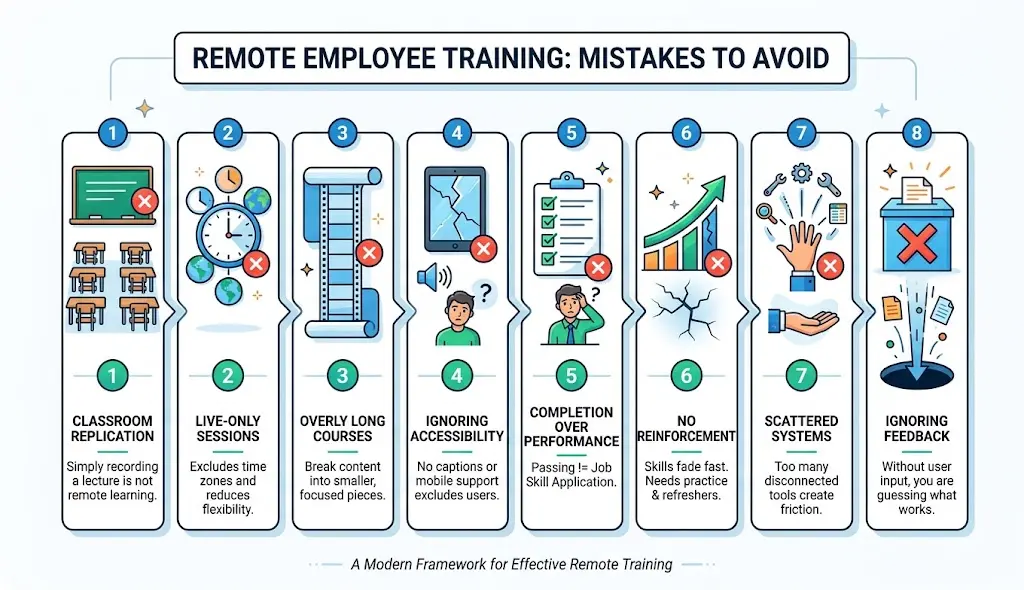
Treating remote training like classroom training
Simply recording a lecture and posting it online skips the redesign remote learning actually needs.
Making every session live
Live-only training excludes time zones and gives employees no flexibility.
Using overly long courses
Long, unbroken courses lead to drop-off break content into smaller pieces.
Ignoring accessibility
Captions, transcripts, and mobile-friendly design aren’t optional extras; they determine whether people can actually use the content.
Focusing on completion instead of performance
A 100% completion rate means nothing if employees can’t apply what they learned.
Providing training without reinforcement
Skills fade fast without follow-up practice, coaching, or refreshers.
Choosing too many disconnected tools
Scattered systems create friction and make training harder to find and finish.
Failing to collect employee feedback
Without feedback, you’re guessing at what’s working instead of knowing.
Remote Employee Training Best Practices Checklist
- [ ] Identify skills gaps before building content
- [ ] Set SMART, business-aligned training goals
- [ ] Create content that’s accessible on any device
- [ ] Design for accessibility (captions, transcripts, plain language)
- [ ] Use a blended delivery mix, not all-live or all-async
- [ ] Build in interactive and engaging content formats
- [ ] Include hands-on practice opportunities, not just watching
- [ ] Build in feedback loops from managers and peers
- [ ] Track KPIs tied to real business outcomes
- [ ] Review and update training regularly based on data
Frequently Asked Questions
1. How do you train remote employees effectively?
Combine role-specific learning paths, accessible and bite-sized content, a blend of live and self-paced formats, hands-on practice, and clear KPIs to measure impact.
2. What is the best way to train remote employees?
There’s no single “best” way the most effective programs blend synchronous and asynchronous formats based on the topic and the team’s time zones.
3. What training methods work best for remote employees?
Microlearning, interactive modules, simulations, and short live sessions tend to perform best for distributed teams.
4. How do you keep remote employees engaged during training?
Use interactive content, connect lessons to real work, encourage peer learning, and let employees move at their own pace.
5. What tools are needed for remote employee training?
At minimum, an LMS or content hub, video conferencing, a communication tool, and some way to track completion and performance.
6. How do you train remote employees across time zones?
Default to asynchronous content, record all live sessions, and rotate live session times so no region is consistently excluded.
7. How do you measure remote employee training effectiveness?
Use a framework like the Kirkpatrick Model and track KPIs such as completion rate, assessment scores, behavior change, and business impact.
8. Is an LMS necessary for remote employee training?
It’s not strictly required for very small teams, but it becomes valuable quickly as a program scales, since it centralizes content and tracking.
9. How long should remote employee training sessions be?
Live sessions work best kept under 60 minutes, and individual pieces of async content are most effective at 5-10 minutes each.
10. What should remote employees be trained on?
Remote-work technology, cybersecurity, company policies, role-specific skills, communication, time management, and ongoing upskilling.
Conclusion
Training remote employees effectively isn’t about picking one platform or scheduling more video calls, it’s about building a flexible learning system. That system needs to connect what employees actually need to learn, content they can access wherever they are, real opportunities to practice, manager support along the way, and metrics that prove the training actually worked. Get those pieces working together, and remote employee training stops being a compliance exercise and starts becoming a real driver of performance.