


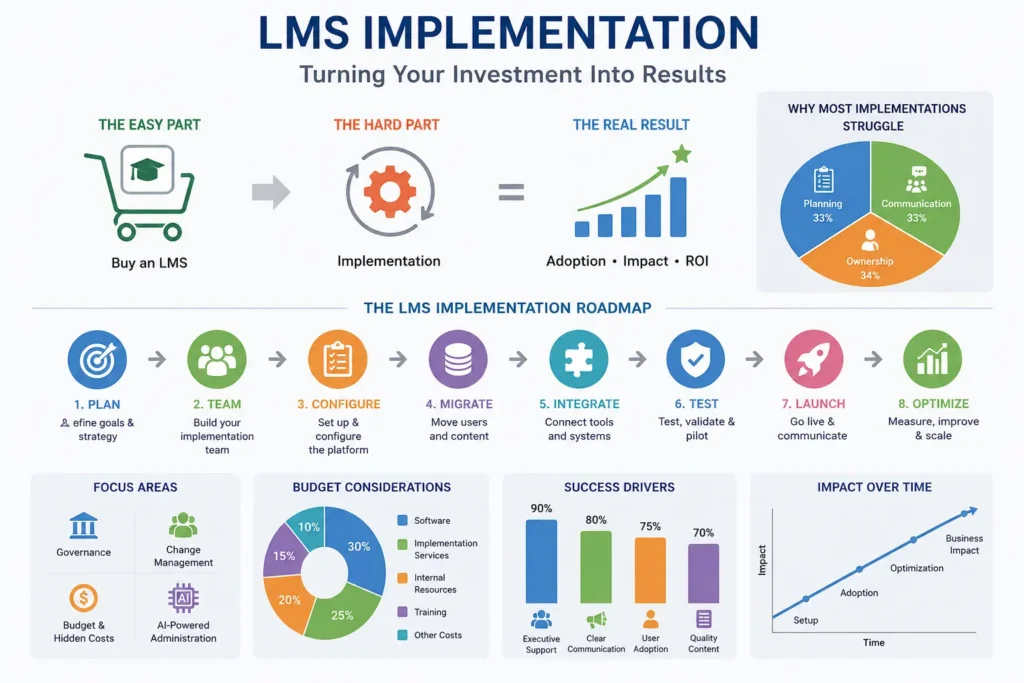
Buying a Learning Management System is the easy part. The hard part, the part that decides whether your investment actually pays off is the implementation that follows. I’ve sat in more than one project kickoff where a team assumed “implementation” meant a few weeks of software setup, only to discover months later that half the workforce still hadn’t logged in.
That gap between buying an LMS and actually running a successful LMS implementation is where most organizations lose momentum. It’s rarely a technology problem. It’s a planning, communication, and ownership problem.
This guide lays out the full LMS implementation process, phase by phase, along with the pieces most how-to articles leave out entirely: governance, change management, budgeting for hidden costs, and where AI is starting to show up in day-to-day platform administration. Use it as a working roadmap whether you’re rolling out your first LMS to 150 employees or replacing a legacy platform across a 5,000-person enterprise.
What Is LMS Implementation?
LMS implementation is the process of planning, configuring, populating, testing, and launching a Learning Management System inside an organization, followed by ongoing optimization. It spans platform selection, content migration, system integrations, administrator and manager training, and the change management work needed to get employees actually using it.
As per Wikipedia’s overview of the technology, a learning management system is software built to administer, document, track, report on, and deliver training and educational programs implementation is the process of turning that generic capability into something that fits your specific organization.
Why LMS Implementation Matters
It’s tempting to treat implementation as a technical checkbox: configure the software, load the courses, flip the switch. But an LMS is only as valuable as the behavior it creates. A platform nobody logs into isn’t saving anyone time, it’s just another line item.
Two companies can license the exact same LMS and end up in completely different places a year later. The difference almost never comes down to the software’s feature list. It comes down to how deliberately the rollout was planned and communicated.
Benefits for Organizations
Organizations that implement an LMS thoughtfully tend to see:
- Shorter onboarding ramp time, since new hires follow a structured path instead of piecing training together from scattered documents
- Cleaner compliance records, replacing spreadsheets with automated, audit-ready completion tracking
- Higher completion rates, because training fits into existing workflows rather than competing with them
- One source of truth for reporting, so HR, L&D, and department leaders aren’t reconciling different numbers
- Content that scales, since a single course can serve fifty employees or five thousand with the same amount of setup work
- A better employee experience, with training that’s easier to find, track, and complete
Signs Your Organization Is Ready for an LMS
Business Challenges an LMS Solves
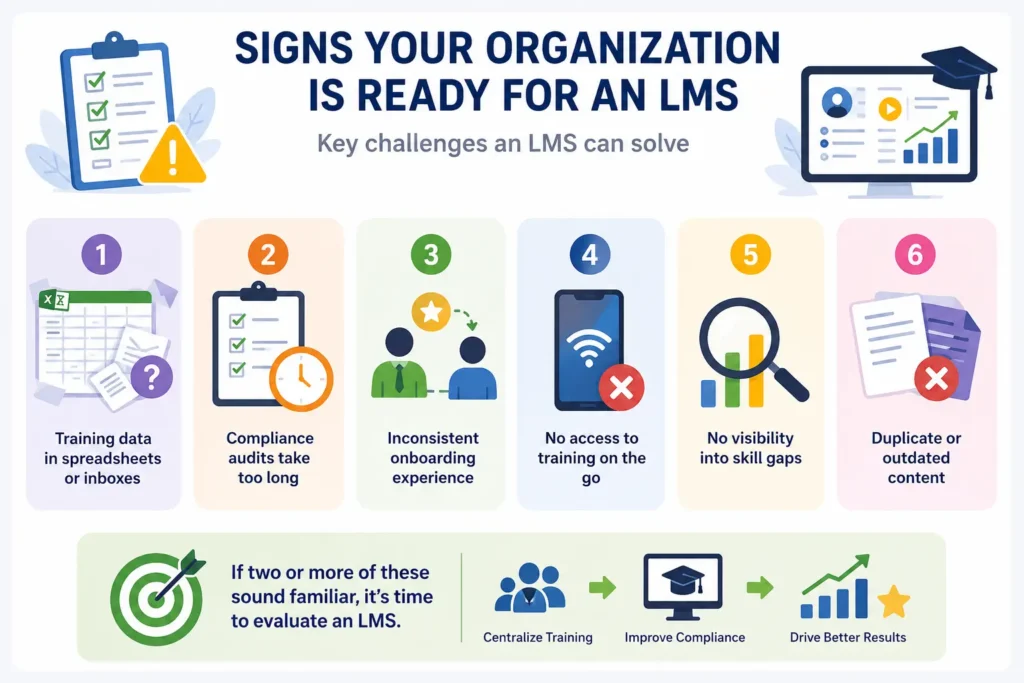
Most organizations don’t decide to buy an LMS out of curiosity a specific pain point usually forces the conversation. Common triggers include:
- Training completion data living in spreadsheets, inboxes, or a shared drive nobody fully trusts
- Compliance audits that take days to prepare because there’s no centralized record
- Onboarding quality that depends entirely on which manager happens to be training a new hire
- Employees unable to access training materials remotely or from a phone
- No visibility into skill gaps across teams or locations
- Duplicate or outdated content that nobody has the bandwidth to clean up
If two or more of these sound familiar, it’s a reasonable signal to start formally evaluating an LMS.
When to Upgrade or Replace an Existing LMS
For organizations that already run an LMS, the question shifts from “do we need one” to “does this one still work.” Consider replacing your current platform if:
- It can’t integrate cleanly with your current HR or collaboration tools
- Adoption has plateaued below roughly half your workforce despite repeated communication efforts
- The vendor hasn’t kept pace with modern data standards like xAPI or cmi5
- Reporting still requires manual spreadsheet work rather than live dashboards
- Mobile and offline access are missing, but a meaningful share of your workforce is remote, frontline, or field-based
Replacing an LMS is a heavier project than a first-time rollout, mainly because of learner history migration — but the framework below applies to both scenarios equally.
Planning Your LMS Implementation Strategy
This is the phase competing guides tend to rush past, and it’s the one that determines whether everything downstream goes smoothly or turns into a scramble.
Define Learning Goals
Before evaluating any software, get specific about what success looks like for learners. “Improve training” isn’t a goal your team can build toward. Something like “cut new-hire ramp time from six weeks to four” or “hit 95% completion on mandatory compliance training within 30 days of assignment” gives the project actual direction.
Identify Business Objectives
Learning goals should connect to something the business cares about beyond L&D. A manufacturing company might tie its LMS goals to a reduction in safety incidents. A retail chain might tie them to reducing first-90-day turnover. That connection is also what keeps executives engaged past the launch date — a point we’ll return to later, in the budgeting and ROI sections.
Build the Project Team
LMS implementation tends to struggle when it’s treated as purely an IT initiative or purely an HR initiative. A well-rounded project team pulls in:
HR
Owns the accuracy of employee data and makes sure the rollout aligns with company policy and compliance requirements. HR’s employee roster is usually the backbone of user provisioning.
IT
Handles configuration, security review, and technical integrations — including Single Sign-On (SSO), a standard that lets employees log in with credentials they already use.
L&D
Owns content strategy, learning path design, and instructional decisions. L&D typically becomes the day-to-day administrator once the platform is live.
Department Managers
Represent real end users. Managers catch workflow friction early and, once on board, become informal advocates who nudge their teams to actually engage with the system.
Executive Sponsors
Provide budget authority and organizational visibility. A sponsor who visibly champions the rollout signals to the rest of the company that this isn’t a side project.
Table: Stakeholder Responsibility Matrix
| Stakeholder | Primary Responsibilities |
| HR | Employee data accuracy, compliance mapping, policy alignment |
| IT | Security review, SSO/API integrations, technical configuration |
| L&D | Content strategy, course design, day-to-day administration |
| Department Managers | End-user feedback, team-level adoption, workflow input |
| Executive Sponsor | Budget approval, cross-department alignment, visible advocacy |
A practitioner-written checklist of LMS implementation tasks shared is a useful sanity check here it’s built from dozens of real-world rollouts and covers the granular decisions (admin permission levels, catalog structure) that formal project plans sometimes skip.
Choosing the Right LMS
Vendor selection tends to absorb more time than the rollout itself. It shouldn’t — the two deserve roughly equal attention.
Must-Have Features
At minimum, the platform supports course authoring or import, automated assignment rules, completion tracking, reporting dashboards, and standard content formats like SCORM.
Scalability
Ask whether pricing and performance hold up not just at today’s headcount but three years out. Some platforms are attractively priced for small teams and become expensive fast as user counts climb.
Security
Look for role-based access controls and encryption both in transit and at rest. SOC 2 compliance is a reasonable baseline expectation for a SaaS LMS vendor. If you’re in a regulated industry like healthcare, confirm HIPAA-aligned data handling directly with the vendor rather than assuming it’s covered.
Mobile Learning
A workforce that’s partly remote, frontline, or field-based needs real mobile access — ideally with offline caching so training isn’t blocked by a weak signal.
AI Capabilities
Many modern platforms now offer AI-driven course recommendations, automated content tagging, or predictive analytics that flag learners at risk of missing deadlines. Not every organization needs these on day one, but it’s worth asking where a vendor’s roadmap is headed — we go deeper on this in the AI section below.
Integration Requirements
Before scheduling vendor demos, list every system the LMS needs to talk to: your HRIS (Workday, BambooHR, SAP SuccessFactors), your SSO provider (often Microsoft Entra ID), video conferencing tools like Zoom or Microsoft Teams, and any reporting or BI systems. Integration gaps discovered after signing a contract are one of the most common causes of a delayed go-live.
Vendor Evaluation Checklist
- [ ] Supports required content standards (SCORM, xAPI, cmi5)
- [ ] Meets security and compliance requirements for your industry
- [ ] Offers native or well-documented API integrations
- [ ] Provides implementation support with a named onboarding contact
- [ ] Has transparent pricing with no hidden per-integration fees
- [ ] Delivers mobile access appropriate to your workforce
- [ ] Provides reporting flexible enough for your compliance needs
- [ ] Has verifiable customer references in your industry or size range
LMS Implementation Roadmap
Once a platform is selected, implementation typically moves through nine phases. Organization size changes the timeline, not the sequence.
Table: Implementation Phases, Activities, and Deliverables
| Phase | Key Activities | Deliverables |
| 1. Discovery and Planning | Define goals, assemble project team, map current state | Project charter, timeline, RACI matrix |
| 2. Platform Configuration | Set up branding, roles, permissions, notification rules | Configured environment, admin accounts |
| 3. User Management | Set up provisioning, org hierarchy, groups | User roster loaded, roles assigned |
| 4. Content Migration | Audit, convert, and upload existing courses | Migrated course library |
| 5. System Integrations | Connect HRIS, SSO, video tools | Working integrations, tested data sync |
| 6. Pilot Testing | Run with a small user group, gather feedback | Pilot report, issue log |
| 7. User Training | Train admins, managers, and end users | Training materials, completed sessions |
| 8. Organization-wide Launch | Roll out to all employees | Go-live announcement, support plan |
| 9. Post-Launch Optimization | Monitor adoption, fix issues, refine content | Adoption dashboard, improvement backlog |
Phase 1: Discovery and Planning
Everything from the planning section above gets formalized into a project charter — scope, timeline, budget, and named owners per workstream. Skipping this step to “move faster” almost always resurfaces later as delays during configuration or migration.
Phase 2: Platform Configuration
IT and L&D set up the environment together: branding, user roles and permissions, notification templates, and organizational hierarchy by department, location, or cost center. Security settings and data retention policies also get finalized here.
Phase 3: User Management
User provisioning determines how employees get accounts, whether through automatic HRIS sync, SSO-based just-in-time provisioning, or manual upload. Automated provisioning through an HRIS integration meaningfully cuts down on ongoing admin work compared to manual account creation.
Phase 4: Content Migration
Existing courses, videos, and documents get audited, converted where needed, and uploaded into the new environment. We cover this in more depth in the dedicated migration section below.
Phase 5: System Integrations
HRIS, SSO, video conferencing, and reporting connections are built and tested. This phase often surfaces technical gaps that weren’t visible during vendor demos — build in buffer time rather than assuming every integration will work on the first attempt.
Phase 6: Pilot Testing
Before rolling out to everyone, test with a representative slice of the workforce — typically 5-10% across different departments and comfort levels with technology. A pilot surfaces usability issues, content gaps, and workflow friction while the stakes are still low.
Phase 7: User Training
Administrators need deep platform training. Managers need enough to support their teams and pull basic reports. End users generally need only a short orientation — if logging in and completing a course requires extensive training, that’s usually a sign the configuration is more complex than it needs to be.
Phase 8: Organization-wide Launch
Go-live: communications go out, accounts activate, and initial assignments push through. A strong launch is well-communicated in advance, not sprung on employees the morning it happens.
Phase 9: Post-Launch Optimization
Implementation doesn’t end at launch. The weeks right after go-live are when adoption problems are cheapest to catch and fix, before they harden into permanent habits of avoidance.
LMS Content Migration Best Practices
Audit Existing Content
Inventory what you actually have before migrating anything. It’s common for organizations to find that 20-40% of their existing library is outdated, duplicated, or no longer relevant. Migrating stale content just recreates the same clutter inside a new system.
SCORM, xAPI, and cmi5 Compatibility
Content standards determine how easily courses move between systems and how much learner data you can capture.
- SCORM, formally the Sharable Content Object Reference Model, is the most widely used standard and was originally developed under the U.S. Department of Defense’s Advanced Distributed Learning (ADL) initiative. It tracks basic completion and score data. Most legacy corporate content still runs on SCORM 1.2 or SCORM 2004.
- xAPI (Experience API, also known as Tin Can API) captures far richer activity data, including learner actions that happen outside the LMS itself, such as inside a mobile app or a simulation. According to “entry on the standard“, xAPI was designed to succeed SCORM and now has an IEEE-approved specification.
- cmi5 blends SCORM’s structure with xAPI’s flexible tracking, and it’s increasingly the standard newer platforms build around.
- AICC is an older format still found in some legacy content, though it’s largely been phased out in favor of SCORM and newer standards.
If your existing library was built on an outdated standard, confirm with your new vendor early whether conversion is required — this is a common source of missed migration timelines.
Organize Learning Paths
Migration is a natural moment to restructure content into logical learning paths instead of a flat, alphabetical catalog. Group courses by role, department, or competency so employees see a guided sequence rather than an overwhelming list.
Archive Outdated Courses
Not everything needs to move. Archive or retire content tied to discontinued products, outdated policies, or duplicate topics. A leaner course library drives more engagement than a bloated one.
LMS Integration Strategy
An LMS rarely operates on its own. The more it connects to the rest of your technology stack, the less manual admin work your team carries long term.
HRIS
Integrating with a system like Workday, BambooHR, or SAP SuccessFactors automates provisioning and deprovisioning as employees join, change roles, or leave — closing off a major source of manual work and a common security gap from stale accounts.
SSO
Single Sign-On, often through a provider like Microsoft Entra ID, lets employees log in with credentials they already use. This alone tends to move the adoption needle, since it removes yet another password to forget.
CRM
For organizations training external partners or resellers alongside employees, CRM integration ties learning assignments to existing customer or partner records.
Video Conferencing
Connecting tools like Zoom or Microsoft Teams lets the LMS schedule and track attendance for live sessions alongside self-paced content, giving one unified completion record instead of two.
Collaboration Tools
Integrating with Slack or Microsoft Teams routes reminders and assignment notifications to where employees already spend their day, rather than relying only on email that gets buried.
Reporting Systems
For organizations with broader business intelligence needs, feeding LMS data into a BI tool puts learning metrics alongside other workforce data for deeper analysis.
Change Management for Successful LMS Adoption
This is the section most competing guides skip entirely, and it’s often the single biggest factor separating a successful LMS implementation from a quietly failed one.
Leadership Buy-In
Adoption starts at the top. When executives visibly complete their own training and reference the LMS in team meetings, employees read that as a genuine priority. When leadership treats it as optional, employees follow suit.
Employee Communication
Communicate early, often, and in plain language. Explain not just that a new system is coming, but why — what it solves for employees themselves, not only for the organization. A typical communication plan includes an early announcement, a “what to expect” message closer to launch, and a follow-up addressing common questions once the system is live.
Training Champions
Identify a handful of enthusiastic early adopters in each department before the company-wide launch. These champions pilot the system, answer peer questions informally, and take pressure off the core project team. Peer encouragement usually lands better than a top-down email ever will.
Managing Resistance
Some resistance is normal, especially when replacing a familiar — if inefficient — old system. It typically stems from fear of added complexity, distrust of new technology, or plain habit. Address it directly: acknowledge the change is real, explain what’s in it for employees, and give them an easy way to ask questions or flag problems.
Adoption Campaigns
Light-touch incentives in the first 30-60 days can help build the habit: recognition for early completers, department-level leaderboards, or tying early adoption to an existing recognition program. The goal isn’t gamification for its own sake — it’s building the reflex of logging in during the critical early window, before old habits reassert themselves.
Common LMS Implementation Challenges
Table: Poor vs. Successful Implementation
| Dimension | Poor Implementation | Successful Implementation |
| Planning | Rushed, no defined goals | Clear goals tied to business objectives |
| Stakeholders | IT-only or HR-only ownership | Cross-functional team with executive sponsor |
| Content | Full legacy library migrated as-is | Audited, streamlined, reorganized content |
| Testing | Skipped or minimal | Structured pilot with real user feedback |
| Communication | One announcement email | Phased communication plan, champions network |
| Launch | “Big bang” with no support plan | Phased rollout with dedicated support window |
| Post-launch | No follow-up | Ongoing monitoring and iteration |
Poor Planning
Rushing past the planning phase to save time almost always costs more time later, resurfacing as delays during configuration, migration, or launch.
Low User Adoption
This is usually a symptom of weak change management, not a technology problem. When usage stays low, the fix is rarely a settings tweak — it’s revisiting communication and leadership visibility. Discussions on communities like humanresources frequently circle back to this same point: the platform itself is rarely what people are actually complaining about.
Data Migration Issues
Skipping a content audit before migration tends to surface later as broken links, missing completion history, or duplicate courses in the new system.
Technical Problems
SSO misconfigurations, failed HRIS syncs, and browser compatibility issues are the most common technical snags most are avoidable with adequate testing time during Phase 5 and Phase 6.
Budget Constraints
Underestimating implementation services, integration work, or content conversion fees is a frequent source of mid-project budget strain. The budgeting section below breaks down where costs typically hide.
Integration Failures
Integrations that weren’t fully scoped during vendor evaluation tend to become the most expensive and time-consuming fixes mid-implementation, since they may require custom development.
LMS Implementation Timeline
Small Organizations
Organizations under roughly 200 employees, with a modest content library and few integrations, can typically implement an LMS in 4 to 8 weeks.
Mid-Sized Organizations
Organizations between roughly 200 and 2,000 employees, with moderate content migration and a handful of integrations, typically need 2 to 4 months.
Enterprise Organizations
Organizations above 2,000 employees — especially those with multiple business units, complex integrations, or multilingual requirements — often need 4 to 9 months for a fully tested rollout.
Sample 30-60-90 Day Plan
Table: 30-60-90 Day Implementation Roadmap
| Timeframe | Focus | Key Milestones |
| Days 1-30 | Discovery, configuration, team setup | Project charter finalized, LMS environment configured, project team trained |
| Days 31-60 | Migration, integration, pilot | Content migrated, integrations tested, pilot group launched and feedback collected |
| Days 61-90 | Launch and stabilization | Org-wide launch, support channels active, early adoption metrics reviewed |
This framework fits a mid-sized organization as a baseline. Enterprise rollouts typically stretch each phase further, while small organizations can compress the whole thing into four to six weeks.
Budgeting for LMS Implementation
Software Costs
Most LMS platforms price per active user, per month or year, though some use per-employee or tiered pricing instead. Get clarity on whether pricing is based on total headcount, active users, or registered accounts — the distinction meaningfully affects cost as you scale.
Implementation Services
Many vendors offer, or require, a paid implementation package covering configuration support, migration assistance, and initial training. Weigh vendor-led implementation against handling it internally: vendor support speeds things up but adds cost, while internal ownership is cheaper but demands more staff time.
Internal Resources
Even with vendor support, budget for internal time: IT hours for integration work, L&D hours for content restructuring, and project management across the whole timeline. This is the single most commonly underestimated cost category.
Training Costs
Budget for admin and manager training time, plus any materials your team builds for end users — quick-reference guides, short recorded walkthroughs, and similar assets.
Hidden Costs
- Content conversion fees for outdated SCORM or AICC packages
- Custom integration development beyond what’s natively supported
- Storage overages for video-heavy content libraries
- Ongoing support or maintenance fees after the initial contract year
- Translation and localization for multilingual workforces
- Accessibility remediation for existing content that doesn’t meet current standards
Measuring LMS Implementation Success
Adoption KPIs
Track login frequency, the share of employees who’ve logged in at least once, and time-to-first-login after account activation. These metrics tell you whether the system is being used at all, before you worry about how well it’s being used.
Learning KPIs
Track course completion rates, average time to complete, and assessment scores where relevant. These indicate whether content is landing effectively, separate from whether people are simply logging in.
Business KPIs
Tie learning data back to outcomes the business actually cares about: reduced onboarding time, fewer compliance incidents, or better performance review scores tied to specific completed learning paths.
ROI Metrics
ROI calculations typically weigh implementation and ongoing costs against measurable gains — lower training delivery costs (less in-person instructor time, for instance), reduced compliance risk, or faster time-to-productivity for new hires.
Table: Sample KPI Dashboard
| Metric | Target (First 90 Days) | Measurement Method |
| Login activation rate | 85%+ of employees | LMS login reports |
| Mandatory training completion | 95%+ within deadline | Completion dashboard |
| Manager report usage | 70%+ of managers pull at least one report | Admin usage logs |
| Help desk tickets (LMS-related) | Declining week over week | IT/support ticket system |
| Learner satisfaction | 4/5 average or higher | Post-course survey |
Continuous Improvement
Review success metrics on a recurring cadence — monthly through the first quarter, then quarterly after that — and feed what you learn directly into content updates, communication adjustments, or configuration changes.
LMS Governance Framework
Content Ownership
Define who has authority to publish, edit, or retire content. Without clear ownership, course libraries drift into duplication and inconsistency within a year of launch.
User Administration
Decide who can create accounts, adjust permissions, and manage the org hierarchy. In most organizations, this sits with a small, defined group inside HR or L&D rather than being open to every manager.
Compliance Management
Assign clear responsibility for tracking regulatory or industry-specific training requirements and maintaining audit-ready records — typically a joint responsibility between HR and Compliance or Legal.
Platform Maintenance
Set a cadence for reviewing integrations, applying updates, and auditing user accounts, especially deprovisioning former employees. A quarterly governance review is a reasonable baseline for most mid-sized and enterprise organizations.
A lightweight governance committee — one representative each from L&D, HR, IT, and Compliance, meeting monthly or quarterly — is usually enough to keep the system healthy well after the initial energy of launch fades.
AI and the Future of LMS Implementation
AI-Powered Personalization
Modern LMS platforms increasingly use AI to tailor learning paths to individual roles, skill gaps, or performance data, instead of assigning identical training across an entire department.
Automated Learning Recommendations
Much like a streaming service suggesting what to watch next, some platforms now recommend relevant courses based on an employee’s role, past completions, or stated career goals.
Predictive Analytics
AI-driven analytics can flag employees at risk of missing a compliance deadline, giving managers a chance to intervene before a deadline is missed rather than reacting after the fact.
Intelligent Reporting
AI-assisted reporting tools can summarize trends in plain language — flagging, for instance, which department has the lowest completion rate — cutting down the manual work of building reports from raw exports.
These capabilities are becoming more common but aren’t universal across vendors yet. If AI features matter to your longer-term strategy, confirm during vendor evaluation whether they’re included today, actively in development, or an add-on cost.
LMS Implementation Best Practices
Start Small
Resist the urge to migrate every course, integration, and feature on day one. A focused initial launch — core compliance training plus one or two high-value learning paths — is easier to support and easier for employees to absorb.
Pilot First
As covered in Phase 6, a small pilot group catches problems while they’re still cheap to fix. Skipping this step to save two weeks tends to cost far more time later in support tickets and rework.
Prioritize User Experience
If employees find the system confusing, good content won’t save adoption. Keep navigation simple, minimize the clicks needed to start a course, and test the experience on mobile, not just desktop.
Keep Content Updated
An LMS full of outdated material loses employee trust fast. Assign clear ownership, per the governance section above, for regular content reviews — at least annually, or immediately when a related policy changes.
Review Analytics Regularly
Don’t wait for an annual review to check adoption and completion data. Monthly check-ins during the first year let you catch and correct problems while they’re still small.
LMS Implementation Checklist
Before Implementation
- [ ] Learning and business goals defined
- [ ] Project team assembled with named owners
- [ ] LMS vendor selected and contract finalized
- [ ] Budget approved, including buffer for hidden costs
- [ ] Content audit completed
During Implementation
- [ ] Platform configured (branding, roles, permissions)
- [ ] User provisioning and integrations tested
- [ ] Content migrated and organized into learning paths
- [ ] Pilot group launched and feedback incorporated
- [ ] Admins and managers trained
Before Launch
- [ ] Communication plan sent to all employees
- [ ] Training champions identified in each department
- [ ] Support channel (help desk, FAQ, or dedicated inbox) established
- [ ] Final QA pass completed on content and integrations
After Launch
- [ ] Adoption metrics reviewed weekly for the first month
- [ ] Help desk tickets triaged and recurring issues addressed
- [ ] Governance committee scheduled for ongoing oversight
- [ ] 90-day success metrics reviewed against original goals
Frequently Asked Questions
1. What is LMS implementation?
LMS implementation is the process of planning, configuring, migrating content into, testing, and launching a Learning Management System, followed by ongoing optimization based on adoption and performance data.
2. How long does LMS implementation take?
Small organizations typically need 4-8 weeks, mid-sized organizations 2-4 months, and enterprise organizations 4-9 months, depending on content volume, integrations, and organizational complexity.
3. What are the phases of LMS implementation?
The typical phases are discovery and planning, platform configuration, user management, content migration, system integrations, pilot testing, user training, organization-wide launch, and post-launch optimization.
4. What is an LMS implementation plan?
It’s a documented roadmap covering project goals, timeline, stakeholder responsibilities, migration strategy, and success metrics for the rollout.
5. Who should lead LMS implementation?
Most successful rollouts are led jointly by L&D and IT, with an executive sponsor for visibility and HR involved for data accuracy and compliance — rather than any single department owning it alone.
6. How much does LMS implementation cost?
Costs vary by organization size and vendor, but typically include software licensing, implementation services, internal staff time, and easy-to-miss costs like content conversion and integration development.
7. What are the biggest LMS implementation challenges?
The most common are insufficient planning, weak change management leading to low adoption, incomplete data migration, and underestimated integration complexity.
8. What are LMS implementation best practices?
Key practices include starting with a focused launch scope, piloting before a full rollout, prioritizing user experience, and reviewing adoption analytics regularly rather than only at year-end.
9. How do you migrate learning content to a new LMS?
Start with a content audit to identify what’s outdated or redundant, confirm compatibility with standards like SCORM, xAPI, or cmi5, then reorganize surviving content into structured learning paths instead of migrating everything as-is.
10. How do you measure LMS implementation success?
Success is measured through adoption KPIs (login and activation rates), learning KPIs (completion and assessment scores), business KPIs (like reduced onboarding time), and ROI metrics comparing costs to measurable gains.
11. What integrations should an LMS have?
At minimum, most organizations benefit from HRIS integration for automated provisioning and SSO for simplified login; video conferencing and collaboration tool integrations add further value depending on how training is delivered.
12. How do you increase LMS adoption?
Adoption improves through visible leadership buy-in, clear communication about the benefit to employees (not just the organization), a network of peer champions, and light-touch recognition for early completers.
13. How often should an LMS be updated?
Platform updates are typically managed by the vendor, but content should be reviewed at least annually, or immediately when a related policy or regulation changes.
14. What are common LMS implementation mistakes?
The most frequent mistakes are skipping the pilot phase, migrating outdated content without an audit, underestimating change management, and treating implementation as solely an IT or HR responsibility.
Conclusion
LMS implementation succeeds or fails on planning and change management far more than on the platform itself. A cross-functional project team — HR, IT, L&D, managers, and an executive sponsor — consistently outperforms single-department ownership. Content migration should include a real audit and reorganization, not a wholesale copy of the old library. And governance and adoption metrics matter after launch just as much as the rollout does on day one.
If you’re just starting this process, begin with the planning phase: define your learning and business goals, assemble a cross-functional team, and build your vendor evaluation checklist before booking a single demo. If you’ve already picked a platform, put your energy into the pilot and change management stages — they’ll shape your outcome more than any remaining configuration decision will.
Getting an LMS implementation right is ultimately less about the software and more about the organization adopting it. Get the planning, communication, and governance in place, and the technology will do exactly what it was bought to do: make learning easier to deliver, track, and improve, for the long run.